
Skip to content
  • Home
  • Features
  • Pricing
  • FAQs
  • Help Center
Sign In

Getting Started

1
  • Getting Started with Office-X

Subscription & Billing

1
  • How Seats Work in Office-X

Features & Modules

71
  • Overview
  • Business Management
    • Company
    • Billing & Payment
    • Payroll Configuration
    • Business Support
  • Admin Module
    • Department
    • Designation
    • Pay Type
    • Employment Status
    • Leave Types
    • Benefits
    • Expense Category
    • Teams
    • Forms
    • Events & Announcements
    • Incident Configuration
    • IP Configuration
    • Currency
    • Support Categories
  • SMTP & Email Templates
    • SMTP Config
    • Email Templates
  • Privacy & Security
    • Security
  • Employees Module
    • Employee List
    • Adding a New Employee
    • View Employee Details
    • Edit an Employee
    • Reset Password
    • Work Hours/Shift Hours
    • Change Status
    • Assign/Unassign Seat
    • Opening Balance
    • Assign Work Days
    • Visual Guide
  • Permissions & Approval Flows
    • Permissions Management
    • Approval Flows (Workflow Management)
  • Work Shifts
    • Work Shifts
  • Holidays Calendar
    • Calendar
  • Attendance Management
    • Attendance Records
    • Individual Attendance Summary
    • Overall Attendance Summary
    • Visual Guide
  • Leave Management
    • Create Leave
    • Approve & Reject Leave
    • Cancel Approved Leave
    • View All Leaves
    • Visual Guide
  • Bill Management
    • Create Bill
    • Approve & Reject Bill
    • View All Bills
    • Visual Guide
  • Travel Requests
    • Create Travel Request
    • Approve & Reject Travel Request
    • View All Travel Requests
    • Visual Guide
  • Purchase Requests
    • Create Purchase Request
    • Approve & Reject Purchase Requests
    • View All Purchase Requests
    • Visual Guide
  • Payroll (Bangladesh)
    • Business → Payroll Configuration
    • Payroll Management
    • Income and Tax Statement
    • Visual Guide
  • Performance Management
    • Performance Management
  • Incident Report
    • Incident Report
  • Asset Tracking
    • Asset Tracking
  • Activity Logs
    • Activity Logs
  • Dashboard
    • Visual Guide
  • Support
    • Create Support Request
    • Resolve Support Requests
    • View All Support
    • Visual Guide
View Categories
  • Home
  • Docs
  • Features & Modules
  • Admin Module
  • Teams

Teams

On Admin → Teams, create teams within your organization — such as Development Team, Design Team, Support Team, etc. When you create a team, you also pick its members right away by searching and selecting employees — a team isn’t just a name, it’s a name plus a member list.

The team table shows each team’s name and its members (avatars and names, with a “+N more” link to see the full list), and you can search for a team by name.

  • Later, you can assign team-wise permissions from: Admin → Permissions → Team Permissions.

Simply search for the team you created here and manage access rights in one place — the permission applies to everyone currently on that team’s member list.

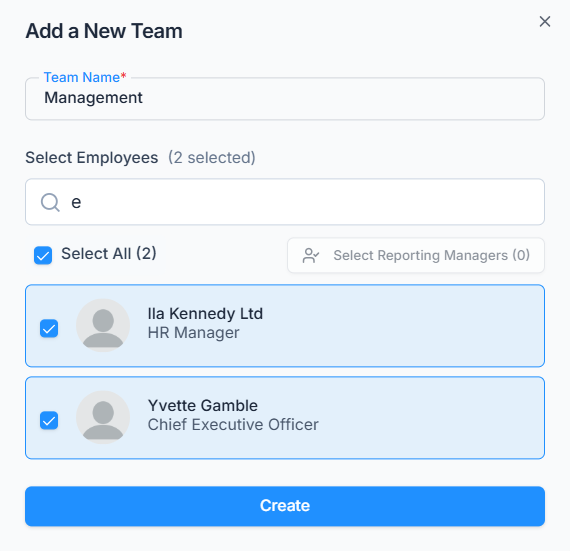
Use the Action menu on any team to Edit its name or member list, or Delete it.

What Happens When You Add or Remove a Team Member #

Permission checks are always evaluated live: whenever the system checks what an employee can do, it looks at
(1) that employee’s own individually assigned permissions, and — only if the action isn’t granted there.
(2) the permissions of every team they’re currently a member of. There’s no one-time copy or sync step, so:

  • Adding someone to a team that already has permissions assigned gives them every one of those permissions, on top of anything they already have individually or through another team.
  • Removing someone from a team takes away the permissions they only had through that team. They keep anything granted directly to them, or through any other team they’re still on.

Note: A team can’t be deleted while it still has a Team Permission assigned to it. If it does, deletion is blocked with a message telling you why — remove that permission assignment first, from Admin → Permissions → Team Permissions.

Updated on July 8, 2026
Expense CategoryForms
Table of Contents
  • What Happens When You Add or Remove a Team Member

Office-X is an all-in-one office management platform that streamlines employee management, attendance, payroll (Bangladesh only), asset tracking, and approvals. Automate workflows, gain insights, and run your business smarter with ease and security.

  • Links
  • Home
  • Features
  • Pricing
  • Support
  • FAQ
  • Help Center
  • Terms of Service
  • Privacy Policy
  • Follow Us
  • LinkedIn
  • Facebook
  • Youtube
Copyright ©2026 Office-X LLC. All rights reserved.
  • Home
  • Features
  • Pricing
  • FAQs
  • Help Center
Sign In