Skip to content
Office-X
Partners Pricing Add-ons FAQ Help Center
Sign in Start free trial →
Features & Solutions

Everything You Need to
Make Your Workplace Smarter

Office-X brings your people, payroll, clients, and daily operations together in one secure workspace.

Employee Management
Onboarding & Performance Manage and track growth
Attendance & OT IP-locked check in + overtime
Time off / Leave Requests, balances & approvals
Internal Support Tickets & helpdesk
Payroll Paystubs & Tax statements
Work Shifts Schedule Create and manage rosters
Business Management
CRM Manage leads, clients & sales
Estimate & Agreements Quotation + e-sign docs.
Web & AI Phone Bookings Automated scheduling
Activity Log Who did what, when & where
Permissions & Approvals Multi-level approval flows
Business Management
Task Management Assign & track work
Asset & Incident Tracking Track assets & report incidents
Bill, Travel & Purchase Approve & manage expenses
Holiday Calendar Company-wide holidays
Email Templates & SMTP Branded emails & delivery
Employee Management
Onboarding & Performance Attendance & OT Time off / Leave Internal Support Payroll Work Shifts Schedule
Business Management
CRM Estimate & Agreements Web & AI Phone Bookings Activity Log Permissions & Approval Flow Task Management Asset & Incident Tracking Bill, Travel & Purchase Holiday Calendar Email Templates & SMTP
Partners Pricing Add-ons FAQ Help Center
Sign in Start free trial

Getting Started

1
  • Getting Started with Office-X

Subscription & Billing

1
  • How Seats Work in Office-X

Features & Modules

80
  • Overview
  • Business Management
    • Company
    • Billing & Payment
    • Payroll Configuration
    • Business Support
  • Employees Module
    • Employee List
    • Adding a New Employee
    • View Employee Details
    • Edit an Employee
    • Reset Password
    • Work Hours/Shift Hours
    • Change Status
    • Assign/Unassign Seat
    • Opening Balance
    • Assign Work Days
    • Visual Guide
  • Privacy & Security
    • Security
  • Performance Management
    • Performance Management
  • Work Shifts
    • Work Shifts
  • Tasks
    • Schedule
    • History
    • Customers
  • Holidays Calendar
    • Calendar
  • Attendance Management
    • Attendance Records
    • Individual Attendance Summary
    • Overall Attendance Summary
    • Visual Guide
  • Leave Management
    • Create Leave
    • Approve & Reject Leave
    • Cancel Approved Leave
    • View All Leaves
    • Visual Guide
  • Bill Management
    • Create Bill
    • Approve & Reject Bill
    • View All Bills
    • Visual Guide
  • Travel Requests
    • Create Travel Request
    • Approve & Reject Travel Request
    • View All Travel Requests
    • Visual Guide
  • Purchase Requests
    • Create Purchase Request
    • Approve & Reject Purchase Requests
    • View All Purchase Requests
    • Visual Guide
  • Payroll (Bangladesh)
    • Business → Payroll Configuration
    • Payroll Management
    • Income and Tax Statement
    • Visual Guide
  • Incident Report
    • Incident Report
  • Asset Tracking
    • Asset Tracking
  • Admin Module
    • Department
    • Designation
    • Pay Type
    • Employment Status
    • Leave Types
    • Benefits
    • Expense Category
    • Teams
    • Forms
    • Events & Announcements
    • Incident Configuration
    • IP Configuration
    • Currency
    • Support Categories
    • Integrations
  • CRM
    • Clients
    • Items
    • Estimates
    • Docs
    • Agreements
    • Bookings
  • Support
    • Create Support Request
    • Resolve Support Requests
    • View All Support
    • Visual Guide
  • Activity Logs
    • Activity Logs
  • Permissions & Approval Flows
    • Permissions Management
    • Approval Flows
  • SMTP & Email Templates
    • SMTP Config
    • Email Templates
View Categories
  • Home
  • Docs
  • Features & Modules
  • Holidays Calendar
  • Calendar

Calendar

Keep track of company holidays easily

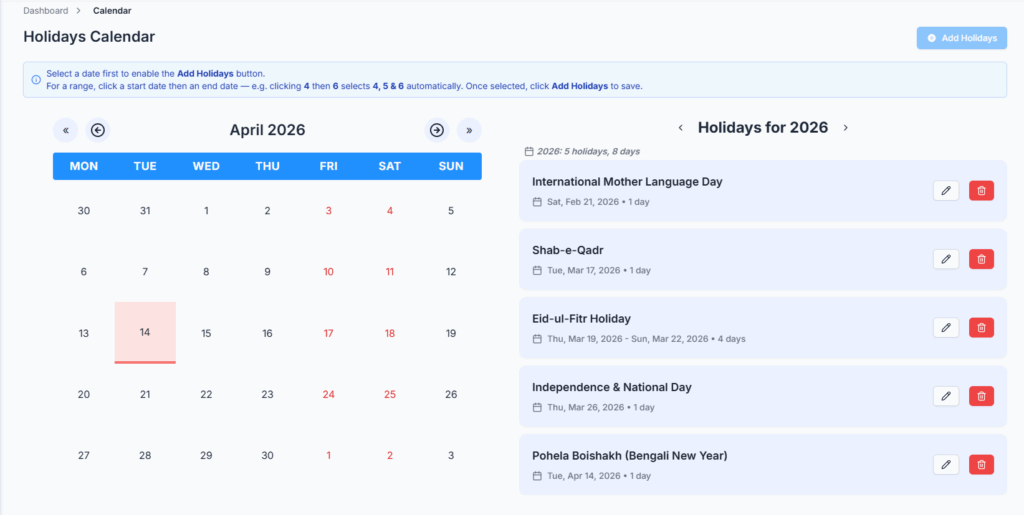
The Holidays Calendar module helps your organization plan, view, and manage company holidays throughout the year. It supports both single-day and multi-day holidays, making it easy for employees and admins to see upcoming holidays and plan work schedules accordingly.

Who Can Use This Feature #

Subscriber Admin can always view, add, edit, and delete holidays, without needing any specific permission.

Employees can access this page and act on holidays only to the extent they hold the permission actions below.

Permission Behavior

Holiday actions are permission-controlled from: Admin → Permission → Holiday → Manage Holidays

Permission-based access includes:

  • View Holidays: Required just to open the Holidays Calendar page at all — without it (and without being the Subscriber Admin), the page shows “Access Denied.”
  • Add Holiday: Allows users to create a new holiday. Without this, the calendar isn’t even clickable — dates don’t respond to clicks and the Add Holidays button doesn’t appear at all — so a View-only user can look but not touch.
  • Edit Holiday: Allows users to update an existing holiday’s title.
  • Delete Holiday: Allows users to remove a holiday.

These permissions can be assigned directly to an employee, or to an entire team at once. See the Permissions Management guide for how to assign permissions.

Calendar View #

  • Left Side – Month Calendar
    • Displays the current month at a glance, with today and weekends (Friday & Saturday) both subtly highlighted so you can orient yourself quickly.
    • Holidays in the month are highlighted, every day within a multi-day holiday is highlighted, not just its start date.
    • Hover over a highlighted date to view that holiday’s title.
  • Right Side – Yearly Holiday List
    • Opens on the current year by default, but you can step to any previous or future year using the ‹ and › arrows above the list.
    • Shows every holiday in the year you’re viewing, each with its date range and how many days it spans (e.g. “3 days”).
    • Gives you a running total for that year — how many holidays and how many total days off they add up to.

Manage Holidays #

To manage holidays, select a date (or a date range) on the calendar and use the available actions:
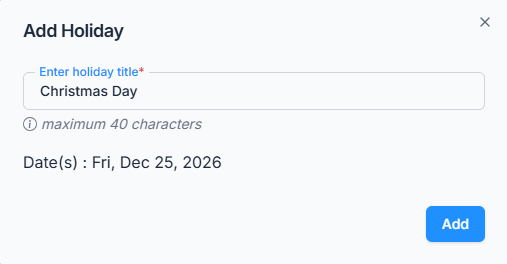
  • Add Holiday: Click a date to select it, then click Add Holidays — the button only becomes active once a date is selected. For a holiday that spans several days, click the start date and then the end date; every day in between is selected automatically (e.g. clicking 4 then 6 selects 4, 5, and 6). Enter a title (up to 39 characters) and click Add. The calendar won’t let you select a date that’s already part of another holiday, and if any date in a new range would overlap an existing holiday, the whole selection is rejected.
    • Good to know — Selecting a date range: Always select the earlier date first, then select the later date. If you select the earlier date after the later date, Office-X will show an error and clear the selection.
    • If you click a date outside your current range, the range starts again from that date. Clicking a date inside the selected range will also clear the selection so you can choose a new range.
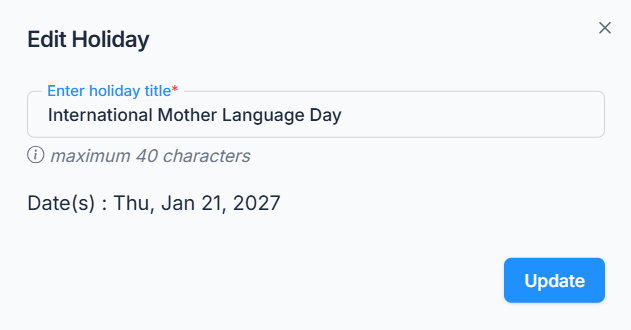
  • Edit Holiday – Click the pencil icon next to a holiday in the yearly list to change its title. Note: only the title can be changed this way — the date range is set when the holiday is first added and can’t be edited afterward. If the dates need to change, delete the holiday and add it again with the correct dates.
  • Delete Holiday – Click the trash icon next to a holiday in the yearly list, then confirm in the popup. This can’t be undone.

All actions are permission-controlled, so only admins and permitted employees can add, edit, or delete holidays.

This ensures the holiday calendar is always accurate, reflecting company-wide days off for employees and management.

Summary #

The Holidays Calendar keeps everyone on the same page — easy to view, add (single days or multi-day ranges), and manage all holidays for the year, making office planning simple and transparent.

Updated on August 19, 2026
Table of Contents
  • Who Can Use This Feature
  • Calendar View
  • Manage Holidays
  • Summary

Office-X brings your people, payroll, clients, and daily operations together in one secure workspace.

Facebook Linkedin Youtube

Company

  • Partner Programme
  • Pricing
  • Trust & Security
  • Free Migration

EMPLOYEE MANAGEMENT

  • Onboarding & Performance
  • Attendance & OT
  • Time off / Leave
  • Work Shifts Schedule
  • Payroll
  • Internal Support

BUSINESS MANAGEMENT

  • CRM, Estimate & Agreement
  • Tasks Management
  • Web & AI Phone Bookings
  • Activity log
  • Permissions & Approval Flow
  • Asset & Incident Tracking

Resources

  • Help Center
  • See how it works
  • FAQs
© Office-X. All rights reserved.
  • Terms of Service
  • Cookie Policy
  • Privacy Policy