
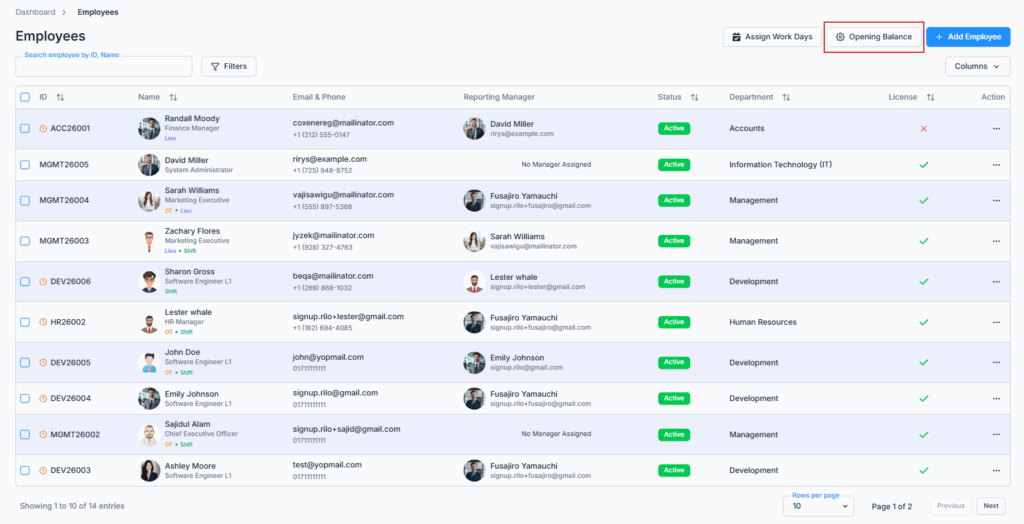
The Opening Balance page is accessed from the Employees route by clicking the Opening Balance button beside the Add Employee button.
This feature allows authorized users to record an employee’s already-used leave, and any existing overtime or lieu hours, from before that employee started using Office-X. It helps ensure each employee’s leave, overtime, and lieu balances start out accurate, based on real historical records rather than from zero.
Who Can Use This Feature #
Subscriber Admin can always access the Opening Balance page, without needing any specific permission.
Employees can access it only if they hold the permission below.
Permission Behavior
This is controlled from: Admin → Permission → Employee → Manage Opening Balance (For All)
- Manage Opening Balance (For All)
Required action: Update
Lets you view and set opening balance values for any employee.
Without this permission (and without being the Subscriber Admin), the Opening Balance button doesn’t appear on the Employees page, and opening the page directly shows Access Denied. This is genuinely enforced on the server too, for both viewing and saving — not just a hidden button.
This permission can be assigned directly to an employee, or to an entire team at once. See the Permissions Management guide for how to assign permissions.
Good to know: only employees who currently have a license/seat show up on this page at all — an unlicensed employee won’t appear here regardless of your permissions.
Overview #
The Opening Balance feature is mainly used for companies that already have employees with previous leave usage, overtime, or lieu records before using Office-X.
When employees are added or migrated into the system, their leave entitlement may already be partially used. Some employees may also have existing overtime or lieu hours that need to be recorded. This page is one table listing your employees, where you can search, sort, and page through them, and set these opening values inline, cell by cell.
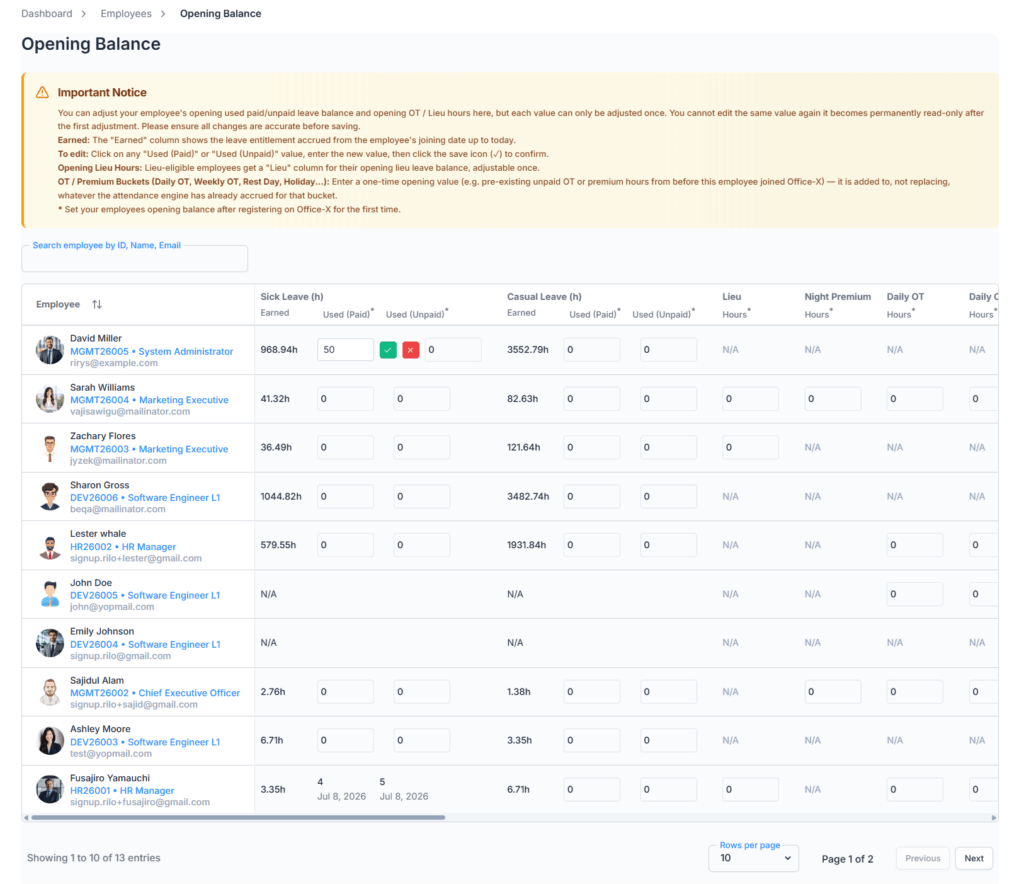

Each value you save here works as that employee’s opening balance. Once a value is saved, it becomes permanently locked and cannot be edited again. This one-time edit rule helps maintain data accuracy, audit control, leave tracking, and payroll integrity.
When to Use This Feature #
Use Opening Balance when:
- An existing employee has already used paid leave before being added to the system.
- An existing employee has already used unpaid leave before being added to the system.
- An employee has existing overtime or lieu hours that need to be recorded.
- A company is migrating employee balance data from a previous system or manual records.
- HR needs to record historical leave usage for accurate leave balance calculation.
- HR needs to record opening overtime or lieu hours.
- Payroll calculations need correct leave, overtime, or lieu history.
- The organization wants to start employee leave tracking with accurate opening balances.
The Table: Search, Sort, and Columns
You can search employees by ID, Name, or Email, sort the list by name, and page through it (10/20/30 rows per page).
Every non-Lieu leave type your company has configured under Admin → Leave Type gets its own column, shown for every employee row. If a particular employee isn’t actually assigned that leave type, their cell for it simply shows N/A instead of an editable field — the columns themselves aren’t filtered per employee, only the ability to edit each one is.
Lieu Leave doesn’t share a column with the other leave types — it gets its own dedicated Lieu Hours column, described separately below.
What Can Be Updated #
For each leave type column, you can set:
- Used Paid
- Used Unpaid
Read-only, never editable here:
- Earned
- Employee ID, name, and email
- Already-adjusted values (once locked, see below)
- N/A cells for leave types, overtime categories, or lieu hours that don’t apply to that employee
Good to know: “Earned” here works exactly like the Earned figure on the employee’s own Leave Quota tab — it’s not the employee’s full yearly entitlement, it’s prorated based on how long they’ve actually been with the company (Entitled ÷ 365 × days since joining). It keeps growing day by day even as you’re using this page, so don’t expect it to equal the full yearly number unless the employee has been with the company a full year already.
Example
Say an employee is entitled to 12 days of Casual Leave per year, joined 6 months ago, and had already used 4 days as paid leave before being added to Office-X.
Enter 4 days in the Used Paid field for that leave type. After saving:
- Earned Casual Leave (prorated for 6 months): roughly 6 days
- Used Paid Casual Leave: 4 days
- Remaining Casual Leave right now: roughly 2 days
As more time passes, Earned keeps growing toward the full 12 days, so the remaining balance grows too — the 4 days you entered stays fixed as a permanent starting point.
Overtime and Lieu Hours #
Unlike the leave-type columns, overtime doesn’t have one single “OT Hours” field — it’s broken down into up to 17 separate overtime columns, one for each category your company has enabled under Business → Payroll Configuration:
- Night Premium
- Daily OT
- Daily OT (Night)
- D/T2 OT (Daily Tier 2 / Double-Time Overtime)
- Weekly OT
- Weekly OT (Night)
- Rest Day Premium
- Rest Day (Night)
- Rest Day OT
- Rest Day OT (Night)
- Rest Day D/T2 OT
- Holiday Premium
- Holiday (Night)
- Holiday OT
- Holiday OT (Night)
- Holiday D/T2 OT
- Monthly Excess OT
Each of these 17 gets its own column, and only for employees who are Eligible for Overtime — everyone else, or any category your company hasn’t enabled, shows N/A for that column instead.
Lieu Hours is separate again, shown only for employees marked Eligible for Lieu Leave.
Good to know — these two work differently:
- An overtime category’s opening value is added on top of whatever that employee may have already accrued from attendance since joining Office-X — it doesn’t overwrite anything, since real overtime may already be building up in the background.
- Lieu Hours is a plain starting value that gets set directly, not added to anything.
For example, if an employee has 10 hours of existing Daily Overtime from before joining Office-X, enter 10 in that employee’s Daily Overtime column (if they’re eligible and your company has Daily Overtime enabled).
Good to know: if an employee’s Overtime or Lieu Leave eligibility is turned off later (from Edit Employee), any opening value you already entered for them stops being shown, and — for overtime — stops being paid out in payroll too, even though it’s technically still stored. If eligibility is turned back on later, the previously entered value reappears.
One-Time Edit Rule #
Opening Balance adjustment is a one-time action, enforced separately for every individual value:
- Each employee
- Each leave type’s Used Paid
- Each leave type’s Used Unpaid
- Lieu Hours
- Each individual overtime category (Daily Overtime, Weekly Overtime, Night Premium, and so on) — locking one category doesn’t lock the others
Before you confirm a save, Office-X shows a warning: “Are you sure you want to update this to [value]? You can only edit this value one time. Once updated, it cannot be edited again.” Once you save:
- That specific value becomes read-only.
- The edit/save/cancel icons disappear for it.
- It stays locked after a page refresh, and after logging out and back in.
- Trying to set it again is rejected on the server with a message like “Paid leave balance has already been adjusted and cannot be modified again” — this is enforced by Office-X itself, not just hidden in the interface, so it can’t be bypassed.
Good to know: if you remove a leave type from an employee’s entitlements after already recording an opening balance for it, that recorded opening value is dropped along with it the next time their leave entitlements are saved — there’s no way to recover it afterward. Double-check before removing a leave type from someone who already has an opening balance set for it.
How This Affects Leave Balance and Payroll #
Entering a “Used Paid” or “Used Unpaid” value here reduces that employee’s visible remaining leave balance immediately, exactly the same way an approved leave request would — it isn’t a separate hidden number, it’s a real starting point added to the same balance everyone else sees on the Leave Quota tab.
On top of that, Office-X compares your opening balance figures against what the employee would have genuinely earned by the time their very first payroll is run. If the opening “Used Paid” you entered is more than what they’d have earned by then, the difference is charged as a deduction on that first payroll (labeled “Opening Balance Deficit”), the same way an over-drawn leave balance normally would be. This only ever happens on an employee’s first payroll — it’s not repeated on later runs.
Key Features #
- Record opening paid leave usage for existing or migrated employees.
- Record opening unpaid leave usage for existing or migrated employees.
- Record opening overtime hours per overtime category, and opening Lieu hours, for eligible employees.
- Display leave types dynamically from Admin → Leave Type — not hardcoded to specific leave types like Casual or Sick Leave.
- Keep Earned leave values permanently read-only.
- Show N/A wherever a leave type, overtime category, or Lieu isn’t applicable to that employee.
- Allow every eligible value to be updated only once, enforced by the server.
- Support employee search by ID, name, and email, plus sorting and pagination.
- Feed directly into leave balance display and first-payroll calculations.
- Restrict access to the Subscriber Admin and authorized employees only.
Summary #
The Opening Balance feature provides a controlled way to record employees’ starting leave, overtime, and lieu balances. It is especially useful when a company starts using Office-X with existing employees or migrates historical employee data from another system. Every value — each leave type’s Used Paid and Used Unpaid, Lieu Hours, and each individual overtime category — can be set exactly once, enforced by Office-X itself, and feeds directly into the employee’s real leave balance and their first payroll calculation.