
On Admin → Currency, add and manage multiple currencies for your organization.
You can:
- Define your workplace currencies
- Set a default currency
- Use them across billing, purchase requests, and other financial modules
Your company starts with one currency already set as default: United States (USD) — regardless of which country your company is actually registered in. If you operate in a different currency, add your country here and make it the default.
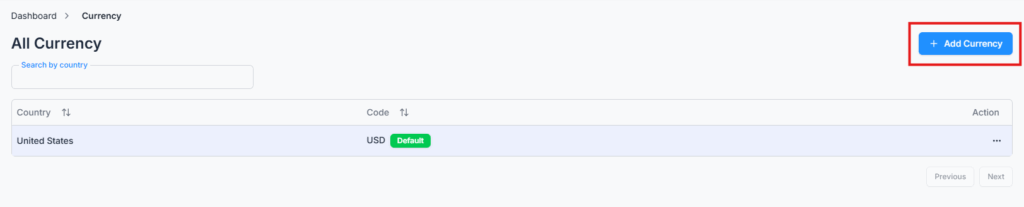
Add Currency #
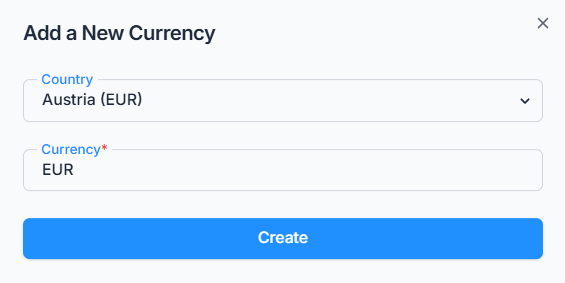
Click Add Currency and select a Country from the dropdown — you don’t type a currency code yourself; it’s filled in automatically based on the country you pick (for example, selecting “Japan” fills in “JPY”). Each country and each currency code can only be added once per company.
Set the Default Currency #
The table shows every currency you’ve added, with a Default badge next to the current default. To switch it, open the Action menu on any non-default currency and choose Make Default — Office-X automatically unsets the old default at the same time, so there’s always exactly one.
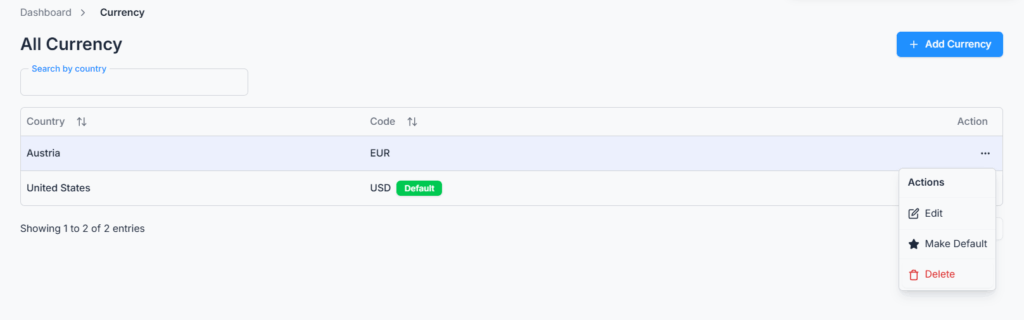
The default currency automatically appears throughout the system unless changed.
Edit & Delete Currency #
Use the Action menu to edit an entry — editing works the same way as adding: pick a different country and its currency code updates automatically. You can search the list by country name.
Note:
- The current default currency cannot be deleted — make a different one default first if you need to remove it.
- Any currency that’s already used in a bill, purchase request, or travel request also cannot be deleted — deletion is blocked with a message telling you exactly where it’s in use.