
The Cancel Approved Leave feature allows permitted users to cancel a leave request that has already been approved. This is useful when an approved leave needs to be reversed due to a mistake, schedule change, employee request, or business requirement.
When an approved leave is cancelled, the system updates the leave status to Cancelled and reverses the related leave balance adjustments according to company rules.
Who Can Use This Feature #
Subscriber Admin can cancel any approved leave request in the company — subject to the payroll and timing restrictions covered below, which apply to everyone, including the Subscriber Admin.
Employees can cancel an approved leave only if they’re eligible through the approval flow assigned to that specific leave request — cancellation eligibility isn’t a standalone permission you assign like most other actions in Office-X; it comes from how the approval flow’s steps are configured.
Cancellation Eligibility Behavior #
Whether an employee can cancel a given approved leave depends on how that leave’s approval flow was set up under Dashboard → Admin → Approval Flows (see the Approval Flows guide). Each step in a flow can individually be marked as allowed to cancel approved leave once the whole request has gone through. An employee is eligible to cancel a specific leave request if:
- They’re named as a Selected Employee on a step that’s marked to allow cancellation, or
- A step marked to allow cancellation is set to Reporting Manager, and they are, in fact, that specific requester’s reporting manager.
If a user doesn’t meet either condition, the Cancel Leave option simply won’t be available to them for that request.
Good to know: unlike approving or rejecting, there’s no built-in rule stopping someone from cancelling their own approved leave — if you happen to independently qualify as an eligible canceller (for example, you’re an admin, or you’re a designated approver elsewhere in the company’s approval setup), that eligibility isn’t specifically switched off just because the leave is yours. In practice, this rarely comes up for a typical employee, since ordinary staff aren’t usually also configured as cancel-eligible approvers.
Where to Find the Cancel Leave Option #
You can cancel an approved leave from:
- Dashboard → Leave → Approve Route
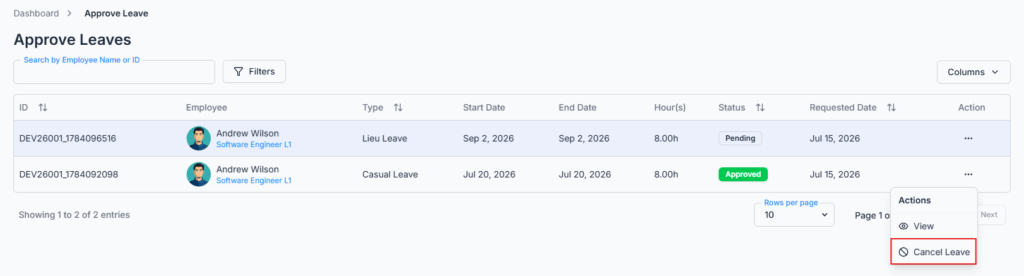
- Open the action menu for an approved leave request. If the leave is eligible and you’re an eligible canceller, the Cancel Leave option will appear.
- The Cancel Leave option appears only for leave requests with Approved status. Pending, rejected, or already cancelled leaves cannot be cancelled.
Good to know: the Cancel Leave option currently only appears on this Approve Leaves table — it isn’t available from the leave request’s own detail page, and an employee viewing their own leave from Create Leave Request‘s list can’t cancel it from there either. If you have cancel eligibility, this Approve Leaves table is where you’ll always need to come to use it.
How to Cancel an Approved Leave #
- Go to Dashboard → Leave → Approve Route.
- Find the approved leave request you want to cancel.
- Click the action menu.
- Select Cancel Leave.
- A confirmation window titled “Cancel Approved Leave” appears, asking: “Are you sure you want to cancel this approved leave? This will reverse the leave balance adjustments.” There’s no reason or comment field to fill in here — just the confirmation itself.
- Click Yes, Cancel Leave to confirm.
To close the window without cancelling, click No, Keep Leave or the close icon.
Good to know: seeing the Cancel Leave option doesn’t guarantee the cancellation will go through. Clicking Yes, Cancel Leave always re-checks the payroll and timing restrictions below on the server at that moment — so if something has changed since the page loaded (for example, payroll has since been run for that period), you’ll see a warning message and the leave will stay Approved, even though the option was available to click.
What Happens After Cancellation? #
After a leave is cancelled successfully:
- The leave status changes from Approved to Cancelled.
- The employee’s leave balance is restored based on the cancelled leave’s hours — the same “Used” figure that was added when the leave was approved is subtracted back out (never dropping below zero).
- Unpaid leave hours are reversed if applicable, up to whatever the employee’s unpaid-leave total currently is.
- Backdated leave hours are reversed if applicable — the system re-works out how many of this leave’s hours fell into an already-processed payroll period and reduces the backdated total by that amount.
- Lieu leave hours are restored if the cancelled leave used Lieu Leave — the exact number of hours that leave had used is credited back.
- The cancellation date is recorded and shown on the leave’s detail page once it’s Cancelled.
- The cancelled leave remains visible as history — it isn’t deleted, and the fact that it was cancelled (and by whom) is recorded in the company’s Activity Log.
Good to know: these balance reversals are re-calculated at the moment of cancellation rather than simply undoing a single stored number from when the leave was approved. In the large majority of cases this restores exactly what the leave had used. In less common situations — for example, if other leave requests for the same employee were approved or cancelled in between — the reversed amount is based on the employee’s balance as it stands right now, which can occasionally land a little differently than a perfectly exact undo. If you ever notice a balance that looks slightly off after a cancellation, it’s worth double-checking the employee’s other recent leave activity around the same time.
Payroll and Timing Restrictions #
An approved leave can’t be cancelled forever — these restrictions exist to keep payroll and leave records consistent once money or finalized calculations are involved.
For companies with payroll enabled:
- If this leave’s hours have already been factored into a completed payroll run, cancellation is blocked with: “This leave cannot be cancelled because payroll has already been processed for this period.”
- Separately, if the employee’s most recent payroll run’s pay period already extends up to or beyond this leave’s end date, cancellation is blocked with the same message — even if this particular leave wasn’t itself individually flagged as processed.
For companies without payroll enabled:
- Cancellation is blocked once the leave’s end date has already passed, with: “This leave cannot be cancelled because the leave period has already ended.”
In either case, once cancellation is blocked, the leave status stays Approved and no balance changes are applied.
Notifications and Emails #
When an approved leave is cancelled:
- The employee whose leave it is receives an in-app notification, and an email if they have an email address on file.
- Everyone who actually approved a step on this specific request also receives an in-app notification, and an email if they have an email address on file. Whoever performed the cancellation doesn’t get a notification about their own action.
- The notification and email include the leave type, the leave period, the status (“Cancelled”), and who performed the cancellation.
Good to know: if this leave was originally created on someone’s behalf by a different person (for example, HR submitting it for an employee), that on-behalf submitter isn’t separately notified of the cancellation — only the employee the leave actually belongs to, and the request’s approvers, are notified.
Summary #
The Cancel Approved Leave feature helps organizations safely reverse approved leave when needed. Eligibility comes from the leave’s own approval flow setup — a Subscriber Admin can always cancel, while an employee needs to be a cancel-eligible approver (or the requester’s actual reporting manager on a cancel-eligible step) for that specific request.
Cancelling restores leave balances, keeps cancellation history, notifies the employee and approvers, and is blocked once payroll has processed the period (or, without payroll, once the leave period has already ended) — keeping leave records accurate, traceable, and compliant with company policy.