The Create Bill Request module lets employees submit expense claims for things like travel, office supplies, and other business expenses. Authorized users can also submit a claim on behalf of another employee.
It helps make sure each expense has the required details, is placed in the correct category, and follows the company’s approval process before it is paid or processed.
Where to Find It #
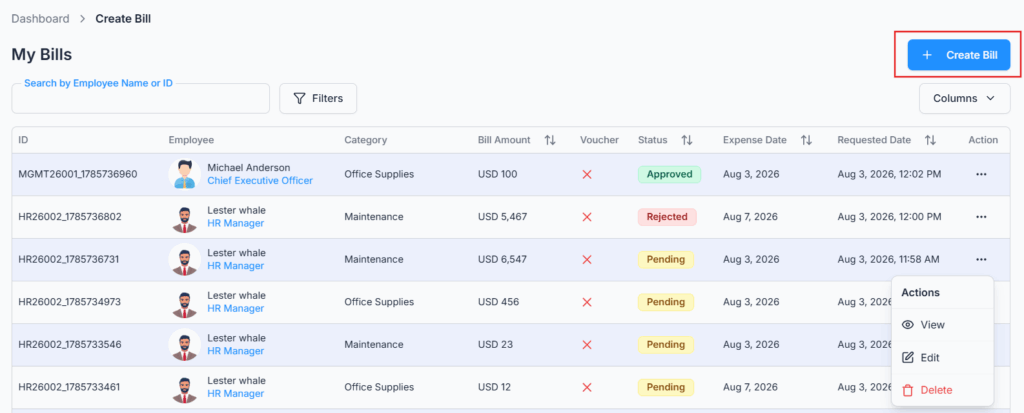
Go to Dashboard → Bill → Create. The page has two parts: a button that opens the bill request form, and below it a table of the bills you can see — your own, plus any you submitted on someone else’s behalf. Everything in this guide happens on that one page.
Related Setup and Navigation #
Before employees submit bill requests, admins should make sure the following is set up.
- Expense Category Setup
Route: Dashboard → Admin → Expense Category
Used to create the categories employees choose from when submitting a bill, such as Travel & Transportation or Office Supplies. Please check the Admin → Expense Category for a better understanding. - Currency Setup
Route: Dashboard → Admin → Currency
Used to configure which currencies are available on the bill form, and which one is the default. - Permission Setup
Route: Dashboard → Admin → Permission → Employee Permission / Team Permission
Used to assign bill-related permissions, such as creating bills for yourself or on behalf of others, editing, deleting, viewing, approving, or rejecting bill requests. Please check the Permissions Management guide for a better understanding. - Approval Flow Setup
Route: Dashboard → Admin → Approval Flows
Used to configure single-step or multi-step approval workflows for bill requests. Please check the Approval Flows (Workflow Management) for a better understanding. - Create Bill Request
Route: Dashboard → Bill → Create Bill Request
Used by employees to submit expense claims for themselves, or by permitted users to submit bills on behalf of other employees.
Who Can Use This Feature #
Subscriber Admin can create a bill request for any employee in the company, at any time, without needing any specific permission.
Employees need permission even to submit a bill request for themselves — this isn’t automatic just from being an employee. Submitting a bill on behalf of someone else requires a separate permission on top of that.
Permission Behavior
Two permissions control who can create a bill request at all, and for whom:
- Create Bill Request (For Own)
Required action: Create
Required just to submit a bill request for yourself. Without this, the Create Bill Request option won’t appear at all — not even to submit your own expenses. - Create Bill Request (For Others)
Required action: Create
Shows the Search Employee field in the Create Bill Request form, letting you pick another employee and submit the request on their behalf instead of your own. This is on top of, not instead of, Create Bill Request (For Own).
Without Create Bill Request (For Others), the Search Employee field doesn’t appear, and the form can only submit a bill request for yourself (assuming you hold Create Bill Request (For Own)).
Beyond creating a bill, several other permissions control the rest of the bill lifecycle:
- Edit Bill Request (For Own) / Edit Bill Request (For On Behalf) — see Edit Bill Request below.
- Delete Bill Request (For Own) / Delete Bill Request (For On Behalf) — see Delete Bill Request below.
- View Bill Request Details — To open and view the details of a bill request, the employee also needs the View Bill Request Details permission.
All of these permissions can be assigned directly to an employee, or to an entire team at once (so everyone on that team inherits them). See the Permissions Management guide for how to assign permissions.
Create Bill Request Form #
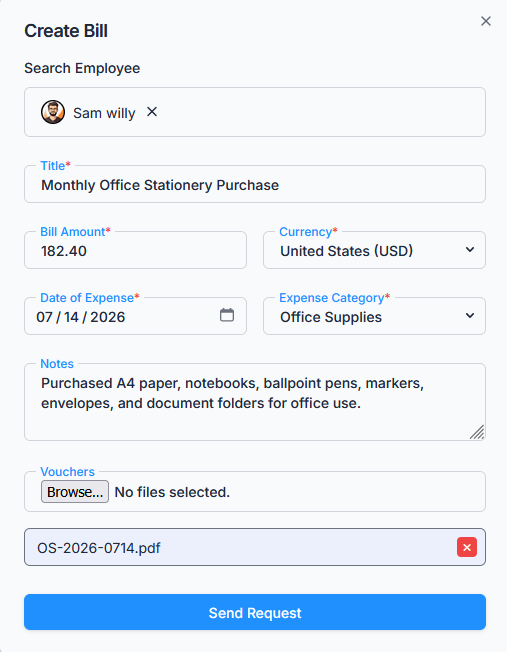
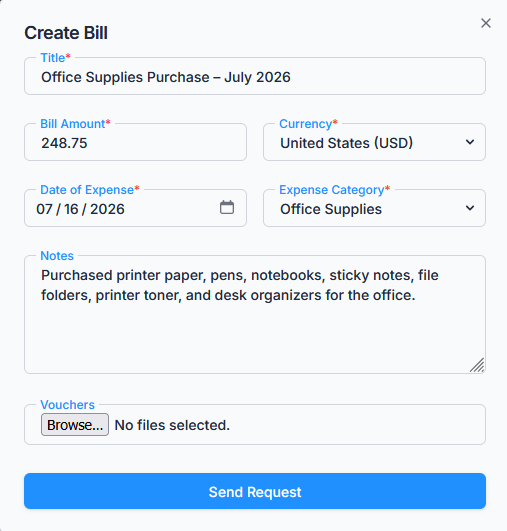
The form includes the following fields:
- Search Employee
Appears only for users with Create Bill Request (For Others) permission (or the Subscriber Admin). Used to select another employee when creating a bill on behalf of someone else. - Title
A short, clear description of the expense. Limited to 100 characters. - Bill Amount
The total amount of the expense. Must be greater than zero, and can’t exceed 9,999,999. - Currency
Select the applicable currency, from the currencies configured under Dashboard → Admin → Currency. Defaults to your company’s default currency, but can be changed per bill. - Date of Expense
The date the expense occurred. Unlike leave requests, there’s no past/future limit here — you can pick any date. - Expense Category
Choose from the categories configured under Dashboard → Admin → Expense Category, such as Travel or Office Supplies. - Notes
Optional remarks or details about the expense. Limited to 500 characters. - Vouchers / Attachments
Upload receipts or proof of purchase — up to 5 files per bill. Each file must be a JPG, PNG or PDF and no larger than 2 MB. A file outside those rules is refused as you pick it. - Send Request
Submits the bill request for approval.
Tip: Admins or users with permission can create bills for other employees, making it easy to manage group or delegated expense submissions.
Approval Flow Assignment #
If your organization has an approval flow configured for bills (from Dashboard → Admin → Approval Flows), every submission follows that workflow before final approval. The applicable flow is chosen based on the employee, their team, gender, department, or designation — the same criteria used for other approval-based modules in Office-X.
Good to know: Approval flows can include exceptions, so you can create one company-wide flow and exclude specific employees from it. Only active flows are used. If no active flow applies to an employee, the bill request is still created as Pending and goes directly to the Subscriber Admin. If a step is assigned to the Reporting Manager but the employee has no Reporting Manager, the Subscriber Admin is notified instead, so the request does not get stuck.
A bill request follows the configured approval flow step by step. Each approval moves it to the next step, and it becomes Approved only after the final step is approved. If any approver rejects it, the request is Rejected immediately. The Subscriber Admin can also act on any currently pending step.
What Happens After Submission? #
After a bill request is submitted successfully:
- The bill request status becomes Pending.
- If an approval flow applies, the first step’s approver(s) are notified (in-app and/or by email, depending on how that step is configured). If no flow applies, the Subscriber Admin is notified instead.
- The employee whose bill it is always receives a confirmation email, separately from whatever goes to approvers.
- The bill request appears in the employee’s bill request list.
Finding Your Bills #
The table below the button is where you track what you’ve submitted. Each row shows the ID, Employee, Category, Bill Amount, Vouchers, Expense Date, Status, Requested Date, and the Action menu (View, Edit, Delete — whichever are available to you on that bill). Newest bills come first.
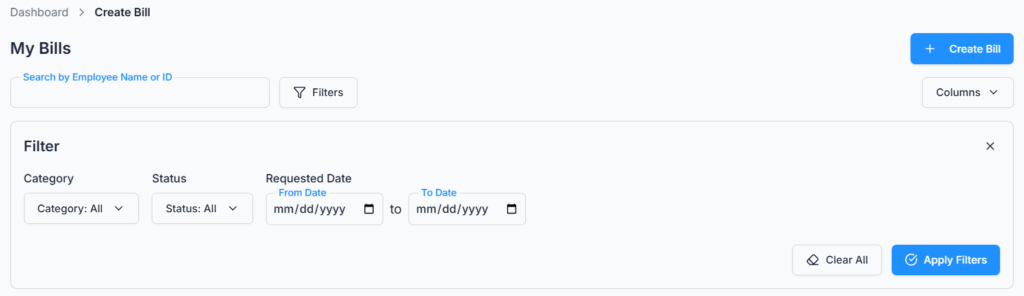
To narrow it down:
- Search — type an employee name or a Request ID.
- Filters — the Filters button opens Category, Status (All, Pending, Approved, Rejected) and a Requested Date From/To range. The button shows how many filters are active, each appears as a small badge, and Clear removes them all at once.
- Columns — hide any columns you don’t need so the table fits your screen.
- Pages — 10 rows per page by default, switchable to 20 or 30, with a “go to page” box for long lists.
Action Options (Permission-Based) #
All actions are controlled by user permissions:
Edit Bill Request #
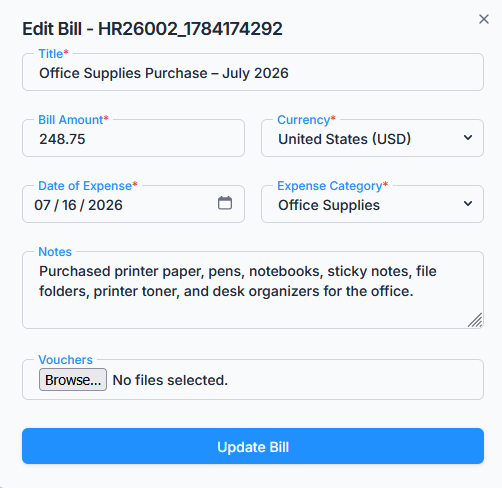
A bill request can be edited only while its status is Pending. Approved or rejected bill requests cannot be edited.
- Subscriber Admin can edit any pending bill request in the company.
- Users with Edit Bill Request (For Own) permission can edit their own pending bill requests.
- Users with Edit Bill Request (For On Behalf) permission can edit a pending bill request only if they personally created it on that employee’s behalf in the first place — not just any employee’s bill.
When editing, you can add or remove vouchers, still capped at 5 attachments in total.
Delete Bill Request #
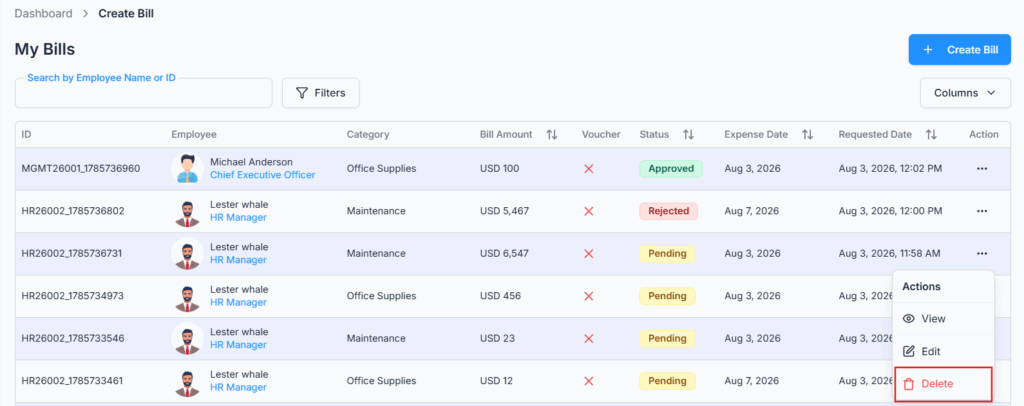
A bill request can be deleted only while its status is Pending. Approved or rejected bill requests cannot be deleted.
- Subscriber Admin can delete any pending bill request in the company.
- Users with Delete Bill Request (For Own) permission can delete their own pending bill requests.
- Users with Delete Bill Request (For On Behalf) permission can delete a pending bill request only if they personally created it on that employee’s behalf in the first place — same rule as editing.
Deleting a bill request also removes its uploaded vouchers and any comments (along with their attachments) on that bill.
View Bill Request #
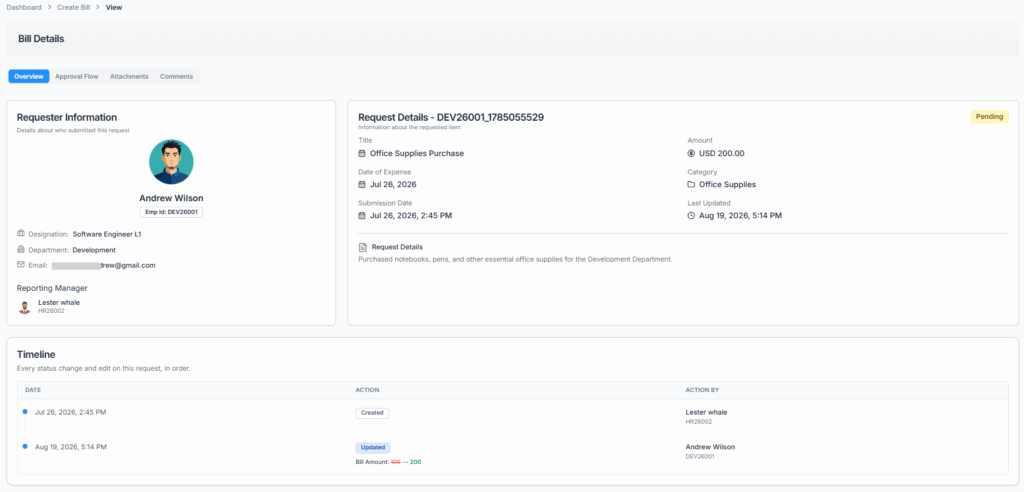
Users with the required access can open the bill request’s details page to review the full information — bill details, vouchers/attachments, approval flow, and comments.
The details page also carries a Timeline — a plain Date / Action / Action By table of everything that has actually happened to this bill, in date order: Created (and who filed it, which matters when someone submitted it for you), any edits with the exact fields that changed from old value to new value, and every approval or rejection with the person who did it. If you ever need to answer “who changed this amount, and when?”, the Timeline is where to look.
Comments #
Users can use comments to communicate with approvers or admins — to ask for clarification, provide additional information, or explain a decision — with up to 5 file attachments per comment (same rules as vouchers: JPG, PNG or PDF, 2 MB each).
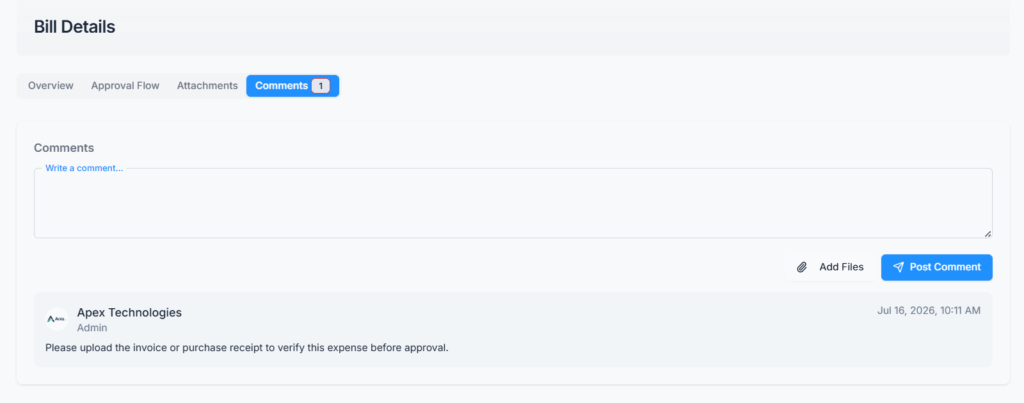
Who can comment: the requester, the requester’s reporting manager, the Subscriber Admin, any approver named in the bill’s approval flow, or anyone holding View Bill Request Details permission.
How long you can comment: only while the bill request is still Pending. As soon as it becomes Approved or Rejected, commenting closes — comments made while it was still pending remain visible afterward.
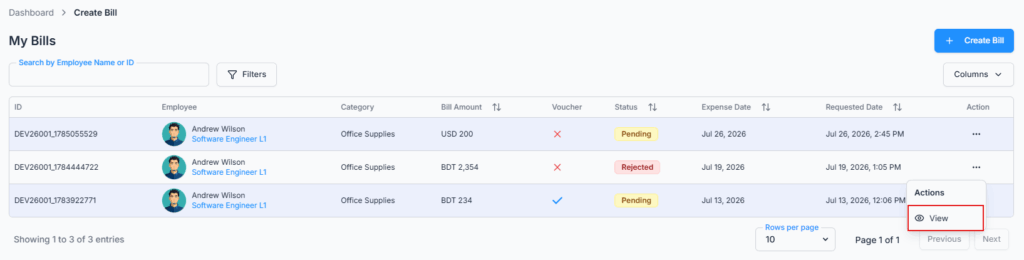
Approved or rejected bill requests cannot be edited or deleted.
Your Daily Routine #
Claiming an expense, start to finish:
- Go to Dashboard → Bill → Create and open the bill request form.
- If you’re claiming for someone else, pick them in Search Employee first.
- Give it a clear Title — this is what approvers see in their list, so “Taxi to client meeting, 12 Aug” beats “Expense”.
- Enter the Bill Amount, check the Currency, and set the Date of Expense to the day the money was actually spent (not today).
- Pick the Expense Category, and attach the receipt under Vouchers. Keep each file under 2 MB.
- Click Send Request. If a message appears instead, it names the field that needs fixing.
- Find the new row in the table below and watch the Status column. While it’s still Pending you can edit it, delete it, or add a comment.
Good to know: attach the receipt when you first submit. Once the bill is Approved or Rejected you can’t edit it and comments are closed, so there’s no way to add the missing document afterwards — the bill has to be raised again.
Notifications and Activity Log #
- You (or the employee the bill belongs to) get a confirmation email as soon as it’s created, an update each time it clears a step, and a final notice once it’s Approved or Rejected.
- The approvers whose turn it is get their own notice asking them to act — in-app, by email, both, or neither, depending on that step’s switches in the approval flow.
- If no approval flow covers the employee, only the Subscriber Admin is told, and only in-app.
- Notification emails link straight to the specific bill, so you don’t have to hunt for it in the list.
Activity Log: creating, editing, deleting, approving and rejecting a bill are all recorded in Dashboard → Activity Log, along with who did it and when. Comments are recorded too. So even if a bill is later deleted, the fact that it existed and who removed it stays traceable.
Summary #
The Create Bill Request module ensures employees can submit expense claims accurately and in accordance with company policy. Permission-based access — including the base permission just to create a bill for yourself — allows authorized users to create, edit, or delete bills for others while maintaining control, traceability, and accountability. Pending requests can be edited, deleted, or commented on based on permission, while approved and rejected requests are protected from further changes.
Note: If your organization has an approval flow configured for bills, all submissions will follow the defined workflow before final approval — see the Approve & Reject Bill guide for exactly how that works.
