Skip to content
Office-X
Partners Pricing Add-ons FAQ Help Center
Sign in Start free trial →
Features & Solutions

Everything You Need to
Make Your Workplace Smarter

Office-X brings your people, payroll, clients, and daily operations together in one secure workspace.

Employee Management
Onboarding & Performance Manage and track growth
Attendance & OT IP-locked check in + overtime
Time off / Leave Requests, balances & approvals
Internal Support Tickets & helpdesk
Payroll Paystubs & Tax statements
Work Shifts Schedule Create and manage rosters
Business Management
CRM Manage leads, clients & sales
Estimate & Agreements Quotation + e-sign docs.
Web & AI Phone Bookings Automated scheduling
Activity Log Who did what, when & where
Permissions & Approvals Multi-level approval flows
Business Management
Task Management Assign & track work
Asset & Incident Tracking Track assets & report incidents
Bill, Travel & Purchase Approve & manage expenses
Holiday Calendar Company-wide holidays
Email Templates & SMTP Branded emails & delivery
Employee Management
Onboarding & Performance Attendance & OT Time off / Leave Internal Support Payroll Work Shifts Schedule
Business Management
CRM Estimate & Agreements Web & AI Phone Bookings Activity Log Permissions & Approval Flow Task Management Asset & Incident Tracking Bill, Travel & Purchase Holiday Calendar Email Templates & SMTP
Partners Pricing Add-ons FAQ Help Center
Sign in Start free trial

Getting Started

1
  • Getting Started with Office-X

Subscription & Billing

1
  • How Seats Work in Office-X

Features & Modules

80
  • Overview
  • Business Management
    • Company
    • Billing & Payment
    • Payroll Configuration
    • Business Support
  • Employees Module
    • Employee List
    • Adding a New Employee
    • View Employee Details
    • Edit an Employee
    • Reset Password
    • Work Hours/Shift Hours
    • Change Status
    • Assign/Unassign Seat
    • Opening Balance
    • Assign Work Days
    • Visual Guide
  • Privacy & Security
    • Security
  • Performance Management
    • Performance Management
  • Work Shifts
    • Work Shifts
  • Tasks
    • Schedule
    • History
    • Customers
  • Holidays Calendar
    • Calendar
  • Attendance Management
    • Attendance Records
    • Individual Attendance Summary
    • Overall Attendance Summary
    • Visual Guide
  • Leave Management
    • Create Leave
    • Approve & Reject Leave
    • Cancel Approved Leave
    • View All Leaves
    • Visual Guide
  • Bill Management
    • Create Bill
    • Approve & Reject Bill
    • View All Bills
    • Visual Guide
  • Travel Requests
    • Create Travel Request
    • Approve & Reject Travel Request
    • View All Travel Requests
    • Visual Guide
  • Purchase Requests
    • Create Purchase Request
    • Approve & Reject Purchase Requests
    • View All Purchase Requests
    • Visual Guide
  • Payroll (Bangladesh)
    • Business → Payroll Configuration
    • Payroll Management
    • Income and Tax Statement
    • Visual Guide
  • Incident Report
    • Incident Report
  • Asset Tracking
    • Asset Tracking
  • Admin Module
    • Department
    • Designation
    • Pay Type
    • Employment Status
    • Leave Types
    • Benefits
    • Expense Category
    • Teams
    • Forms
    • Events & Announcements
    • Incident Configuration
    • IP Configuration
    • Currency
    • Support Categories
    • Integrations
  • CRM
    • Clients
    • Items
    • Estimates
    • Docs
    • Agreements
    • Bookings
  • Support
    • Create Support Request
    • Resolve Support Requests
    • View All Support
    • Visual Guide
  • Activity Logs
    • Activity Logs
  • Permissions & Approval Flows
    • Permissions Management
    • Approval Flows
  • SMTP & Email Templates
    • SMTP Config
    • Email Templates
View Categories
  • Home
  • Docs
  • Getting Started
  • Getting Started with Office-X

Getting Started with Office-X

Set up your company and start managing your office operations efficiently in just a few simple steps.

Register Your Company →

Office-X helps you simplify and centralize your daily business management, from tracking assets and monitoring employee performance to managing shifts, attendance, and internal communication.

This guide walks you through registering your company, choosing the right plan, and setting up your workspace, so your team can start working productively in no time.

Register Your Company #

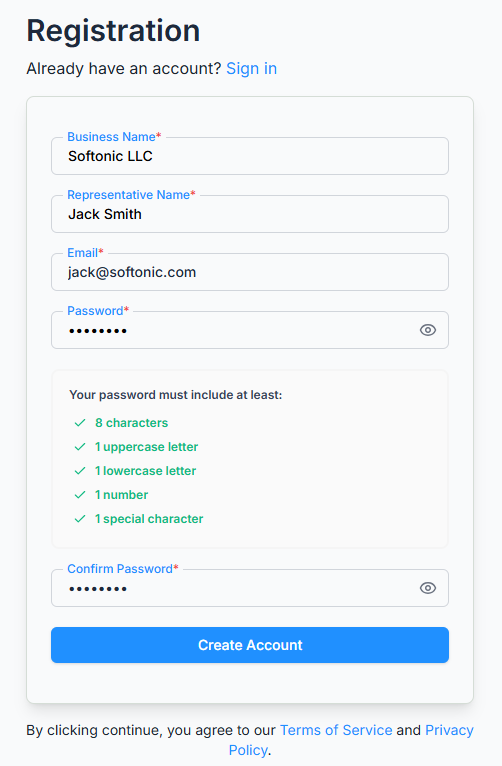
  1. Go to the Office-X registration page.
  2. Enter your business name, representative’s name, and business email address. (The representative is your primary administrator — the first account that manages the company.)
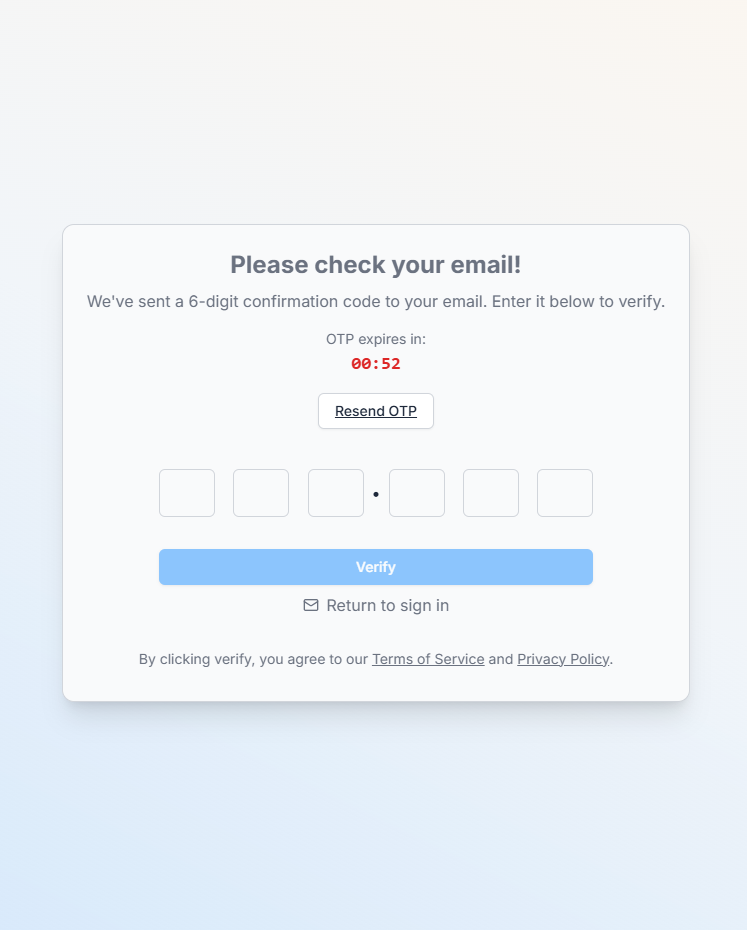
  3. Verify your email to activate your account.
  4. Once verified, you’ll be able to choose a plan.

Didn’t receive the verification email? use the resend option on the verification screen.
Choose Your Business Plan #

Next, select the plan and country that fit your company’s needs. Higher plans unlock more features and modules, and the available plans and features may vary by country.

After selecting your plan, complete the secure payment through Stripe.

Setting Up Your Account #

After your payment is confirmed, Office-X automatically prepares your workspace. It:

  • Processes your payment
  • Creates your company workspace
  • Sets up default data and configurations
  • Finalizes plan activation

Once setup is complete, your company is ready for operation, starting with one active seat for your representative.

Add Employees and Assign Seats #

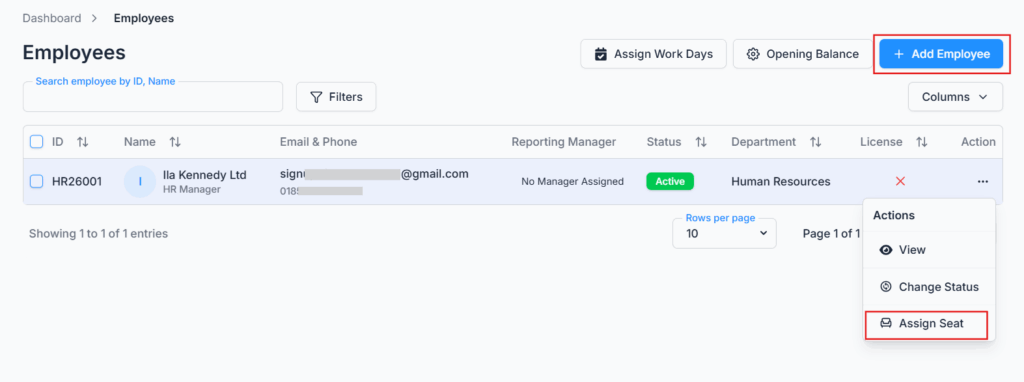
Expand your team by adding employees through your company dashboard.

  • Employees can be added anytime, so your company can scale gradually.
  • Each employee needs an assigned seat licence to log in and use the system’s modules.
  • Purchase and assign seats as your team grows.
You’re All Set! #

Your Office-X workspace is ready to use. Start managing your assets, tracking attendance, organizing shifts, and streamlining communication — all in one place.

What’s Next?

  • To ensure a smooth and hassle-free experience, complete the onboarding checklist by configuring your company profile, payroll, employees, work schedules, permissions, and other essential settings.
  • Once the required setup is complete, you’ll be able to manage your workforce, track attendance, process payroll, organize shifts, and streamline daily operations—all from a single platform.

Updated on August 17, 2026
Table of Contents
  • Register Your Company
  • Choose Your Business Plan
  • Setting Up Your Account
  • Add Employees and Assign Seats
  • You're All Set!

Office-X brings your people, payroll, clients, and daily operations together in one secure workspace.

Facebook Linkedin Youtube

Company

  • Partner Programme
  • Pricing
  • Trust & Security
  • Free Migration

EMPLOYEE MANAGEMENT

  • Onboarding & Performance
  • Attendance & OT
  • Time off / Leave
  • Work Shifts Schedule
  • Payroll
  • Internal Support

BUSINESS MANAGEMENT

  • CRM, Estimate & Agreement
  • Tasks Management
  • Web & AI Phone Bookings
  • Activity log
  • Permissions & Approval Flow
  • Asset & Incident Tracking

Resources

  • Help Center
  • See how it works
  • FAQs
© Office-X. All rights reserved.
  • Terms of Service
  • Cookie Policy
  • Privacy Policy