
Overview #
The Income and Tax Statement feature provides a yearly summary of an employee’s income, deductions, and tax information based on payroll records. It is designed to support reporting, compliance, and personal financial review.
The statement is generated for a selected fiscal year (July to June) and displayed in a structured, read-only format. Users can also download the statement as a PDF.
Access Control #
Subscriber Admin
- Can generate statements for any employee.
- Can view and download all employee statements.
Employee with View Payroll or Run Payroll Permission
- Can generate and view statements for all employees.
- Can download any employee’s statement as a PDF.
Employee (No Payroll Permission)
- Can generate and view only their own statement.
- No additional permission is required to access their own statement.
- Cannot access other employees’ statements.
How to Generate a Statement #
Subscriber Admin or Employee with Payroll Permission
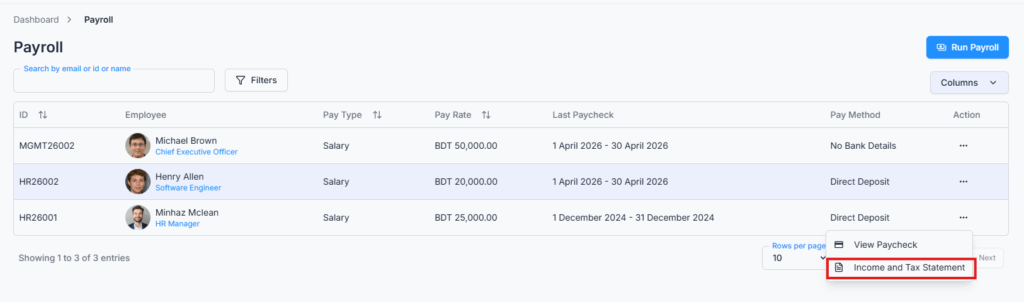
- Navigate to Payroll → BD.
- Click the Action menu for an employee.
- Select Income and Tax Statement.
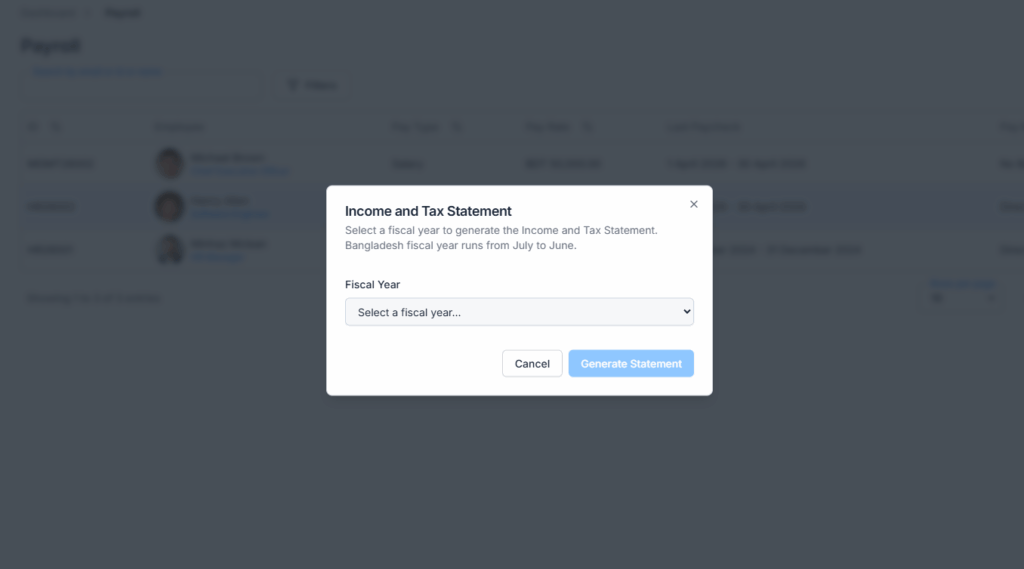
- Choose a Fiscal Year from the dropdown.
- Click Generate Statement.
Employee (No Payroll Permission — Own Statement Only)
- Navigate to the Payroll module.
- Click Income and Tax Statement from the Action column on your own row.
- Choose a Fiscal Year from the dropdown.
- Click Generate Statement.
Fiscal Year Rules #
- The system follows the Bangladesh fiscal year (July to June).
- Only completed fiscal years are available in the dropdown.
- The current running fiscal year is not selectable.
- Available fiscal years depend on the employee’s joining date.
- If an employee joined recently and no completed fiscal year is available yet, the dropdown will show “No fiscal years available” and the Generate Statement button will remain disabled.
- The statement page displays both a Fiscal Year label (e.g., FY 2024–2025) and an Assessment Year label (the year following the fiscal year end, e.g., 2026).
What the Statement Contains
The generated statement is structured into the following sections:
| Section | Contents |
|---|---|
| Employer Information | Company name, address, TIN, and contact details. |
| Employee Information | Employee name, ID, TIN, department, designation, address, contact, and joining date. |
| Income Breakdown | Yearly Basic Salary total, Additions total with itemised breakdown, and Deductions (excluding income tax). |
| Tax Breakdown | Total Gross Salary, Non-Taxable Income, Taxable Income, Total Calculated Tax, and Total Tax Deducted. |
| Summary | Total Gross Salary, Total Deductions, and Total Net Pay for the fiscal year. |
Data Requirements #
- At least one payroll record must exist in the selected fiscal year.
- If no payroll data is available for the selected year, the system displays:
“No payroll records found for the selected fiscal year. Run at least one payroll to generate this statement.”
Partial Data Handling #
- If some months in the selected fiscal year do not have payroll data, the statement is still generated using the available records.
- A partial data warning banner appears at the top of the statement listing the specific months for which payroll data is available, so you know which months are included in the totals.
Download Statement #
- The statement can be downloaded as a PDF using the Download PDF button on the statement page.
- The PDF contains all displayed sections: Employer Information, Employee Information, Income Breakdown, Tax Breakdown, and Summary.
- The downloaded file is named in the following format:
Income Tax Statement {First Name} {Last Name} FY {start}–{end} {timestamp}
Example:Income_Tax_Statement_Minhaz_Mazumder_FY2024-2025_20251023.pdf
Summary #
The Income and Tax Statement provides a complete yearly overview of an employee’s income, deductions, and tax details based on submitted payroll records. It supports accurate reporting, role-based access control, and easy PDF export for official and personal use. Because tax status flags are read from the live employee configuration, always ensure the employee’s payroll setup is up to date before generating the statement.