A complete, permanent history of what happened in your workspace — and who did it.
The Activity Log module in Office-X records a running history of actions taken across the system — who created, updated, approved, or deleted what, when, and from where. It’s a read-only audit trail: nothing in it can be edited or deleted, by anyone, including the Subscriber Admin.
Who Can Use This Feature #
Subscriber Admin can always view the full activity log for the company, without needing any specific permission.
Employees can view activity log entries only if they hold one of the two permissions below.
Permission Behavior
Two permissions control access, both under Dashboard → Admin → Permission → Activity Log:
- View Activity Logs (For Own)
Required action: View
Shows only log entries for actions you personally performed — logins, things you created, edited, approved, rejected, and so on. - View Activity Logs (For All)
Required action: View
Shows every log entry across the whole company, performed by anyone.
Good to know: “For Own” means logs of actions you carried out — it does not mean “everything that happened to my records.” For example, if your manager approves your leave request, that log entry belongs to your manager (they performed the action), not to you — with only “For Own,” you won’t see it. You’d only see log entries for actions where you were the one who actually clicked the button, so to speak: submitting the request, editing your profile, logging in, and so on.
These permissions can be assigned directly to an employee, or to an entire team at once (including teams set up as “all employees” or “all reporting managers”). See the Permissions Management guide for how to assign permissions.
Accessing the Activity Log #
Route: Dashboard → Activity Log
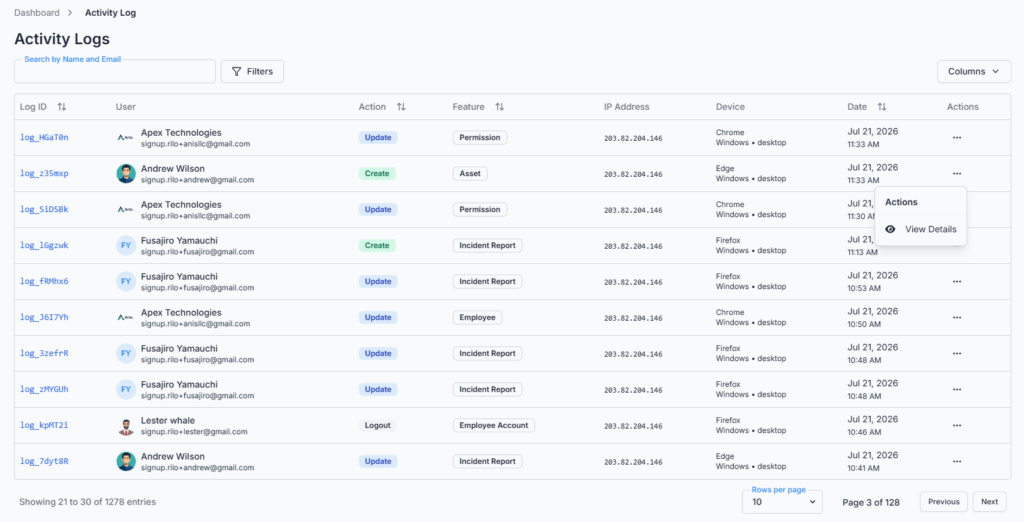
The table shows the following columns, each of which can be shown or hidden using the Columns option:
- Log ID — a unique reference for the entry.
- User — who performed the action (name, email, avatar). Only shown to those who can view all logs — with “For Own” only, every row is already you, so this column isn’t needed.
- Action — a colored badge for the most common action types (Create, Update, Delete, Login, Logout, View). Less common types (Approve, Reject, Activate, Deactivate, Send, Upload, Download, Export, Import, Reset) still show up, just as plain text with the action’s name rather than a colored badge.
- Feature — which part of Office-X the action happened in (e.g., Leave, Payroll, Asset, Employee, Permission).
- IP Address — the public IP address the action was performed from, if available (“N/A” otherwise).
- Device — browser, operating system, and device type, if it could be determined from the request.
- Date — the date and time the action happened.
- Actions — a menu with a View Details option (see below).
Log ID, Action, Feature, and Date columns are sortable. Results are paginated (10, 20, or 50 rows per page), newest first by default.
Good to know: clicking a sortable column heading only reorders the rows on the current page, not the entire log — to see the true oldest/newest entries for a given filter, use the Date range filter rather than sorting.
Search and Filters #
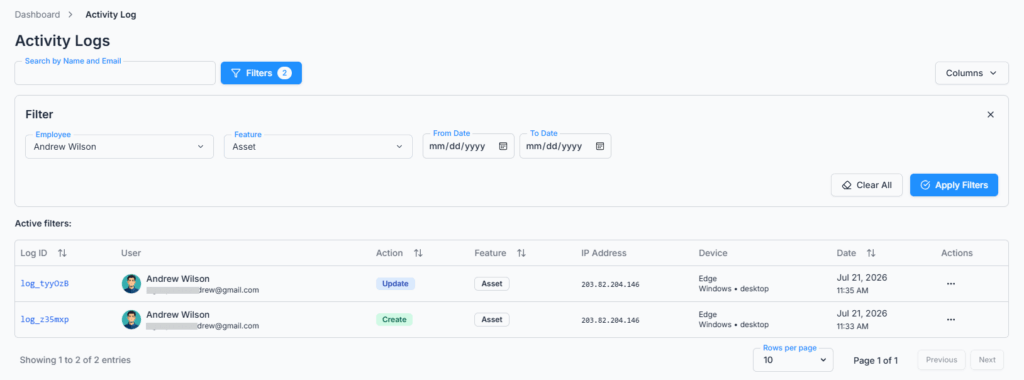
Everyone can:
- Filter by Feature (which module the action belongs to).
- Filter by a Date range (From / To).
If you can view all logs (or you’re the Subscriber Admin), you additionally get:
- Search by name or email.
- An Employee filter, letting you narrow the list down to one specific person’s activity — including a quick way to filter back down to just your own actions, even though you can see everyone’s.
Good to know: if you only hold “View Activity Logs (For Own),” both Search and the Employee filter are unavailable to you — your view is already locked to your own actions only, with no way to widen or search across it from this screen.
All searching, filtering, sorting, and pagination happen on the server, so the log stays fast and accurate even as it grows.
Viewing a Log Entry’s Details #
Clicking View Details on any row opens a window showing:
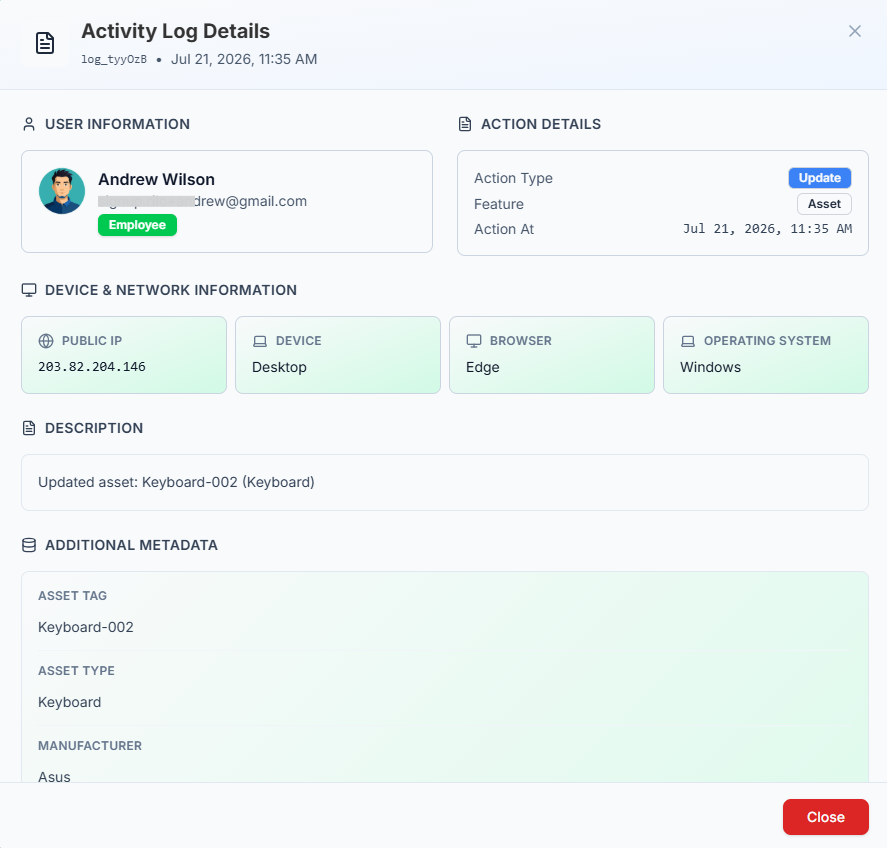
- User Information — who performed the action, with their role (Admin, Employee, or Super Admin).
- Action Details — the action type, the feature it happened in, and the exact timestamp.
- Device & Network Information — public IP address, device type, browser, and operating system.
- Description — a short, human-readable line describing what happened, if one was recorded.
- Activity Details — any extra details captured for that specific action (this varies by feature — for example, an edited record might list which fields changed).
What Gets Logged #
Activity is logged across most of Office-X, Like Leave, Attendance, Work Shifts, Bill, Travel, Purchase, Performance assessments, Incident Reports, Assets, Employee records and account changes, Permissions (employee and team), Teams, Support tickets, Announcements, Calendar, CRM (bookings, clients, estimates, and more), comments on records, and most Admin configuration screens (Leave Type, Currency, Department, Designation, Expense Category, Incident Config, Approval Flows, and others). Logins and logouts are also recorded.
Retention #
Activity log entries are kept permanently — there is no delete, purge, or retention-period setting anywhere in Office-X, for anyone, including the Subscriber Admin. Once something is logged, it stays.
Summary #
The Activity Log gives your company a permanent, tamper-proof record of who did what, when, and from where, across most of Office-X. Access is controlled by two permissions — one scoped to your own actions, one to the whole company — with the Subscriber Admin always able to see everything. Entries can never be edited or deleted by anyone, and while most day-to-day actions across the system are covered — including running payroll itself — logging is added area by area rather than applied uniformly everywhere, so a handful of actions may still fall outside it.
