
The View All Bills module allows authorized users to view all bill requests submitted by employees, across every expense category (Travel, Office Supplies, etc.) and every status (Pending, Approved, Rejected). It’s a company-wide, read-only monitoring view — it doesn’t let you approve, reject, edit, or delete anything from here.
Access to this module is permission-based. Route: Dashboard → Bill → View (the page itself is titled “All Bills”).
Who Can Use This Feature #
Subscriber Admin can always access View All Bills and see every bill request in the company, without needing any specific permission.
Employees can access it only if they hold the required permission below.
Permission Behavior #
One permission controls access to this entire page:
- View All Bill Requests (Route Access)
Required action: View
Grants access to the View All Bills page, showing every employee’s bill requests company-wide.
Without this permission (and without being the Subscriber Admin), attempting to open this page shows a “no access” message instead of the bill list.
This permission can be assigned directly to an employee, or to an entire team at once (so everyone on that team inherits it, including teams set up as “all employees” or “all reporting managers”). See the Permissions Management guide for how to assign permissions.
What the List Shows #
Each row in the All Bills table shows:
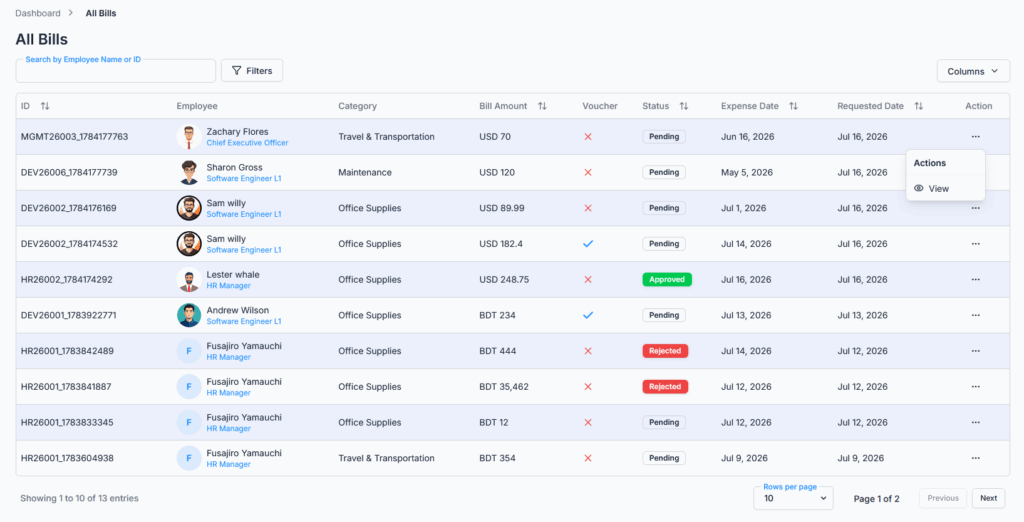
- ID — the bill’s own Request ID, or the employee’s ID if a Request ID isn’t available.
- Employee — the requester’s photo, name, and designation.
- Category — the expense category (Travel, Office Supplies, etc.), or “Other” if none is set.
- Bill Amount — the amount and currency.
- Voucher — a simple checkmark or cross showing whether the bill has any attachments, not a download link itself.
- Status — Pending, Approved, or Rejected.
- Expense Date — the date the expense actually occurred.
- Requested Date — when the bill was originally submitted.
- Action — a View option that opens the bill’s details.
You can show or hide most of these columns yourself using the Columns option above the table.
By default, the newest submitted bills appear first.
Good to know: clicking a column heading (like Bill Amount or Expense Date) to sort only reorders the rows currently loaded on your screen — it doesn’t re-sort the entire company-wide list across pages. To find the highest or oldest bill overall, you’d still need to page through, or narrow things down with search/filters first.
Search and Filters #
You can narrow the list using:
- Search — by employee name or employee/request ID.
- Category — filter to a single configured expense category.
- Requested Date (From / To) — a date range.
Good to know: the Requested Date filter narrows results by when the bill was submitted, not by the Expense Date shown in its own column. If you’re trying to find every bill for expenses that happened within a particular window (rather than requests submitted during that window), this filter won’t do that — check the Expense Date column directly instead.
All searching and filtering happens on the server, so it stays accurate and fast even with a large number of bills, and results are spread across pages (10 per page by default, adjustable to 20 or 30) rather than loaded all at once. There’s no default date range limiting what’s shown — with no filter applied, every bill ever submitted for the company is available, just paginated.
Viewing a Bill’s Details #
Clicking View (or clicking anywhere on a row) opens that bill’s details, showing:
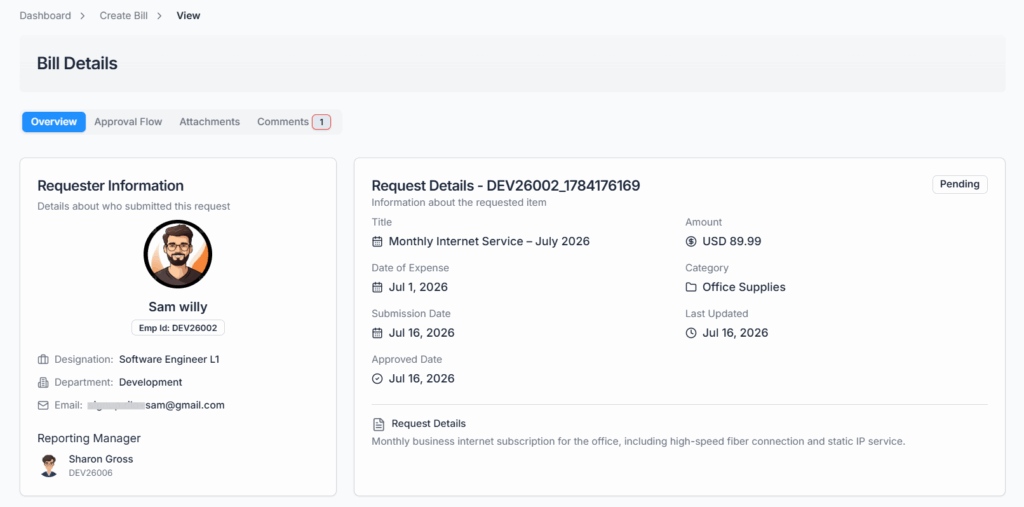
- An overview of the bill — employee, title, amount, category, expense date, and notes.
- The approval flow steps and history, if the bill has one.
- Uploaded vouchers/attachments.
- Comments on the bill.
There are no Approve/Reject actions here even for eligible approvers — those only appear from the Approve Bill page. Commenting is still possible from this details page, on the same terms as anywhere else in Office-X — only while the bill is still Pending.
Known limitation: View All Bills is meant to let anyone holding its permission open any bill’s details from here. In practice, if you’re not the requester, their reporting manager, a named approver on the bill’s approval flow, or the Subscriber Admin, clicking into a specific bill’s details can send you back to the list instead of showing the details — even though the bill appeared there in the first place. If this happens, ask the Subscriber Admin, the employee’s reporting manager, or one of the bill’s approvers to pull up the details for you.
Good to know: there’s currently no Excel or PDF export option on this page, and no way to download a voucher directly from the list — the Voucher column only shows whether attachments exist; opening the bill’s details is how you actually view or download them.
Summary #
The View All Bills module ensures that authorized users have full visibility of all submitted bills, across all categories and statuses. It’s mainly used to monitor expense activity and maintain historical records — it does not offer any way to act on a bill, only to search, filter, and review it. Permission controls (the View All Bill Requests (Route Access) permission, or Subscriber Admin status) maintain security while providing a single source of truth for company-wide expense visibility.