
The Overall Attendance Summary tab provides a consolidated view of attendance for all employees within a selected date range. It is designed to act as a comprehensive worksheet for attendance data, helping organizations track work hours, extra hours, leaves, holidays, and weekends. This tab is especially useful for payroll processing, including companies using third-party payroll systems.
Permission Behavior #
Access to this tab depends on permission from: Admin → Attendance → Overall Attendance Summary (Route Access)
How It Works #
When you open the tab:
- The system initially displays the last 14 days of attendance data for all employees.
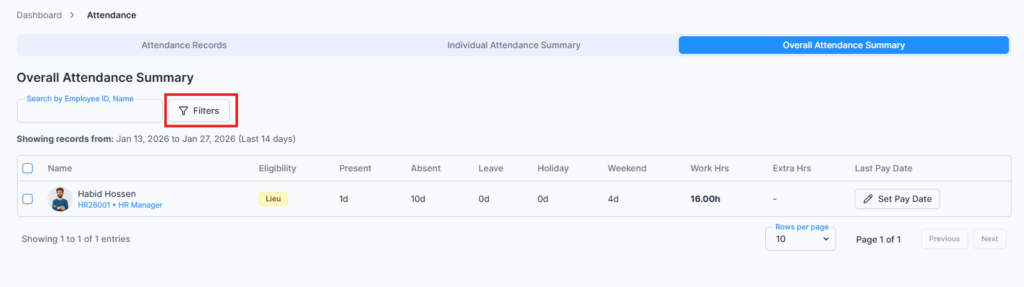
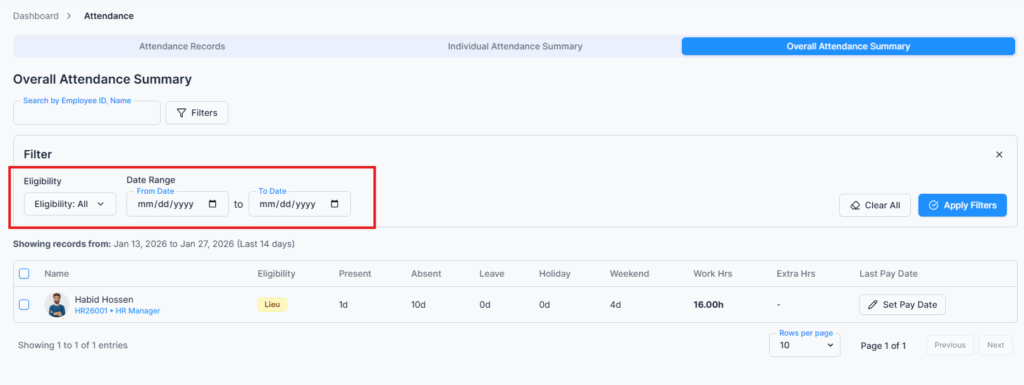
- You can select a custom date range to view attendance for a specific period.
- Data is displayed for each employee in a structured table with key metrics.
Attendance Metrics Displayed #
For each employee, the following information is available:
• Present – Number of days attended
• Absent – Number of days absent
• Leave – Number of leave days taken
• Holiday – Official holidays within the range
• Weekend – Number of weekend days
• Work Hours – Total actual working hours
• Extra Hours – Overtime or approved extra work hours
• Last Pay Date – Shows the last payroll date for the employee
Last Pay Date Notes:
• For Office-X Payroll users, this field is hidden, as the system automatically tracks payroll dates.
• For third-party payroll users, you can manually set the Last Pay Date per employee.
• The last pay date can also be updated in bulk for all employees for easier payroll processing.
Export to Excel #
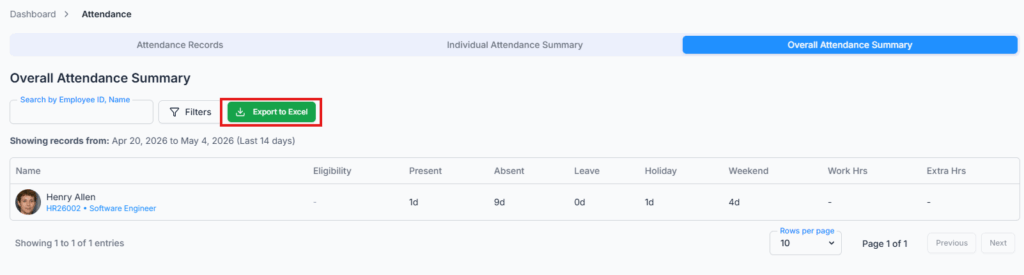
The Overall Attendance Summary can be exported to Excel for payroll preparation, HR reporting, and record keeping.
The exported file follows the selected date range and applied filters. If no filter is applied, it exports the default last 14 days of attendance data. It includes employee details, attendance counts, work hours, extra hours, and payroll-related summary information.
Use Cases #
The Overall Attendance Summary tab acts as a worksheet for payroll processing:
✔ Quickly review all employees’ attendance within a specific date range
✔ Identify overtime or extra hours eligible for payroll
✔ Ensure accurate leave and absence tracking
✔ Provide data for third-party payroll systems with proper last pay date references
✔ Generate a snapshot of workforce attendance for managerial and HR reporting
Key Features #
- Custom date range selection for flexible reporting
- Bulk update of Last Pay Date for third-party payroll users
- Provides a ready-to-use worksheet for payroll and attendance analysis
- Consolidates all employee attendance metrics in one place
Summary #
The Overall Attendance Summary tab provides a comprehensive, ready-to-use overview of all employee attendance. It simplifies payroll processing, ensures accurate reporting, and supports both Office-X and third-party payroll systems with configurable last pay dates.