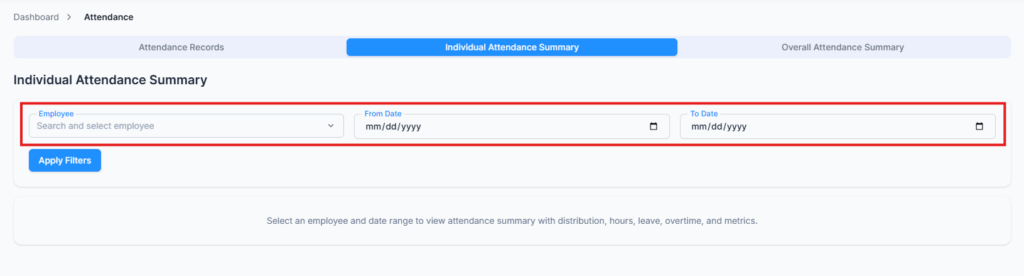
The Individual Attendance Summary tab gives you a complete picture of one employee’s attendance over any date range you choose. It’s built for answering questions like “how many days did she actually work last month?”, “how much overtime has he built up?”, or “why do these hours look low?” — with number cards, an hours breakdown, and two charts on one page.
Who Can Use This Feature #
Subscriber Admin can always open this tab for any employee, without needing any specific permission.
Employees can open this tab only if they hold one of the permissions below. Without one, the tab doesn’t appear at all in the Attendance module — you’ll just see the Attendance Records list.
Permission Behavior
This is controlled from: Admin → Permission → Attendance
- Individual Attendance Summary (For All)
Lets you view any employee’s attendance summary. - Individual Attendance Summary (For Subordinates)
Lets you view the attendance summary of employees in your own reporting chain only (people who report to you, directly or through someone else who reports to you).
Anyone can always view their own summary — but they need one of the two permissions above for the tab to show up here. If you want employees to see their own attendance summary without giving them access to anyone else’s, point them at the second route described just below instead.
These permissions can be assigned directly to an employee, or to an entire team at once. See the Permissions Management guide for how to assign permissions.
Good to know: You can also find the same attendance summary on an employee’s profile under the Att. Overview tab. This view automatically shows the current month’s data. Employees can use this tab to view their own attendance summary even if they do not have the permissions mentioned above.
How It Works #
From the Attendance module:
- Search for and select an Employee. Nothing is preloaded — the list only fills in as you type.
- Pick a From Date and To Date. These are plain date fields, not preset ranges like “last 30 days” — you choose the exact start and end yourself. You can’t pick a date earlier than when your company’s Office-X account was created, since there’s no attendance data before that.
- Click Apply Filters. Nothing appears until you’ve picked an employee, a date range, and clicked this — there’s no automatic preview. Miss one of the three and you’ll see “Please select employee and date range”.
A Clear Filters button appears next to it once you’ve picked anything, and resets the whole page back to empty.

Reading the Header
Once applied, everything below is topped by a small header that tells you what you’re actually looking at. It’s worth a glance before you read the numbers, because it explains most of them:
- The employee’s name, followed by their eligibility badges — OT Eligible, Lieu Eligible and Shift Worker. Only the ones that apply are shown, and these badges decide which version of the page you get (see the next section).
- Period — the exact date range in the report.
- Working Days — the weekdays this employee is scheduled to work, by name (e.g. Sunday, Monday, Tuesday, Wednesday, Thursday).
- Weekends — the weekdays that are not working days for them (e.g. Friday, Saturday).
If Expected Working Days looks wrong to you, these last two lines are almost always the reason — the employee’s own work schedule is what Office-X counts against, not a company-wide calendar.
Summary Metrics #

These cards are on every version of the page:
- Expected Working Days – total scheduled working days in the selected range, based on the employee’s own work schedule.
- Expected Working Hours – total hours they were scheduled to work over that period.
- Present Days – how many of the expected working days they actually attended.
- Absent Days – expected working days where they neither attended nor had approved leave.
- Total Leaves – approved leave days taken in the period.
- Weekends and Holidays – how many weekend days and company holidays fell within the range. If a holiday lands on what would otherwise be a weekend, it’s only ever counted under one of the two, never both — which one depends on a payroll setting for whether holidays or rest days take priority when they overlap. That setting has a company-wide default, and it can also be overridden for an individual employee.
- Attendance % – Present Days ÷ Expected Working Days.
The rest of the cards depend on what the employee is eligible for.
Good to know: Present Days can show a decimal value, such as 17.63d, when an employee works only part of their scheduled hours on some days. These partial days count as less than one full day.
Total Leaves can also show a decimal value. For example, a half-day leave counts as 0.5 day.
The Avg Daily values are calculated separately, so manually dividing the displayed working hours by Present Days may not always give the exact same average shown by Office-X.
Hours Breakdown #
For an overtime-eligible employee, a wide Hours Breakdown card sits under the number cards. It splits every extra hour they earned into three groups, so you can see where the time came from at a glance:
- Daily OT — everyday overtime. This card also folds in Weekly OT and Night Premium, so it covers D/OT, D/OT Night, D/T2 OT (Tier 2, sometimes called double-time), D/T2 OT Night, W/OT, W/OT Night, Night Premium and Monthly Excess OT.
- Rest Day — everything earned on a weekend: Rest Premium, Rest Night, Rest OT, Rest OT Night, Rest D/T2 OT and Rest D/T2 OT Night.
- Holiday — the same set again for official holidays: Holiday Premium, Holiday Night, Holiday OT, Holiday OT Night, Holiday D/T2 OT and Holiday D/T2 OT Night.
Each group shows its own Total in hours, then one row per category with a small bar showing how big that category is compared to all extra hours in the period — not just its own group. A group with nothing in it says “No data for this period” rather than disappearing, so you can tell the difference between “zero” and “not applicable”.
Only categories with actual hours are listed, so most employees show a short, readable card rather than all twenty.
The Two Charts #
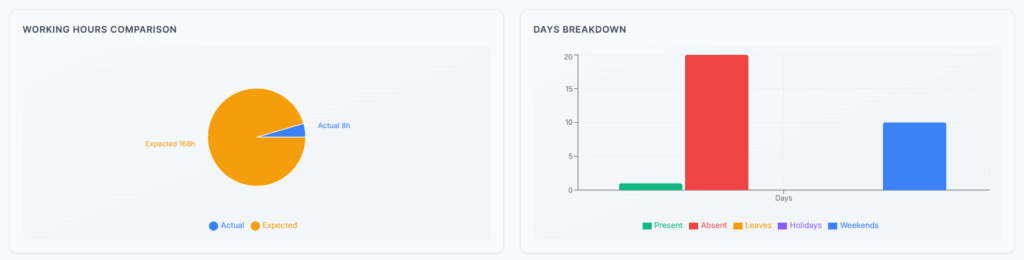
At the bottom of the page, side by side:
Working Hours Comparison — a ring chart of where the employee’s hours went. Every category with hours in it gets its own slice: Regular, Night Premium, Daily OT, Daily OT Night, Weekly OT, Weekly OT Night, Tier2 OT, Tier2 OT Night, Monthly Excess OT, all six Rest Day categories, all six Holiday categories, and Lieu.
Days Breakdown — a bar chart of the period in days: Present, Absent, one bar for each leave type the employee actually used, Total Leave, Holidays and Weekends. Bars with a value of zero are left out, so the chart stays readable. Hover any bar for the exact figure.
If the Numbers Look Too Low #
This is the most common surprise on this page, and it’s almost never a calculation problem.
This summary only counts approved attendance. Specifically:
- A day’s worked hours only count once that day’s check-out has been approved. A day sitting at Pending contributes nothing — no hours, no break time.
- Overtime, Lieu, Rest Day and Holiday hours only count once the extra hours for that day have been approved too. So a day can have approved check-in and check-out (hours showing) while its overtime still reads zero here.
So if a month looks light, go to the Attendance Records tab, set the same date range, and look for orange pending marks. Approve them, then reload this summary. See the Attendance Records guide for how to approve in bulk.
The other two things worth checking:
- Expected Working Days looks wrong → check the Working Days line in the header. The employee’s work schedule drives it.
- “You can only view your subordinates’ attendance summary.” → you hold the (For Subordinates) permission and picked someone outside your reporting chain.
Summary #
Use the Individual Attendance Summary when you need to understand one person’s attendance properly — for an appraisal, a payroll query, or an attendance conversation. Pick the employee and the exact period, and you get their expected versus actual days and hours, their leave and absence, their overtime split down to the category, and two charts that show the shape of the period at a glance. Just remember it reflects approved attendance only, so approve first and read second.