
Complete access control for every user and team
The Permissions Module in Office-X is where you control who can access what within the system. Whether you’re managing a single employee or an entire team, this module ensures that every action from viewing to editing is securely permission-based.
You can manage permissions in two powerful ways:
- Employee Permissions – assign feature-level access to individual users.
- Team Permissions – assign feature-level access to entire teams for easier management.
Employee Permissions #
Assign feature-wise and action-level permissions to specific employees.
Here’s how it works:

- Search Employee: Enter the employee’s name or email to find the person you want to configure.
- Feature List: Once selected, you’ll see a complete list of all features available in the system — such as Admin, Support, Currency, Leave Type, etc.
- Expand a Feature: Click on any feature to expand it and view its related sub-features and available actions.
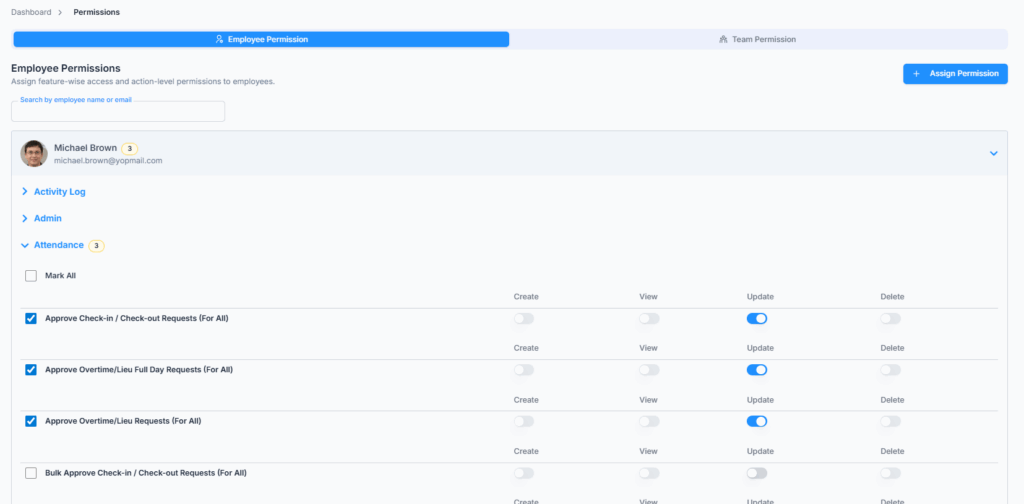
- Action Controls: For each feature or sub-feature, you can toggle permissions for:
- Create, View, Update, Delete
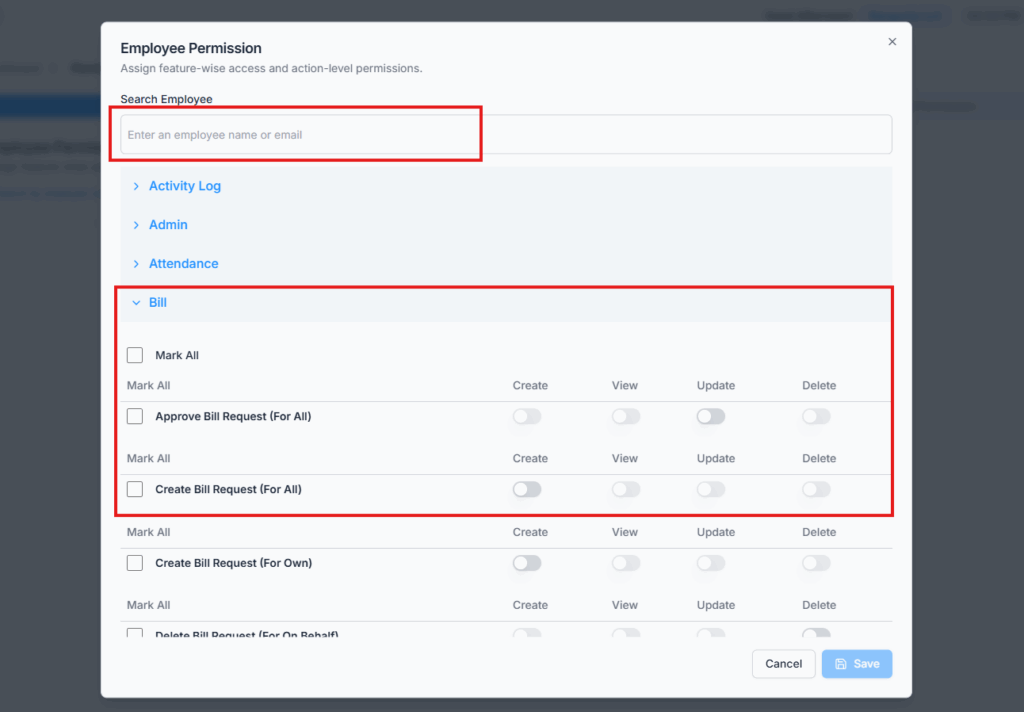
- Save Permissions: After you’ve assigned access, click Save to apply changes. The employee will immediately gain access to the selected operations.
- Edit Anytime: You can revisit and modify these permissions anytime as the organization grows or roles change.
Delete Employee Permissions #
You can delete an employee’s direct permission configuration whenever that employee no longer needs individually assigned access.
Click Delete Permission from the employee permission card and confirm the deletion.
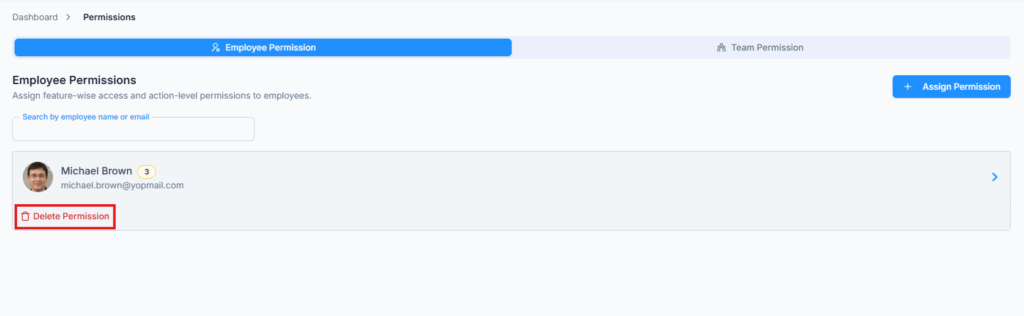
Once deleted, the employee will be removed from the Employee Permission list, and every directly assigned permission for that employee — across all features, not just one — is revoked at once. This doesn’t touch any access they still have through a Team Permission they’re a member of.
Search Assigned Employee Permissions
You can search assigned employee permissions by employee name or email. This helps you quickly find an employee who already has permission access configured.
Team Permissions #
Assign access to an entire team in one go.
This section works almost the same as Employee Permissions, but instead of searching for an individual employee, you’ll search by team name.
(Teams are created under Admin → Teams.)
Here’s the process:
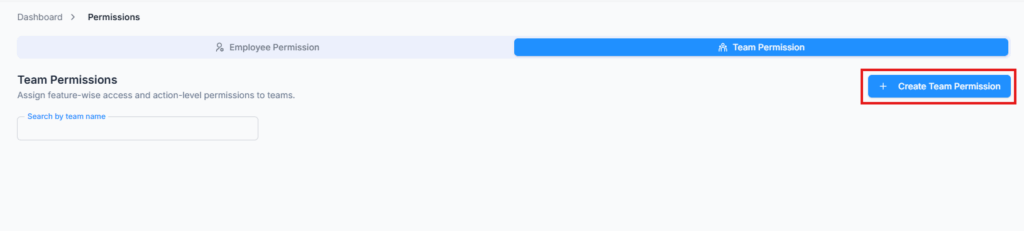
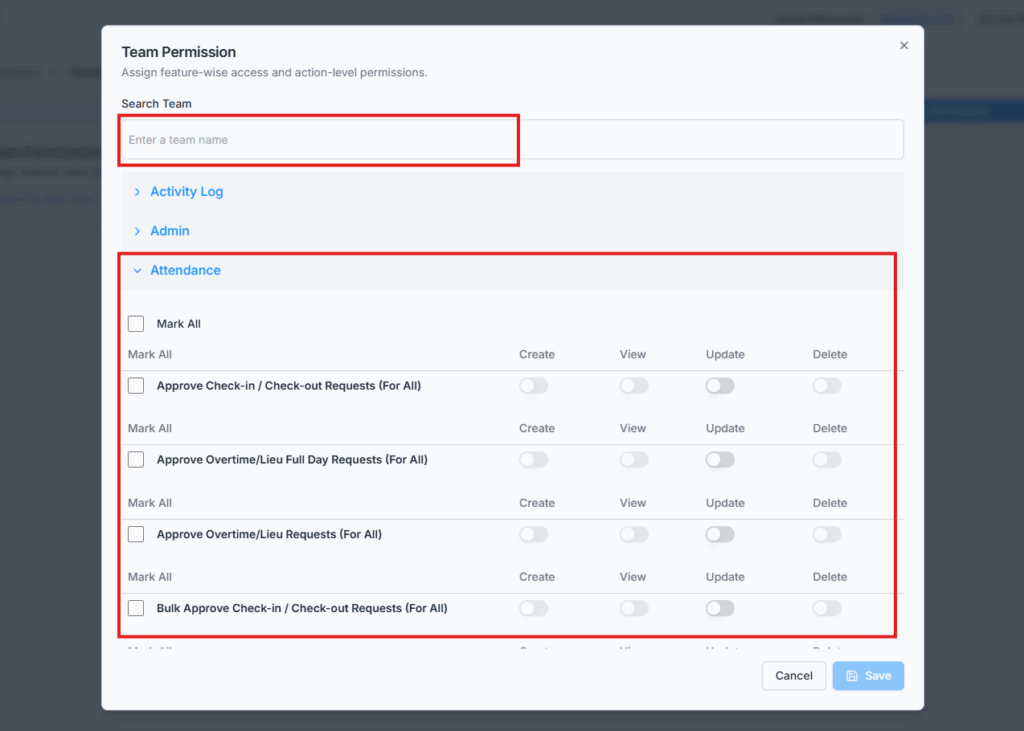
- Search Team: Enter the team’s name (e.g., HR Team, Sales Team, IT Department, etc.).
- Select Features: Just like employee permissions, expand the features and enable or disable actions (Create, View, Update, Delete) using toggles or “Mark All.”
- Save: Once saved, every member of that team will automatically inherit the same permissions.
- Dynamic Access Control:
- When a new employee joins and is assigned to that team, they instantly receive the same permissions.
- If someone is removed from the team, their access is revoked automatically.
Delete Team Permissions #
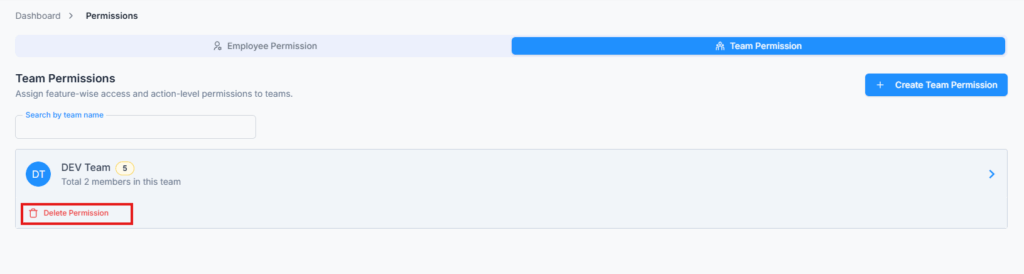
You can remove all permissions assigned to a team at once. Doing so revokes access for all team members, while keeping individual employee permissions intact if separately configured.
Search Assigned Team Permissions
You can search assigned team permissions by team name. This makes it easier to find and manage team-level access when many teams are available.
This saves time, ensures consistency, and prevents access gaps especially in large organizations.
Permission Action Reference #
This section explains what each permission action allows the user to do. Permissions are grouped by module so Subscriber Admins can understand exactly what access they are granting to employees or teams.
Permission Scope Meaning #
| Scope | Meaning |
|---|---|
| For Own | The user can access only their own records or actions. |
| For All | The user can access or manage records for all employees within the organization scope. |
| For On Behalf | The user can manage records submitted or created on behalf of other employees. |
| For Subordinate | The user can access or manage records related to employees who report to them as Reporting Manager. |
| Route Access | The user can access a specific page or section in the system. |
Employee Management #
| Action Name | Action Type | Description |
|---|---|---|
| Create Employee | Create | Allows creating new employee profiles in the system. |
| View Profile & Account (For Own) | View | Allows viewing the logged-in user’s own profile and account details. |
| View Employee Profiles (For All) | View | Allows viewing profile information of all employees. |
| Manage Bank Deposit Forms (For All) | View | Allows accessing and managing bank deposit forms for all employees. |
| Edit Employee (For All) | Update | Allows editing profile details of any employee. |
| Reset Employee Password (For All) | Update | Allows resetting the password of any employee account. |
| Manage Work Hours (For All) | Create | Allows configuring and assigning work hour schedules for all employees. |
| Manage Payroll Config (For All) | Create | Allows setting up payroll configurations such as salary, deductions, and bonuses for any employee. |
| Assign/Unassign Seats (For All) | Create | Allows assigning or unassigning a license seat for any employee. |
| Change Employee Status (For All) | Update | Allows activating, deactivating, or changing the employment status of any employee. |
| Manage Opening Balance (For All) | Update | Allows setting or updating opening balance entries for any employee. |
| Assign Work Days (For All) | View, Create, Update, Delete | Allows viewing, creating, editing, and deleting work day assignments for all employees. |
| Assign Work Days (For Subordinate) | View, Create, Update, Delete | Allows viewing, creating, editing, and deleting work day assignments only for subordinate employees where the logged-in employee is the Reporting Manager. |
| Bulk RM Change (For All) | Update | Allows reassigning the Reporting Manager for multiple employees at once. |
Work Shift Management #
| Action Name | Action Type | Description |
|---|---|---|
| Create Bulk Work Shift (For Subordinate) | Create | Allows creating multiple work shifts at once for subordinate employees. |
| Create Work Shift (For Subordinate) | Create | Allows creating a single work shift schedule for subordinate employees. |
| Edit Work Shift (For Subordinate) | Update | Allows modifying existing work shift details for subordinate employees. |
| Delete Work Shift (For Subordinate) | Delete | Allows removing existing work shifts for subordinate employees. |
| View All Work Shift | View | Allows viewing all work shift records available in the work shift module. |
| Export Work Shift (Excel & PDF) | View | Allows exporting work shift data in Excel or PDF format. |
Holiday Management #
| Action Name | Action Type | Description |
|---|---|---|
| Manage Holidays | View, Create, Update, Delete | Allows full access to view, create, edit, and delete company holidays on the calendar. |
Attendance Management #
This module has separate “For All” and “For Subordinate” versions of most actions. “For All” removes the employee-scope restriction entirely — the user can act on any employee’s attendance in the company, not just their own or their reporting chain. “For Subordinate” restricts the same action to employees under the logged-in user’s reporting chain (direct reports and, through them, indirect reports as well — not direct reports only). If a user holds neither version for a given action, that action isn’t available to them at all.
| Action Name | Action Type | Description |
|---|---|---|
| Overall Attendance Summary | View | Allows accessing the overall attendance summary page for all employees. |
| Individual Attendance Summary | View | Allows accessing individual employee attendance detail pages. |
| Create Manual Attendance (For All) | Update | Allows manually adding or correcting attendance entries for any employee. |
| Approve Check-in / Check-out (For All) | Update | Allows approving or rejecting check-in and check-out correction requests for any employee. |
| Approve OT/Lieu Hours (For All) | Update | Allows approving or rejecting overtime and time-in-lieu requests for any employee. |
| Bulk Approve Check-in / Check-out (For All) | Update | Allows batch approving multiple check-in/check-out requests at once for any employee. |
| View Attendance (For All) | View | Allows viewing attendance records for all employees. |
| View Attendance (For Subordinates) | View | Allows viewing attendance records only for subordinate employees. |
| Create Manual Attendance (For Subordinates) | Update | Allows manually adding or correcting attendance entries only for subordinate employees. |
| Approve Check-in / Check-out (For Subordinates) | Update | Allows approving or rejecting check-in and check-out correction requests only for subordinate employees. |
| Approve OT/Lieu Hours (For Subordinates) | Update | Allows approving or rejecting overtime and time-in-lieu requests only for subordinate employees. |
| Bulk Approve Check-in / Check-out (For Subordinates) | Update | Allows batch approving multiple check-in/check-out requests at once only for subordinate employees. |
Leave Management #
| Action Name | Action Type | Description |
|---|---|---|
| Create Leave Request (For Own) | Create | Allows submitting a new leave request for yourself. |
| Create Leave Request (For All) | Create | Allows submitting leave requests on behalf of any employee. |
| View Leave Request Details | View | Allows viewing detailed information of leave requests. |
| View All Leave Requests (Route Access) | View | Allows accessing the page listing all employee leave requests. |
| Edit Leave Request (For Own) | Update | Allows editing your own pending leave requests. |
| Edit Leave Request (For On Behalf) | Update | Allows editing leave requests submitted on behalf of other employees. |
| Approve Leave Request (For All) | Update | Allows approving leave requests from any employee. |
| Reject Leave Request (For All) | Update | Allows rejecting leave requests from any employee. |
| Delete Leave Request (For Own) | Delete | Allows deleting your own pending leave requests. |
| Delete Leave Request (For On Behalf) | Delete | Allows deleting leave requests submitted on behalf of other employees. |
Bill Management #
| Action Name | Action Type | Description |
|---|---|---|
| Create Bill Request (For Own) | Create | Allows submitting a new expense or bill reimbursement request for yourself. |
| Create Bill Request (For All) | Create | Allows submitting bill requests on behalf of any employee. |
| View Bill Request Details | View | Allows viewing detailed information of bill requests. |
| View All Bill Requests (Route Access) | View | Allows accessing the page listing all employee bill requests. |
| Edit Bill Request (For Own) | Update | Allows editing your own pending bill requests. |
| Edit Bill Request (For On Behalf) | Update | Allows editing bill requests submitted on behalf of other employees. |
| Approve Bill Request (For All) | Update | Allows approving bill or expense requests from any employee. |
| Reject Bill Request (For All) | Update | Allows rejecting bill or expense requests from any employee. |
| Delete Bill Request (For Own) | Delete | Allows deleting your own pending bill requests. |
| Delete Bill Request (For On Behalf) | Delete | Allows deleting bill requests submitted on behalf of other employees. |
Travel Request Management #
| Action Name | Action Type | Description |
|---|---|---|
| Create Travel Request (For Own) | Create | Allows submitting a new travel request for yourself. |
| Create Travel Request (For All) | Create | Allows submitting travel requests on behalf of any employee. |
| View Travel Request Details | View | Allows viewing detailed information of travel requests. |
| View All Travel Requests (Route Access) | View | Allows accessing the page listing all employee travel requests. |
| Edit Travel Request (For Own) | Update | Allows editing your own pending travel requests. |
| Edit Travel Request (For On Behalf) | Update | Allows editing travel requests submitted on behalf of other employees. |
| Approve Travel Request (For All) | Update | Allows approving travel requests from any employee. |
| Reject Travel Request (For All) | Update | Allows rejecting travel requests from any employee. |
| Delete Travel Request (For Own) | Delete | Allows deleting your own pending travel requests. |
| Delete Travel Request (For On Behalf) | Delete | Allows deleting travel requests submitted on behalf of other employees. |
Purchase Management #
| Action Name | Action Type | Description |
|---|---|---|
| Create Purchase Request (For Own) | Create | Allows submitting a new purchase request for yourself. |
| Create Purchase Request (For All) | Create | Allows submitting purchase requests on behalf of any employee. |
| View Purchase Request Details | View | Allows viewing detailed information of purchase requests. |
| View All Purchase Requests (Route Access) | View | Allows accessing the page listing all employee purchase requests. |
| Edit Purchase Request (For Own) | Update | Allows editing your own pending purchase requests. |
| Edit Purchase Request (For On Behalf) | Update | Allows editing purchase requests submitted on behalf of other employees. |
| Approve Purchase Request (For All) | Update | Allows approving purchase requests from any employee. |
| Reject Purchase Request (For All) | Update | Allows rejecting purchase requests from any employee. |
| Delete Purchase Request (For Own) | Delete | Allows deleting your own pending purchase requests. |
| Delete Purchase Request (For On Behalf) | Delete | Allows deleting purchase requests submitted on behalf of other employees. |
Payroll Management #
| Action Name | Action Type | Description |
|---|---|---|
| Run Payroll (For All) | Create | Allows generating and processing payroll for all employees. |
| View Payroll (For All) | View | Allows viewing payroll records and pay slips for all employees. |
Report Management / Incident Report #
| Action Name | Action Type | Description |
|---|---|---|
| Create Incident Report (For Own) | Create | Allows filing incident reports for yourself. |
| Create Incident Report (For All) | Create | Allows filing incident reports against any employee. |
| View Incident Report (For All) | View | Allows viewing incident reports of all employees. |
| Edit Incident Report (For Own) | Update | Allows editing incident reports created by the logged-in user. |
| Edit & Discard Incident Report (For All) | Update | Allows editing or discarding any incident report in the system. |
Tracking / Asset Tracking #
| Action Name | Action Type | Description |
|---|---|---|
| Create Asset | Create | Allows adding new assets to the asset tracking system. |
| View Asset (For Own) | View | Allows viewing assets assigned to yourself. |
| View Asset (For All) | View | Allows viewing all assets across the organization. |
| Edit Asset (For All) | Update | Allows editing details of any asset in the system. |
| Duplicate Asset (For All) | Create | Allows duplicating an existing asset entry to quickly create a similar record — a Create-type permission, since duplicating always produces a new asset record rather than modifying an existing one. |
Setting Management #
| Action Name | Action Type | Description |
|---|---|---|
| Employee Forgot & Change Password (For Own) | View, Update | Allows accessing password recovery and change password functionality, and enabling/disabling personal Two-Factor Authentication, for the logged-in user’s own account. |
| SMTP Settings | View, Create, Update, Delete | Allows full access to configure email SMTP server settings for the organization. |
Admin Configuration #
| Action Name | Action Type | Description |
|---|---|---|
| Department | View, Create, Update, Delete | Allows full access to manage company departments. |
| Pay Type | View, Create, Update, Delete | Allows full access to manage pay types such as hourly, salary, or other pay categories. |
| Designation | View, Create, Update, Delete | Allows full access to manage job designations or titles. |
| Employment Status | View, Create, Update, Delete | Allows full access to manage employment statuses such as full-time, part-time, contract, active, or inactive. |
| Leave Type | View, Create, Update, Delete | Allows full access to manage leave categories such as sick, annual, casual, or other leave types. |
| Benefits | View, Create, Update, Delete | Allows full access to manage employee benefit plans. |
| Expense Category | View, Create, Update, Delete | Allows full access to manage expense categories for bill or purchase requests. |
| Teams | View, Create, Update, Delete | Allows full access to manage team groups within the organization. |
| Forms | View, Create, Update, Delete | Allows full access to manage custom forms used across the system. |
| Announcements | View, Create, Update, Delete | Allows full access to manage company-wide announcements and broadcasts. |
| Incident Config | View, Create, Update, Delete | Allows full access to configure incident report types, severities, and statuses. |
| IP Logs | View, Create, Update, Delete | Allows full access to manage the allowed-IP list used to restrict attendance check-in/out. |
| Currency | View, Create, Update, Delete | Allows full access to manage supported currencies in the system. |
| Support Category | View, Create, Update, Delete | Allows full access to manage internal support ticket categories and their assigned resolvers. |
Support Management #
This is for the internal employee support ticket system, not Business Support (which is listed under Business Management below).
| Action Name | Action Type | Description |
|---|---|---|
| View All Supports | View | Allows viewing every internal support ticket, not just the ones you filed yourself. |
| Create Support Request (For On Behalf) | Create | Allows filing an internal support ticket on behalf of another employee. |
| Edit Support Request (For On Behalf) | Update | Allows editing an internal support ticket that was filed on behalf of another employee. |
Business Management #
| Action Name | Action Type | Description |
|---|---|---|
| Edit Company Profile | Update | Allows editing company information such as name, address, logo, and other profile details. |
| Business Support | Create, View, Update | Allows creating, viewing, and managing your company’s Business Support tickets to Office-X (create requests, and view/edit/resolve/close your own — see the Business Support guide). |
| Manage Billing & Payment | Update | Allows managing subscription billing and payment method details. |
| Manage Business Payroll Configuration | Update | Allows configuring organization-wide payroll settings such as overtime rules, deduction basis, and bonus types. |
Performance Management #
| Action Name | Action Type | Description |
|---|---|---|
| View Assessment Detail (For All) | View | Allows viewing detailed performance assessment results for any employee. |
| View All Assessments | View | Allows accessing the list of performance assessments. |
| Performance Period & Criteria Setup | View, Create, Update, Delete | Allows full access to the page used to configure performance review periods and evaluation criteria — this is complete setup access, not just viewing the page. |
| Take Assessment (For Subordinate) | Create | Allows initiating and submitting performance assessments for subordinate employees. |
| Edit & Mark as Completed Assessment (For Subordinate) | Update | Allows editing assessment details and marking assessments as completed for subordinate employees. |
| Delete Assessment (For Subordinate) | Delete | Allows removing performance assessments for subordinate employees. |
CRM – Clients #
| Action Name | Action Type | Description |
|---|---|---|
| Create Client | Create | Allows creating new client records in the CRM. |
| View All Clients | View | Allows viewing the full list of clients. |
| Edit Client (For All) | Update | Allows editing any client’s details. |
| Delete Client (For All) | Delete | Allows deleting any client record. |
| Activate / Inactivate Client (For All) | Update | Allows activating or deactivating any client. |
CRM – Items #
| Action Name | Action Type | Description |
|---|---|---|
| Create Item | Create | Allows adding new items to the CRM catalog. |
| View All Items | View | Allows viewing the full list of catalog items. |
| Edit Item (For All) | Update | Allows editing any catalog item. |
| Delete Item (For All) | Delete | Allows deleting any catalog item. |
| Activate / Inactivate Item (For All) | Update | Allows activating or deactivating any catalog item. |
CRM – Docs #
| Action Name | Action Type | Description |
|---|---|---|
| Create Doc | Create | Allows creating new document templates. |
| View All Docs | View | Allows viewing the full list of document templates. |
| Edit / Clone Doc (For All) | Update | Allows editing any document template, or cloning one to quickly create a copy of it. |
| Delete Doc (For All) | Delete | Allows deleting any document template that hasn’t been used yet — one that’s already in use can only be deactivated, not deleted. |
| Activate / Inactivate Doc (For All) | Update | Allows activating or deactivating any document template. |
CRM – Estimates #
| Action Name | Action Type | Description |
|---|---|---|
| Create Estimate | Create | Allows creating new client estimates. |
| View All Estimates | View | Allows viewing the full list of estimates. |
| Edit Estimate (For All) | Update | Allows editing any estimate. |
| Delete Estimate (For All) | Delete | Allows deleting any estimate. |
| Send / Resend Estimate (For All) | Update | Allows sending an estimate to a client for the first time, or resending it. |
CRM – Agreements #
| Action Name | Action Type | Description |
|---|---|---|
| Create Agreement | Create | Allows creating new client agreements. |
| View All Agreements | View | Allows viewing the full list of agreements. |
| Edit Agreement (For All) | Update | Allows editing any agreement. |
| Delete Agreement (For All) | Delete | Allows deleting any agreement. |
| Send / Resend Agreement (For All) | Update | Allows sending an agreement out for e-signature, or resending it to a signer. |
| Terminate Agreement (For All) | Update | Allows terminating an agreement that’s already active. |
CRM – Bookings #
Like Attendance Management above, most Booking actions come in an “own” and an “all” version. The “own” version only lets you act on booking services or bookings where you’re the assigned staff member; the “all” version removes that restriction, covering every staff member’s services and bookings.
| Action Name | Action Type | Description |
|---|---|---|
| Create Booking Service (For Own) | Create | Allows creating a bookable service assigned to yourself. |
| Create Booking Service (For All) | Create | Allows creating a bookable service assigned to any staff member. |
| Edit / Activate-Deactivate Booking Service (For Own) | Update | Allows editing, activating, or deactivating booking services assigned to yourself. |
| Edit / Activate-Deactivate Booking Service (For All) | Update | Allows editing, activating, or deactivating any booking service, regardless of who it’s assigned to. |
| Delete Booking Service (For Own) | Delete | Allows deleting booking services assigned to yourself. |
| Delete Booking Service (For All) | Delete | Allows deleting any booking service, regardless of who it’s assigned to. |
| View Bookings (For Own / Assigned) | View | Allows viewing bookings where you’re the assigned staff member. |
| View All Bookings | View | Allows viewing every booking across the organization. |
| Manage Booking Response (For Own) | Update | Allows cancelling, rescheduling, or marking as no-show bookings assigned to yourself. |
| Manage Booking Response (For All) | Update | Allows cancelling, rescheduling, or marking as no-show any booking, regardless of who it’s assigned to. |
Activity Log #
| Action Name | Action Type | Description |
|---|---|---|
| View Activity Logs (For All) | View | Allows viewing system activity logs for all employees. |
| View Activity Logs (For Own) | View | Allows viewing the logged-in user’s own activity log history. |
Summary #
The Permissions Module gives you centralized control over access and security across the entire platform.
Whether you’re granting individual privileges or team-wide permissions, Office-X ensures every operation is handled safely, flexibly, and transparently.