
Skip to content
  • Home
  • Features
  • Pricing
  • FAQs
  • Help Center
Sign In

Getting Started

1
  • Getting Started with Office-X

Subscription & Billing

1
  • How Seats Work in Office-X

Features & Modules

71
  • Overview
  • Business Management
    • Company
    • Billing & Payment
    • Payroll Configuration
    • Business Support
  • Admin Module
    • Department
    • Designation
    • Pay Type
    • Employment Status
    • Leave Types
    • Benefits
    • Expense Category
    • Teams
    • Forms
    • Events & Announcements
    • Incident Configuration
    • IP Configuration
    • Currency
    • Support Categories
  • SMTP & Email Templates
    • SMTP Config
    • Email Templates
  • Privacy & Security
    • Security
  • Employees Module
    • Employee List
    • Adding a New Employee
    • View Employee Details
    • Edit an Employee
    • Reset Password
    • Work Hours/Shift Hours
    • Change Status
    • Assign/Unassign Seat
    • Opening Balance
    • Assign Work Days
    • Visual Guide
  • Permissions & Approval Flows
    • Permissions Management
    • Approval Flows (Workflow Management)
  • Work Shifts
    • Work Shifts
  • Holidays Calendar
    • Calendar
  • Attendance Management
    • Attendance Records
    • Individual Attendance Summary
    • Overall Attendance Summary
    • Visual Guide
  • Leave Management
    • Create Leave
    • Approve & Reject Leave
    • Cancel Approved Leave
    • View All Leaves
    • Visual Guide
  • Bill Management
    • Create Bill
    • Approve & Reject Bill
    • View All Bills
    • Visual Guide
  • Travel Requests
    • Create Travel Request
    • Approve & Reject Travel Request
    • View All Travel Requests
    • Visual Guide
  • Purchase Requests
    • Create Purchase Request
    • Approve & Reject Purchase Requests
    • View All Purchase Requests
    • Visual Guide
  • Payroll (Bangladesh)
    • Business → Payroll Configuration
    • Payroll Management
    • Income and Tax Statement
    • Visual Guide
  • Performance Management
    • Performance Management
  • Incident Report
    • Incident Report
  • Asset Tracking
    • Asset Tracking
  • Activity Logs
    • Activity Logs
  • Dashboard
    • Visual Guide
  • Support
    • Create Support Request
    • Resolve Support Requests
    • View All Support
    • Visual Guide
View Categories
  • Home
  • Docs
  • Features & Modules
  • Admin Module
  • Events & Announcements

Events & Announcements

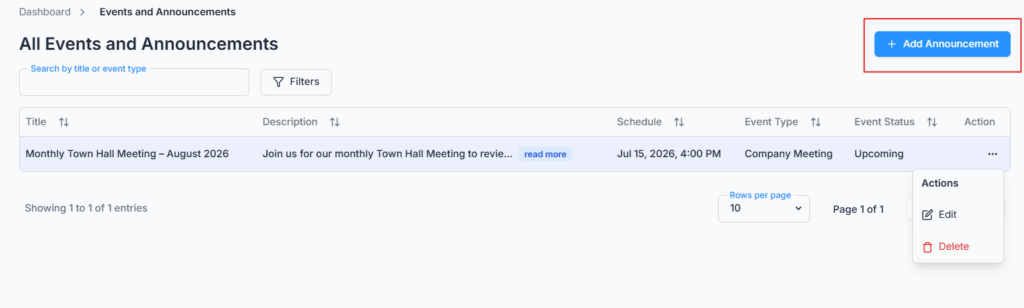
On Admin → Announcements, create and publish office-wide events or announcements. Each entry can be a simple notice or a full event — with a description, date & time, location, type, and status — so this page covers both quick announcements and scheduled events in one place.

Once created, employees will instantly see them on their dashboard — just like a digital notice board. The dashboard shows the 20 most relevant entries, with Ongoing events listed first, then Upcoming, then Completed, so setting the right Status keeps the most important items at the top for your team.
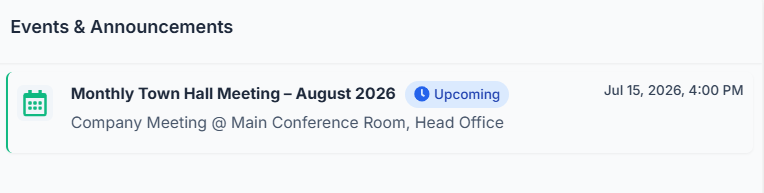
Use this to share company updates, celebrations, or important reminders.

Add Announcement #

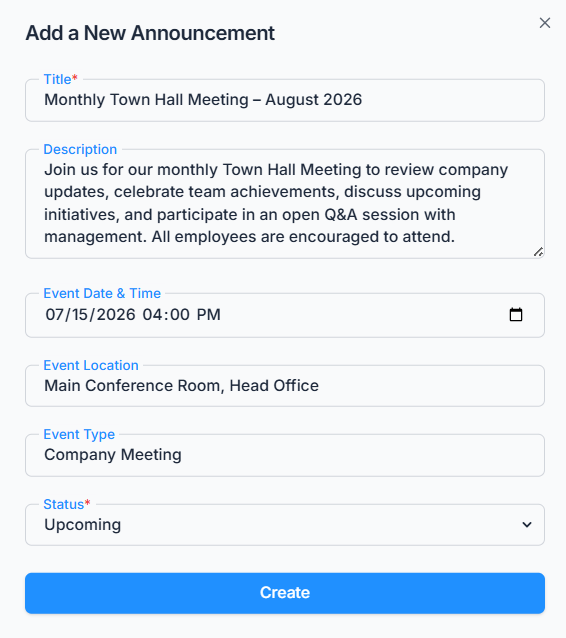
Click Add Announcement and fill in:

  • Title — required, 5 to 100 characters.
  • Description — optional, for the full message or details.
  • Event Date & Time — optional; leave it blank for a plain announcement, or set it for a scheduled event (shown in your company’s timezone).
  • Event Location — optional free text.
  • Event Type — optional free text, e.g. Holiday, Meeting, Celebration — type whatever label makes sense for you.
  • Status — required; choose Upcoming, Ongoing, Completed, Cancelled, Postponed, or Rescheduled.
Edit & Delete Announcement #

The table lists every announcement with its Title, Description, Event Date & Time, Type, and Status. Use the Action menu to edit any of these fields, or delete the announcement — deleting is immediate with a simple confirmation, since announcements aren’t referenced anywhere else in the system.

Updated on July 8, 2026
FormsIncident Configuration
Table of Contents
  • Add Announcement
  • Edit & Delete Announcement

Office-X is an all-in-one office management platform that streamlines employee management, attendance, payroll (Bangladesh only), asset tracking, and approvals. Automate workflows, gain insights, and run your business smarter with ease and security.

  • Links
  • Home
  • Features
  • Pricing
  • Support
  • FAQ
  • Help Center
  • Terms of Service
  • Privacy Policy
  • Follow Us
  • LinkedIn
  • Facebook
  • Youtube
Copyright ©2026 Office-X LLC. All rights reserved.
  • Home
  • Features
  • Pricing
  • FAQs
  • Help Center
Sign In