Skip to content
  • Home
  • Features
  • Pricing
  • FAQs
  • Help Center
Sign In

Getting Started

1
  • Getting Started with Office-X

Subscription & Billing

1
  • How Seats Work in Office-X

Features & Modules

64
  • Overview
  • Privacy & Security
    • Security
  • Business Management
    • Company
    • Billing & Payment
    • Support
  • Admin Module
    • Department
    • Designation
    • Pay Type
    • Employment Status
    • Leave Types
    • Benefits
    • Expense Categories
    • Teams
    • Forms
    • Events & Announcements
    • Incident Configuration
    • IP Configuration
    • Currency
    • Support Categories
  • SMTP & Email Templates
    • SMTP Config
    • Email Templates
  • Employees Module
    • Employee List
    • Adding a New Employee
    • View Employee Details
    • Edit an Employee
    • Reset Password
    • Work Hours/Shift Hours
    • Change Status
    • Assign/Unassign Seat
    • Adjust Leave Balance
    • Visual Guide
  • Permissions & Approval Flows
    • Permissions Management
    • Approval Flows (Workflow Management)
  • Work Shifts
    • Work Shifts
  • Holidays Calendar
    • Calendar
  • Attendance Management
    • Attendance Records
    • Individual Attendance Summary
    • Overall Attendance Summary
    • Visual Guide
  • Leave Management
    • Create Leave
    • Approve Leaves
    • View All Leaves
    • Visual Guide
  • Bill Management
    • Create Bill
    • Approve Bills
    • View All Bills
    • Visual Guide
  • Travel Requests
    • Create Travel Request
    • Approve Travel Requests
    • View All Travel Requests
    • Visual Guide
  • Purchase Requests
    • Create Purchase Request
    • Approve Purchase Requests
    • View All Purchase Requests
    • Visual Guide
  • Payroll (Bangladesh Only)
    • Tax Configuration & Calculation
    • Payroll Management
    • Visual Guide
  • Performance Management
    • Performance Management
  • Incident Report
    • Incident Report
  • Asset Tracking
    • Asset Tracking
  • Activity Logs
    • Activity Logs
  • Dashboard
    • Visual Guide
  • Support
    • Support
View Categories
  • Home
  • Docs
  • Features & Modules
  • Admin Module
  • Pay Type

Pay Type

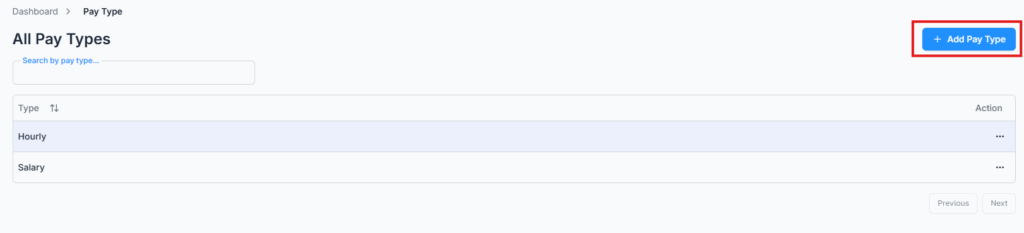
On Admin → pay type, manage how employees are paid.

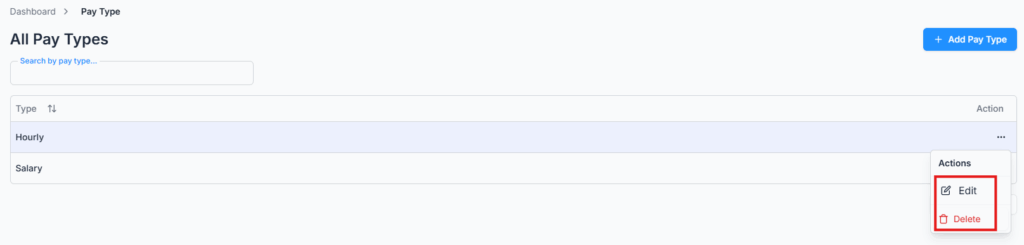
Office-X supports both Hourly and Salary-based payment structures. You can add, edit, or remove pay types to fit your company policy.

Add Pay Type #

Edit & Delete Pay Type #

These options also appear when defining employee payment preferences.

Updated on March 12, 2026
DesignationEmployment Status
Table of Contents
  • Add Pay Type
  • Edit & Delete Pay Type

Office-X is an all-in-one office management platform that streamlines employee management, attendance, payroll (Bangladesh only), asset tracking, and approvals. Automate workflows, gain insights, and run your business smarter with ease and security.

  • Links
  • Home
  • Features
  • Pricing
  • Support
  • FAQ
  • Help Center
  • Terms of Service
  • Privacy Policy
  • Follow Us
  • LinkedIn
  • Facebook
  • Youtube
Copyright ©2026 Office-X LLC. All rights reserved.
  • Home
  • Features
  • Pricing
  • FAQs
  • Help Center
Sign In