
Payroll Configuration for Bangladesh #
Deduction Calculation Basis #
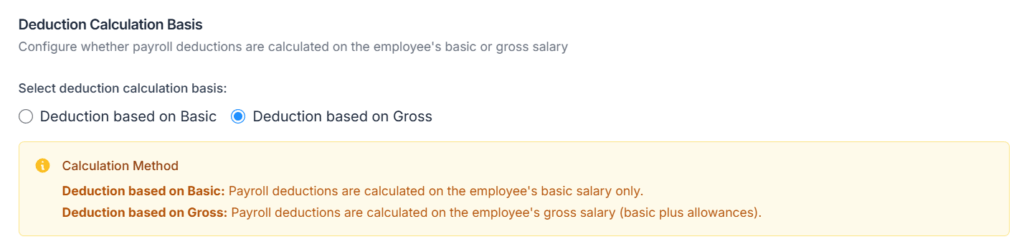
This setting determines whether hour-based deduction lines (such as absent deductions, excess leave deductions, and opening balance deductions) are calculated using the employee’s Basic salary only, or their Gross salary (Basic plus all monthly benefits).
- Deduction based on Basic — deductions use the basic salary per-hour rate only.
- Deduction based on Gross — deductions use the gross per-hour rate (basic salary plus benefits). This is the default for Bangladesh organisations.
Example (Gross basis):
Monthly Salary: BDT 60,000
Monthly Benefits: BDT 5,000
Expected Hours: 176
Gross Per Hour Rate: (60,000 + 5,000) ÷ 176 = BDT 369.32/hour
If the employee is absent for 8 hours:
Absent Deduction: 8 × 369.32 = BDT 2,954.55
Tax Rate Calendar (Fiscal Year: 2025–2026) #
Tax rates are managed and updated yearly based on Bangladesh Government Regulations. 🔗 Source: NBR
| Slab | Taxable Amount (BDT) | Tax Rate |
|---|---|---|
| 1 | First 350,000 | 0% |
| 2 | Next 100,000 | 5% |
| 3 | Next 400,000 | 10% |
| 4 | Next 500,000 | 15% |
| 5 | Next 500,000 | 20% |
| 6 | Next 2,000,000 | 25% |
| 7 | Remaining income | 30% |
The first slab (0% rate) is automatically adjusted to match the employee’s applicable exemption limit based on their personal tax status (see Special Taxpayer Categories below).
Area Minimum Tax
Regardless of the slab calculation result, a minimum annual tax applies based on the employee’s work location, configured in their individual Employee Payroll Config.
| Area Type | Annual Minimum Tax (BDT) |
|---|---|
| Specific City Corporations (DNCC, DSCC, CCC) | 5,000 |
| Other City Corporations | 4,000 |
| Non-City Areas | 3,000 |
If the slab-calculated annual tax is lower than the applicable minimum tax, the system uses the minimum tax instead. The paystub will show an Area Minimum Tax Applied row in the Tax Breakdown section when this happens.
Special Taxpayer Categories
Different taxpayer categories are entitled to higher exemption limits. The system automatically selects the highest applicable exemption for each employee based on their configured tax status.
| Category | Exemption Limit (BDT) | Notes |
|---|---|---|
| General Taxpayer | 350,000 | Standard first-slab exemption |
| Women Taxpayers | 400,000 | Applies to all women taxpayers |
| Senior Citizens (65+) | 400,000 | Based on age |
| Disabled Taxpayers | 475,000 | Additional benefit |
| War-Wounded Freedom Fighters | 500,000 | Highest exemption |
| Third Gender Taxpayers | 475,000 | Recognised category |
| Guardian of Disabled Children | +50,000 per child | Added on top of base exemption |
These limits are automatically applied when the employee’s tax status is configured in their Employee Payroll Config under Tax Information.
Employee Payroll Configuration — Tax and Work Location #
Path: Employees → Action → Payroll Config
Each employee must be individually configured for tax and work location before payroll can be run for them. (The overtime and premium rules you enabled in Business Payroll Configuration also appear here per employee, where you can fine-tune each multiplier.)
Tax Information
Set the employee’s personal tax status. These answers determine which exemption limit applies.
- Are you a disabled person? (Yes / No)
- Are you a freedom fighter? (Yes / No)
- Do you have disabled children? (Yes / No — if Yes, enter the number)
- Is your spouse claiming for disabled children in her tax return? (Yes / No — if Yes, enter the number; cannot exceed the employee’s own disabled children count)
Example configuration:
Disabled Person: Yes
Disabled Children: 1
Spouse Claiming: No
System applies:
- First slab exemption raised to BDT 475,000 (disabled taxpayer limit).
- Additional BDT 50,000 exemption for one disabled child, bringing total exemption to BDT 525,000.
Work Location Settings
This determines which area minimum tax applies for the employee.
- Is your work location in a city corporation area? (Yes / No)
- If Yes: select the specific City Corporation from the dropdown.
⚠️ This is required for all salary-based employees. If work location is not saved, the payroll run will be blocked with the message: “Work location not set for {Name}. Please add work location from Employee Payroll Config.”
Work location is not required for hourly employees — no income tax is calculated for hourly employees.
How the System Calculates Tax #
The system follows these five steps for every salary employee during payroll processing.
Step 1 — Determine the Applicable Exemption Limit
The system selects the highest applicable exemption limit based on the employee’s Tax Information configuration (disabled, freedom fighter, guardian of disabled children, etc.). This exemption replaces the first slab (0% rate).
Step 2 — Calculate Annual Taxable Income
Monthly Income for Tax = Full Monthly Salary + taxable additions (benefits, taxable adjustments, etc.). Annual Income = Monthly Income × 12, then add annual Bonus (from Bonus Types) and the current month’s Overtime Pay.
Step 3 — Apply One-Third Non-Taxable Rebate
As per NBR rules, one third of the annual income is non-taxable.
Taxable Income = Annual Income − (Annual Income ÷ 3)
Step 4 — Apply Progressive Tax Slabs
Tax is calculated slab by slab on the Taxable Income, using the adjusted slabs with the employee’s applicable exemption limit.
Step 5 — Compare with Minimum Tax and Divide by 12
If the calculated annual tax is less than the area minimum tax (based on the employee’s work location), the minimum tax is used instead. Monthly Tax = Final Annual Tax ÷ 12. This monthly tax appears as the Income Tax deduction line on the paystub.
Tax Calculation Examples
Example 1 — Standard Taxpayer, Monthly Salary BDT 60,000
Monthly Salary: BDT 60,000
Benefits: BDT 0
Bonus: BDT 0
Overtime (this month): BDT 0
Tax Status: General (exemption limit BDT 350,000)
Work Location: DNCC (minimum tax BDT 5,000/year)

Step 1 - Annual Income:
60,000 x 12 = BDT 720,000

Step 2 - One-Third Rebate:
720,000 / 3 = BDT 240,000
Taxable Income = 720,000 - 240,000 = BDT 480,000

Step 3 - Slab Calculation:
First 350,000 at 0%  = BDT 0
Next 100,000 at 5%   = BDT 5,000
Remaining 30,000 at 10% = BDT 3,000
Total Annual Tax     = BDT 8,000

Step 4 - Minimum Tax Check:
Calculated: BDT 8,000 vs DNCC Minimum: BDT 5,000
8,000 is greater than 5,000 -> use calculated tax: BDT 8,000

Step 5 - Monthly Deduction:
8,000 / 12 = BDT 666.67/month
Example 2 — Higher Salary with Bonus and Overtime
Monthly Salary: BDT 100,000
Benefits: BDT 10,000
Bonus (annual): BDT 20,000
Overtime (this month): BDT 5,000
Tax Status: General (exemption limit BDT 350,000)
Work Location: DNCC (minimum tax BDT 5,000/year)

Step 1 - Annual Income:
(100,000 + 10,000) x 12 = 1,320,000
Add Bonus: + 20,000
Add Overtime: + 5,000
Total Annual Income = BDT 1,345,000

Step 2 - One-Third Rebate:
1,345,000 / 3 = BDT 448,333
Taxable Income = 1,345,000 - 448,333 = BDT 896,667

Step 3 - Slab Calculation:
First 350,000 at 0%  = BDT 0
Next 100,000 at 5%   = BDT 5,000
Next 400,000 at 10%  = BDT 40,000
Remaining 46,667 at 15% = BDT 7,000
Total Annual Tax     = BDT 52,000

Step 4 - Minimum Tax Check:
52,000 is greater than 5,000 -> use calculated tax: BDT 52,000

Step 5 - Monthly Deduction:
52,000 / 12 = BDT 4,333.33/month
Example 3 — Disabled Taxpayer with Minimum Tax Override
Monthly Salary: BDT 20,000
Benefits: BDT 0
Bonus: BDT 0
Overtime: BDT 0
Tax Status: Disabled (exemption limit BDT 475,000)
Work Location: Other City Corporation (minimum tax BDT 4,000/year)

Step 1 - Annual Income:
20,000 x 12 = BDT 240,000

Step 2 - One-Third Rebate:
240,000 / 3 = BDT 80,000
Taxable Income = 240,000 - 80,000 = BDT 160,000

Step 3 - Slab Calculation:
Taxable Income (160,000) is below exemption limit (475,000)
Annual Tax from slabs = BDT 0

Step 4 - Minimum Tax Check:
Calculated: BDT 0 vs Minimum: BDT 4,000
0 is less than 4,000 -> use minimum tax: BDT 4,000
Paystub will show: Area Minimum Tax Applied

Step 5 - Monthly Deduction:
4,000 / 12 = BDT 333.33/month
Tax Transparency and Compliance
All tax calculations and deductions are visible in:
- Paystub Tax Breakdown section — shows each slab, taxable amount, rate, and tax amount. Includes an Area Minimum Tax Applied row when minimum tax is used.
- Payroll Records Overview — shows the Income Tax deduction per employee during payroll review.
- Income and Tax Statement — generates a yearly income and tax report for each employee, available from the Payroll List under Action → Income and Tax Statement.
All tax calculations follow Bangladesh NBR regulations for the active fiscal year (July to June). The Tax Rate Calendar in Business Payroll Config reflects the current official slabs and exemption limits.