
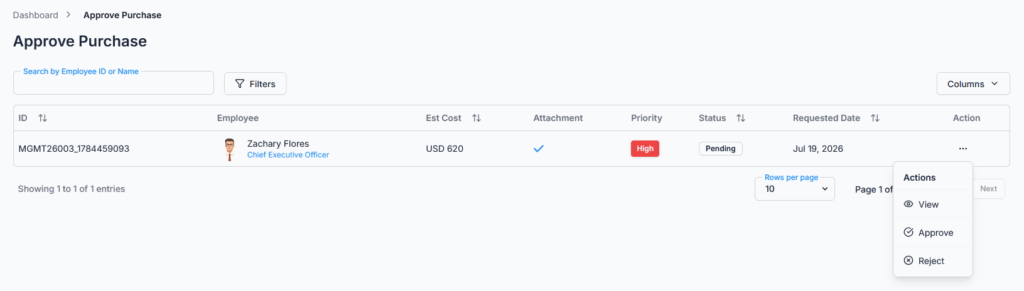
The Approve Purchase Request module allows eligible users, such as managers, HR, or assigned approvers, to review, approve, or reject submitted purchase requests.
Approval Flow: If your organization has a workflow configured for purchase requests, all submissions follow that workflow, step by step. If no workflow is configured, purchase requests default to the Subscriber Admin.
Who Can Use This Feature #
Subscriber Admin can approve or reject any purchase request in the company, at whichever step it currently sits on, without needing any specific permission.
Employees can approve or reject a purchase request only when they’re the assigned approver for its current step and hold the matching permission below.
Permission Behavior #
Two permissions control these actions:
- Approve Purchase Request (For All)
Required action: Update
Shows the Approve option for purchase requests where you’re the assigned approver. - Reject Purchase Request (For All)
Required action: Update
Shows the Reject option for purchase requests where you’re the assigned approver.
Both of the following must be true before an Approve or Reject option shows up for a given purchase request:
- You’re assigned as the approver in the relevant approval flow step (Reporting Manager, Company Admin, or a Selected Employee named on that step).
- You hold the matching permission for that action.
Being included in the approval flow alone is not enough — you also need the matching permission. Likewise, holding the permission alone is not enough if you’re not the assigned approver for that specific request’s current step. If either is missing, that action’s option simply won’t appear for you on that request.
Good to know: unlike leave requests, Office-X does not currently stop someone from approving or rejecting their own purchase request if they happen to qualify as an approver for it — for example, if you’re the Subscriber Admin, or you’ve been added as a Selected Employee approver on a step that also applies to your own purchase requests. If you want to avoid this, keep requesters off the approver list for flows that apply to them.
These permissions can be assigned directly to an employee, or to an entire team at once (so everyone on that team inherits them). See the Permissions Management guide for how to assign permissions.
How Approval Flow Works With Purchase Requests #
This works exactly the same way as leave, bill, and travel approval do — if you’ve read any of those guides already, the mechanics here will feel familiar, since they all use the same underlying approval-flow engine.
The Moment a Purchase Request Is Created
The instant an employee (or someone submitting on their behalf) submits a purchase request, Office-X checks the approval flows set up under Dashboard → Admin → Approval Flows to find the one that applies to that employee — based on the employee themselves, their team, gender, department, or designation. At most one flow applies to any single purchase request.
If an Approval Flow Applies
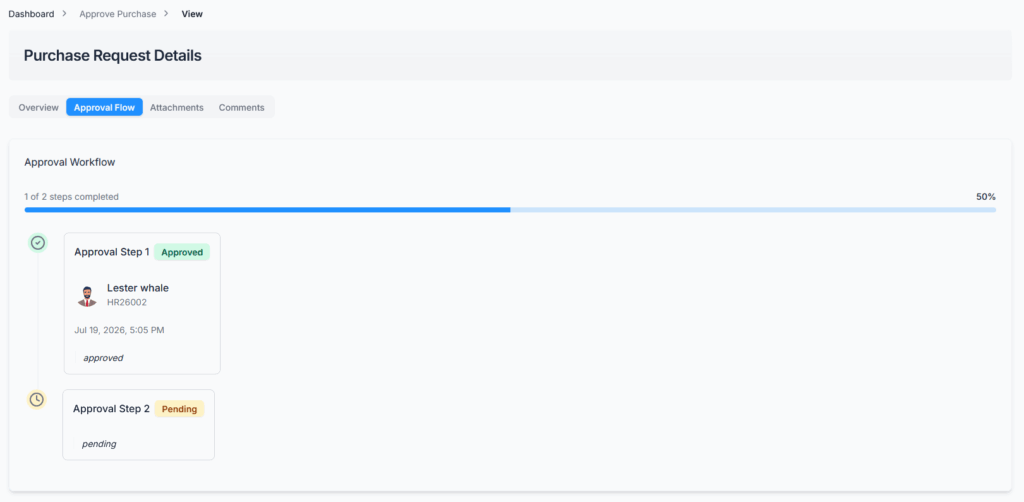
The purchase request is saved as Pending and linked to that flow, with a step-by-step checklist built for it — one entry per step, each starting out as “pending.” Only the first step’s approver(s) are contacted at this point; nobody assigned to a later step hears anything yet. Whether that first-step notice arrives as an in-app notification, an email, both, or neither depends on how that step was configured. The employee who submitted the request always gets their own confirmation email regardless.
Good to know: if a step’s approver type is Reporting Manager but the employee doesn’t actually have one assigned, the Subscriber Admin automatically stands in as the approver for that step instead — so the request never gets stuck with nobody able to act on it.
If No Approval Flow Applies
The purchase request is still created and saved as Pending, but with no step checklist at all — it simply waits on the Subscriber Admin. Only the Subscriber Admin can act on it, and no one else can until an approval flow is set up to cover that employee.
Approval Flow Behavior #
Only users who are assigned as approvers in the applicable approval flow step can take action on the purchase request. Each step is set up with exactly one approver type:
- Reporting Manager
- Company Admin
- Selected Employees
If no approval flow is configured, purchase requests default to the Subscriber Admin — see above for exactly what that means.
Step-by-Step Approval, In Detail #
When a flow has more than one step, the steps are always processed strictly in order — a later step can never be acted on before every step before it has been approved.
Approving a step does not approve the whole purchase request. It only marks that one step as approved (recording who approved it and when), moves the request on to the next step if one exists, and notifies that next step’s approver(s) that it’s now their turn.
Only when the final step is approved does the purchase request’s overall status actually change to Approved. Up until then, the request stays Pending, even though one or more steps have already said yes.
For example, in a 3-step flow (Reporting Manager → Department Head → Company Admin): once the Reporting Manager approves, the request is still Pending — it’s simply moved on to the Department Head. Once they approve, it’s still Pending, now waiting on the Company Admin. Only once the Company Admin approves does the status finally become Approved.
A Reject at any step — first or last — immediately sets the purchase request’s overall status to Rejected. There’s no need for every step to weigh in; one rejection ends it, and steps after the rejected one are simply never reached.
What Happens to a Step Once It’s Decided #
Once an approver has acted on their step, they can’t act on that same purchase request again. If they’re also the assigned approver for a later step in the same flow, they’ll get another chance to act when the request reaches that step; otherwise, their involvement in taking action is finished. They can, however, still view the request and add comments for as long as it remains open for comments (see Comments & Communication below).
The Subscriber Admin’s Role #
The Subscriber Admin can always step in and approve or reject whichever step is currently pending on any purchase request — even if they aren’t personally named as that step’s Reporting Manager, Company Admin, or Selected Employee. But this only lets them act on the current step; it does not let them skip ahead or finalize the whole request early.
In other words: if a 3-step flow is configured and the Subscriber Admin clicks Approve on step 1, the outcome is exactly the same as if the regularly assigned step-1 approver had clicked it — step 1 is marked approved, and the request moves on to step 2, still Pending. The only situation where the Subscriber Admin’s decision is instantly final is when no approval flow applies at all — there, since there’s no step structure, a single Approve or Reject from the Subscriber Admin is the whole decision.
Action Options for Approvers #
Eligible approvers can perform the following actions based on their approval flow assignment and permissions:
- Approve
Approves the purchase request’s current step. If a multi-step approval flow is configured, the request moves to the next approver. If it is the final approval step, the purchase request becomes Approved. This takes effect immediately when you click it — there’s no confirmation prompt. - Reject
Rejects the purchase request immediately, regardless of which step it was rejected at. There’s no built-in reason field on the Reject action itself — if you want to explain why you’re rejecting a request, add a Comment first (see Comments & Communication below), since comments can only be added while the request is still Pending. - View
Opens the purchase request details so the approver can review the full request information before taking action.
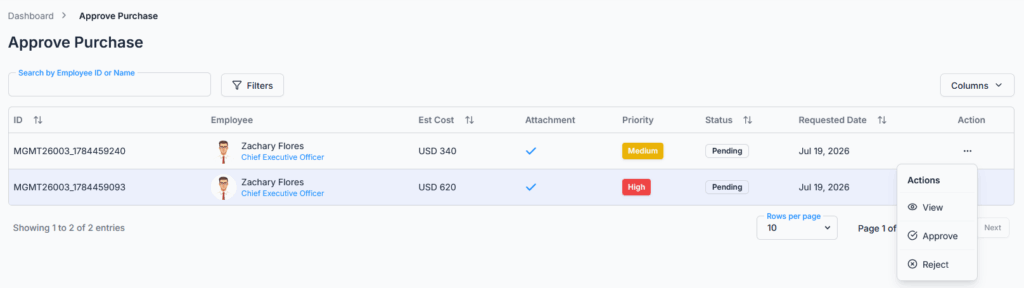
Good to know: Approve and Reject each act on one purchase request at a time — there’s currently no option to select multiple requests and approve or reject them together in bulk.
Notifications differ slightly depending on the outcome: rejecting a purchase request notifies only the employee it belongs to; approving an intermediate step notifies the employee that it moved forward and notifies the next step’s approver(s) that it’s their turn; approving the final step notifies the employee that it’s fully Approved. Approvers who already acted on earlier steps aren’t notified again as the request continues moving.
What Approvers Can View #
From the purchase request details page, approvers can review:
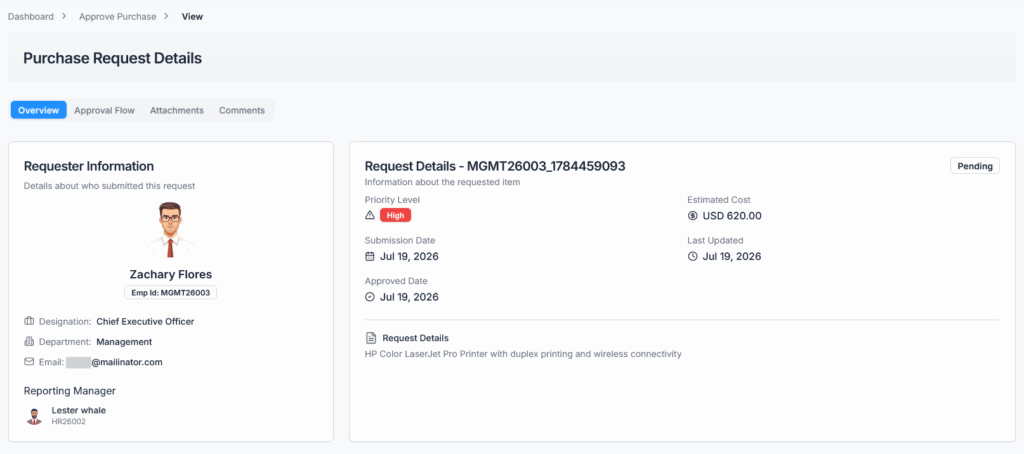
- Equipment or service details
- Estimated cost
- Priority level
- Currency
- Requester or employee details
- Uploaded attachments
- Approval workflow progress and history
- Comments
The Approval Workflow section shows every step in one place — its position, its current status (Pending, Approved, or Rejected), who acted on it (or who it’s currently waiting on), and the date it was acted on, so you don’t need to look in two different places for progress versus history. If a request is rejected partway through a multi-step flow, the steps after it are never shown as “skipped” or acted on — the list simply stops at the step where the rejection happened.
Comments & Communication #
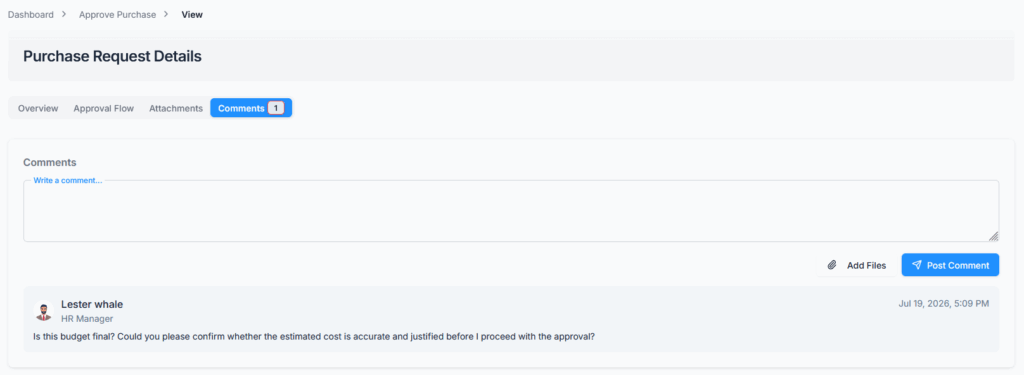
Approvers can add comments to purchase requests to:
- Provide instructions or feedback to the employee
- Request clarification regarding the request
- Explain the reason for rejection, since there’s no reason field on the Reject action itself
- Track communication during the approval process
Comments support file attachments, up to 5 per comment. Anyone who can already view the purchase request can comment on it — the requester, the requester’s reporting manager, the Subscriber Admin, any approver named anywhere in the flow, or anyone holding View Purchase Request Details permission — but only while it’s still Pending. As soon as it’s Approved or Rejected, commenting closes; comments made while it was still pending remain visible afterward.
All comments are logged and visible in the purchase request history for transparency.
Summary #
The Approve Purchase Request module ensures that purchase requests are reviewed efficiently, accurately, and according to company policy.
Every purchase request either follows a configured approval flow step by step, or — if none applies — waits on the Subscriber Admin alone. In a step-by-step flow, each approval only clears one step and moves the request forward; only the final step’s approval sets the request to Approved, while a rejection at any step ends it immediately. The Subscriber Admin can always act on whichever step is currently pending as a safety net, but even they only complete one step at a time — the sole exception being when no approval flow applies at all.
Approval and rejection are further controlled by user permissions: only users assigned as approvers in the relevant approval flow step and holding the required Approve Purchase Request (For All) or Reject Purchase Request (For All) permission can take action. This keeps the purchase approval process secure, transparent, traceable, and auditable.