
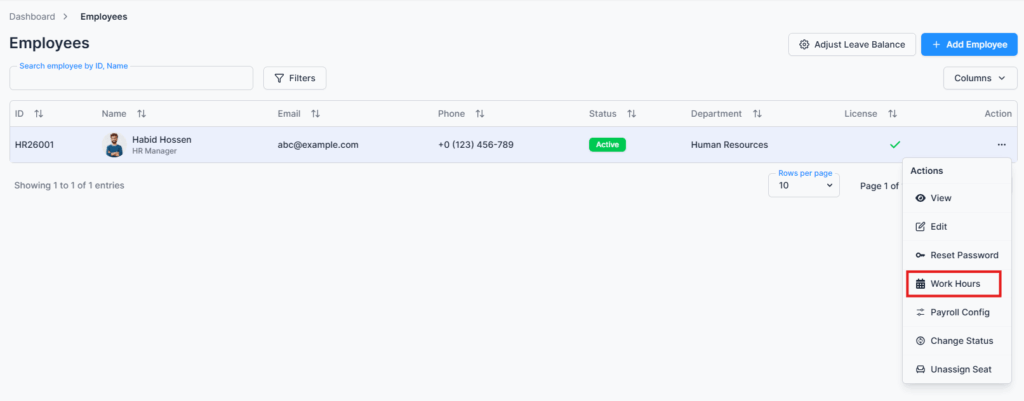
The Work Hours / Shift Hours page is accessed via the Action Menu of the Employee Table under the Employees route. This page allows admins and permitted users to define or modify an employee’s daily work schedule.
Overview #
This page provides flexibility to manage both shift-based and fixed schedules.
- Normal Employees (Non-Shift): Set standard start and end times along with break duration for consistent daily hours.
- Shift Workers: Enter daily shift hours and break durations, allowing dynamic schedules that can vary day to day.
Important Notes:
- Selected days represent working days, while unselected days are treated as weekends.
- Employees must have an assigned seat; otherwise, the Work Hours option is hidden.
- Work hours are employee-specific, not global.
Work Hours Configuration #
Normal Work Hours (Non-Shift Employee) #
For employees with fixed schedules:
- Day Checkbox: Select working days.
- Start Time: Define when the workday begins.
- End Time: Define when the workday ends.
- Break Duration: Enter the break length in hours.
Shift Work Hours (Shift Worker) #
For employees with shift-based schedules:
- Day Checkbox: Select working days.
- Shift Hours: Enter total shift hours for the day (numeric).
- Break Duration: Enter the break length in hours.
Save Changes #
After setting or modifying work hours, click Save to apply the schedule. Changes are immediately reflected in attendance, leave, payroll, and related module calculations.
Summary #
The Work Hours / Shift Hours page enables precise management of employee schedules, accommodating both flexible shifts and fixed work hours to ensure accurate time tracking and operational planning.