
Skip to content
  • Home
  • Features
  • Pricing
  • FAQs
  • Help Center
Sign In

Getting Started

1
  • Getting Started with Office-X

Subscription & Billing

1
  • How Seats Work in Office-X

Features & Modules

64
  • Overview
  • Privacy & Security
    • Security
  • Business Management
    • Company
    • Billing & Payment
    • Support
  • Admin Module
    • Department
    • Designation
    • Pay Type
    • Employment Status
    • Leave Types
    • Benefits
    • Expense Categories
    • Teams
    • Forms
    • Events & Announcements
    • Incident Configuration
    • IP Configuration
    • Currency
    • Support Categories
  • SMTP & Email Templates
    • SMTP Config
    • Email Templates
  • Employees Module
    • Employee List
    • Adding a New Employee
    • View Employee Details
    • Edit an Employee
    • Reset Password
    • Work Hours/Shift Hours
    • Change Status
    • Assign/Unassign Seat
    • Adjust Leave Balance
    • Visual Guide
  • Permissions & Approval Flows
    • Permissions Management
    • Approval Flows (Workflow Management)
  • Work Shifts
    • Work Shifts
  • Holidays Calendar
    • Calendar
  • Attendance Management
    • Attendance Records
    • Individual Attendance Summary
    • Overall Attendance Summary
    • Visual Guide
  • Leave Management
    • Create Leave
    • Approve Leaves
    • View All Leaves
    • Visual Guide
  • Bill Management
    • Create Bill
    • Approve Bills
    • View All Bills
    • Visual Guide
  • Travel Requests
    • Create Travel Request
    • Approve Travel Requests
    • View All Travel Requests
    • Visual Guide
  • Purchase Requests
    • Create Purchase Request
    • Approve Purchase Requests
    • View All Purchase Requests
    • Visual Guide
  • Payroll (Bangladesh Only)
    • Tax Configuration & Calculation
    • Payroll Management
    • Visual Guide
  • Performance Management
    • Performance Management
  • Incident Report
    • Incident Report
  • Asset Tracking
    • Asset Tracking
  • Activity Logs
    • Activity Logs
  • Dashboard
    • Visual Guide
  • Support
    • Support
View Categories
  • Home
  • Docs
  • Features & Modules
  • Employees Module
  • View Employee Details

View Employee Details

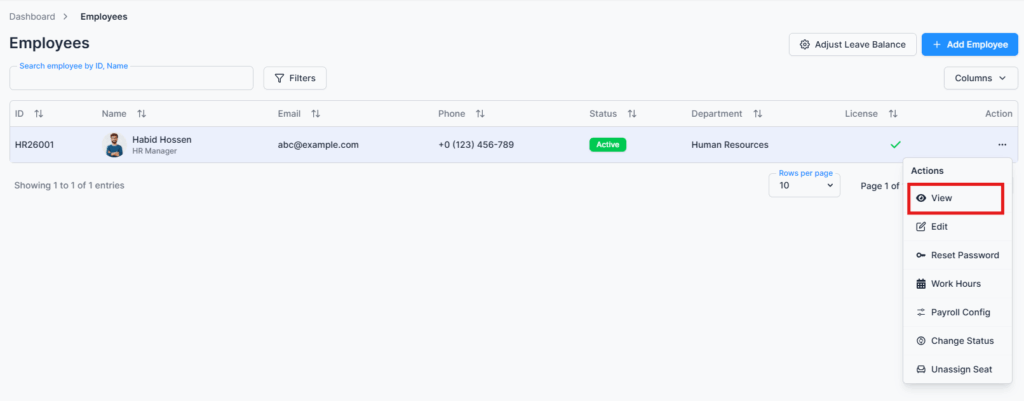
This page is accessed by selecting the “View” option from the Action Menu in the Employee Table under the Employees route. It provides a comprehensive profile of each employee, allowing admins and permitted users to quickly access all relevant information in one place.
Personal Info #

This section displays the employee’s personal information and contact details, including full name, employee ID, email, phone number, emergency contacts, etc. It allows admins to quickly reference essential personal data for each employee.

Employment Info #

Here you can see all job-related information such as the employee’s department, designation, pay type (salary or hourly), employment status, joining date, probation period (if applicable), etc. This helps track the employee’s position and status within the organization.

Assets #

The Assets section shows all company property currently assigned to the employee, including laptops, mobile devices, access cards, software licenses, etc. This allows admins to monitor and manage company resources effectively.

Benefits #

This section lists all benefits linked to the employee, such as health insurance, travel allowance, and other perks, etc. Admins can use this information to ensure proper allocation of employee entitlements.

Leave Quota #

The Leave Quota section tracks the employee’s available leaves and extra work balances. For example, overtime and lieu leave hours can be converted into equivalent days of leave, giving a clear picture of total extra work completed. The system dynamically calculates entitled, used, paid, unpaid, and remaining balances for all leave types such as casual leave, sick leave, annual leave, etc.

💡 All values are automatically adjusted based on the employee’s work schedule, attendance, and leave policy configuration.

⚠️ If the work schedule is not set, the system will display:
“Work schedule not set. Please configure your work schedule before requesting leave.”

Summary #

The View Employee Details page consolidates personal and employment information, assigned assets, benefits, leave quotas, and extra work balances, etc. This centralized view enables admins to make informed decisions, track employee entitlements, and ensure accurate recordkeeping.

Updated on January 28, 2026
Adding a New EmployeeEdit an Employee
Table of Contents
  • Personal Info
  • Employment Info
  • Assets
  • Benefits
  • Leave Quota
  • Summary

Office-X is an all-in-one office management platform that streamlines employee management, attendance, payroll (Bangladesh only), asset tracking, and approvals. Automate workflows, gain insights, and run your business smarter with ease and security.

  • Links
  • Home
  • Features
  • Pricing
  • Support
  • FAQ
  • Help Center
  • Terms of Service
  • Privacy Policy
  • Follow Us
  • LinkedIn
  • Facebook
  • Youtube
Copyright ©2026 Office-X LLC. All rights reserved.
  • Home
  • Features
  • Pricing
  • FAQs
  • Help Center
Sign In