
Skip to content
  • Home
  • Features
  • Pricing
  • FAQs
  • Help Center
Sign In

Getting Started

1
  • Getting Started with Office-X

Subscription & Billing

1
  • How Seats Work in Office-X

Features & Modules

64
  • Overview
  • Privacy & Security
    • Security
  • Business Management
    • Company
    • Billing & Payment
    • Support
  • Admin Module
    • Department
    • Designation
    • Pay Type
    • Employment Status
    • Leave Types
    • Benefits
    • Expense Categories
    • Teams
    • Forms
    • Events & Announcements
    • Incident Configuration
    • IP Configuration
    • Currency
    • Support Categories
  • SMTP & Email Templates
    • SMTP Config
    • Email Templates
  • Employees Module
    • Employee List
    • Adding a New Employee
    • View Employee Details
    • Edit an Employee
    • Reset Password
    • Work Hours/Shift Hours
    • Change Status
    • Assign/Unassign Seat
    • Adjust Leave Balance
    • Visual Guide
  • Permissions & Approval Flows
    • Permissions Management
    • Approval Flows (Workflow Management)
  • Work Shifts
    • Work Shifts
  • Holidays Calendar
    • Calendar
  • Attendance Management
    • Attendance Records
    • Individual Attendance Summary
    • Overall Attendance Summary
    • Visual Guide
  • Leave Management
    • Create Leave
    • Approve Leaves
    • View All Leaves
    • Visual Guide
  • Bill Management
    • Create Bill
    • Approve Bills
    • View All Bills
    • Visual Guide
  • Travel Requests
    • Create Travel Request
    • Approve Travel Requests
    • View All Travel Requests
    • Visual Guide
  • Purchase Requests
    • Create Purchase Request
    • Approve Purchase Requests
    • View All Purchase Requests
    • Visual Guide
  • Payroll (Bangladesh Only)
    • Tax Configuration & Calculation
    • Payroll Management
    • Visual Guide
  • Performance Management
    • Performance Management
  • Incident Report
    • Incident Report
  • Asset Tracking
    • Asset Tracking
  • Activity Logs
    • Activity Logs
  • Dashboard
    • Visual Guide
  • Support
    • Support
View Categories
  • Home
  • Docs
  • Features & Modules
  • Attendance Management
  • Individual Attendance Summary

Individual Attendance Summary

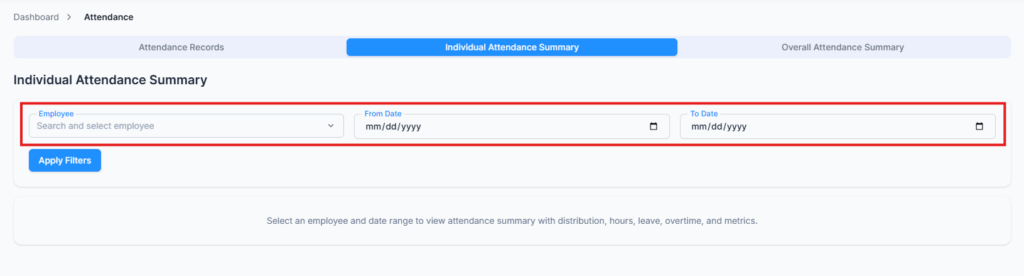
The Individual Attendance Summary tab provides a complete overview of a single employee’s attendance within a selected time range. This feature helps admins and managers quickly analyze work patterns, attendance behavior, and productivity using both data and visual charts.

How It Works #

From the Attendance module:

  1. Select an Employee
  2. Choose a Date Range (e.g., last 30 days, current month, custom range)
  3. The system instantly generates a full attendance summary for that employee
Summary Metrics #

The report includes:

• Expected Working Days – Total scheduled working days in the selected range
• Expected Working Hours – Total expected work hours (e.g., 152 hours)
• Actual Working Hours – Total hours actually worked
• Present Days – Days the employee was present
• Absent Days – Days marked as absent
• Total Leaves – Approved full or partial leave days
• Weekends – Weekend days in the range
• Holidays – Official holidays
• Attendance % – Attendance rate for the period
• Overtime Hours – Total approved overtime
• Avg Daily Working Hours – Average hours worked per day
• Avg Daily Break Time – Average daily break duration

These values are automatically calculated based on attendance logs, leave records, work schedules, and approved overtime.

Visual Charts #

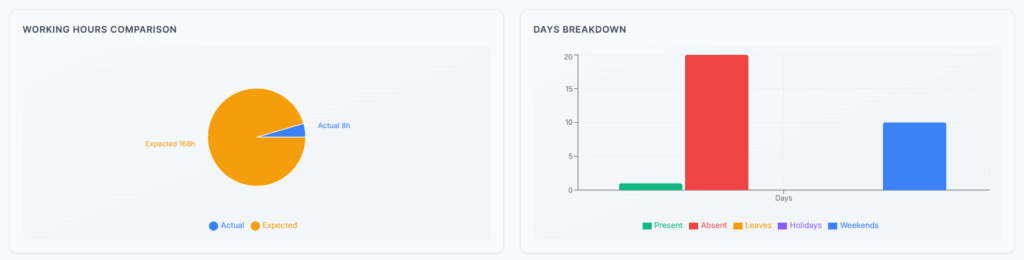
The summary also includes interactive charts to make insights easier to understand:

✔ Working Hours Comparison – Compares Expected Working Hours vs Actual Working Hours for the selected period
✔ Days Breakdown – Visualizes the distribution of present days, absent days, leave days, holidays, and weekends.
Use Cases #

The Individual Attendance Summary is useful for:

✔ Performance reviews
✔ Payroll validation
✔ Leave and overtime analysis
✔ Managerial reporting
✔ Workforce planning

Summary #

The Individual Attendance Summary gives you a powerful, visual, and data-driven view of an employee’s attendance behavior over time — helping you make smarter decisions with confidence.

Updated on January 28, 2026
Attendance RecordsOverall Attendance Summary
Table of Contents
  • How It Works
  • Summary Metrics
  • Visual Charts
  • Use Cases
  • Summary

Office-X is an all-in-one office management platform that streamlines employee management, attendance, payroll (Bangladesh only), asset tracking, and approvals. Automate workflows, gain insights, and run your business smarter with ease and security.

  • Links
  • Home
  • Features
  • Pricing
  • Support
  • FAQ
  • Help Center
  • Terms of Service
  • Privacy Policy
  • Follow Us
  • LinkedIn
  • Facebook
  • Youtube
Copyright ©2026 Office-X LLC. All rights reserved.
  • Home
  • Features
  • Pricing
  • FAQs
  • Help Center
Sign In