
Skip to content
  • Home
  • Features
  • Pricing
  • FAQs
  • Help Center
Sign In

Getting Started

1
  • Getting Started with Office-X

Subscription & Billing

1
  • How Seats Work in Office-X

Features & Modules

64
  • Overview
  • Privacy & Security
    • Security
  • Business Management
    • Company
    • Billing & Payment
    • Support
  • Admin Module
    • Department
    • Designation
    • Pay Type
    • Employment Status
    • Leave Types
    • Benefits
    • Expense Categories
    • Teams
    • Forms
    • Events & Announcements
    • Incident Configuration
    • IP Configuration
    • Currency
    • Support Categories
  • SMTP & Email Templates
    • SMTP Config
    • Email Templates
  • Employees Module
    • Employee List
    • Adding a New Employee
    • View Employee Details
    • Edit an Employee
    • Reset Password
    • Work Hours/Shift Hours
    • Change Status
    • Assign/Unassign Seat
    • Adjust Leave Balance
    • Visual Guide
  • Permissions & Approval Flows
    • Permissions Management
    • Approval Flows (Workflow Management)
  • Work Shifts
    • Work Shifts
  • Holidays Calendar
    • Calendar
  • Attendance Management
    • Attendance Records
    • Individual Attendance Summary
    • Overall Attendance Summary
    • Visual Guide
  • Leave Management
    • Create Leave
    • Approve Leaves
    • View All Leaves
    • Visual Guide
  • Bill Management
    • Create Bill
    • Approve Bills
    • View All Bills
    • Visual Guide
  • Travel Requests
    • Create Travel Request
    • Approve Travel Requests
    • View All Travel Requests
    • Visual Guide
  • Purchase Requests
    • Create Purchase Request
    • Approve Purchase Requests
    • View All Purchase Requests
    • Visual Guide
  • Payroll (Bangladesh Only)
    • Tax Configuration & Calculation
    • Payroll Management
    • Visual Guide
  • Performance Management
    • Performance Management
  • Incident Report
    • Incident Report
  • Asset Tracking
    • Asset Tracking
  • Activity Logs
    • Activity Logs
  • Dashboard
    • Visual Guide
  • Support
    • Support
View Categories
  • Home
  • Docs
  • Features & Modules
  • Travel Requests
  • Create Travel Request

Create Travel Request

Employees can submit travel requests for themselves by default. Users with the “Create Travel for Others” permission (e.g., HR, managers, or travel coordinators) can submit travel requests on behalf of other employees.
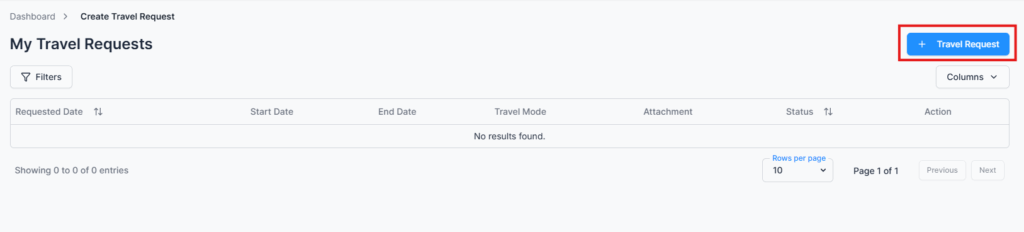
Create Travel Request Form #

Form Fields:

  • Search Employee – Appears only for users with the “Create Travel for Others” permission. Regular employees can only create travel requests for themselves.
  • Title – A short title describing the travel (e.g., Client Visit – Dhaka Branch).
  • Destination – The city or location of travel.
  • Travel Mode – Select the type of travel (e.g., Air, Train, Bus).
  • Start Date / End Date – Select the travel period.
  • Travel Mode Cost – Enter the transportation cost.
  • Hotel Cost – Optional accommodation cost.
  • Currency – Select the currency for expenses.
  • Travel Reason – State the purpose of the travel.
  • Attachments – Upload tickets, bookings, or other travel documents.
  • Submit – Send the travel request for approval.

Tip: Admins or authorized users can create travel requests for other employees, making it ideal for HR or travel coordinators managing multiple team trips.

Action Options (Permission-Based) #

All actions are controlled by user permissions:

  • Edit – Modify the travel request before it is approved or rejected (permission required).
  • View – Access detailed travel information (permission required).
  • Comments – Communicate with approvers for clarification or instructions.

Summary #

The Create Travel Request module ensures employees can submit travel requests accurately and in accordance with company policies. Permission-based access allows authorized users to submit requests on behalf of others, while maintaining a controlled, traceable, and compliant process.

Note: If your organization has an approval flow configured for travel requests, all submissions will follow the defined workflow before final approval.

Updated on January 28, 2026
Approve Travel Requests
Table of Contents
  • Create Travel Request Form
  • Action Options (Permission-Based)
  • Summary

Office-X is an all-in-one office management platform that streamlines employee management, attendance, payroll (Bangladesh only), asset tracking, and approvals. Automate workflows, gain insights, and run your business smarter with ease and security.

  • Links
  • Home
  • Features
  • Pricing
  • Support
  • FAQ
  • Help Center
  • Terms of Service
  • Privacy Policy
  • Follow Us
  • LinkedIn
  • Facebook
  • Youtube
Copyright ©2026 Office-X LLC. All rights reserved.
  • Home
  • Features
  • Pricing
  • FAQs
  • Help Center
Sign In