
Attendance is a core feature of Office-X that ensures employees’ work hours, check-ins, check-outs, breaks, partial leaves, and overtime are accurately tracked. Admins and permitted users can monitor, approve, and manage attendance efficiently with full visibility and control.
Employee Attendance Portal #
Employees can view and record their attendance for the day.
Portal View
- Current Status: Not Checked In / Checked In / Checked Out
- Current Date: e.g., January 22, 2026, 5:19 PM
- Check In / Check Out Buttons: Employees can mark attendance using these buttons.
IP Restriction
If the employee’s current IP address is not allowed (as configured in Admin → IP Config), the system will block check-in and check-out actions. This helps prevent unauthorized attendance marking.
Attendance List Table #
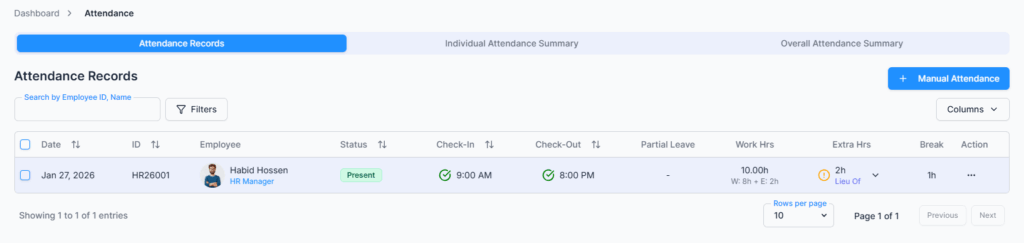
Column Definitions
- Partial Leave: Shows any partial leave hours taken today, e.g., 2h or 4h.
- Working Hours: Total hours worked excluding breaks. Includes actual work time and approved extra hours.
) - Extra Hours: Displays overtime or lieu leave hours if the employee is eligible. Admin or permitted employee with Overtime/Lieu Approve/Reject permission can approve/reject these hours.
- Break: Total break hours taken.
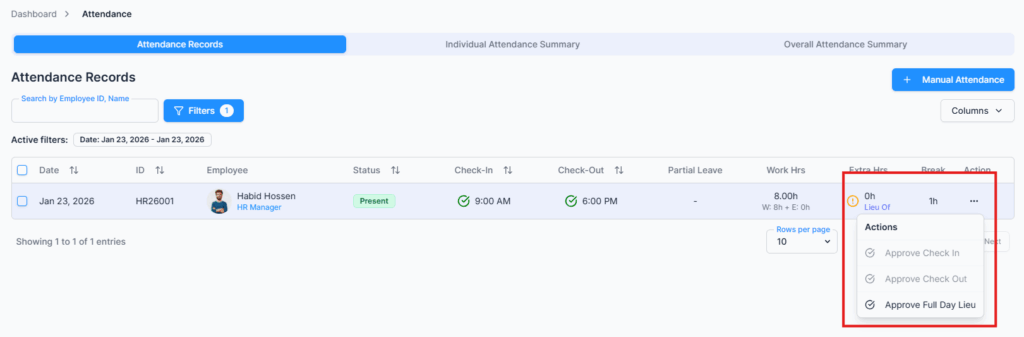
- Action: Dependent on user permissions (approve check-in/out, approve extra hours and approve full day Lieu/OT).
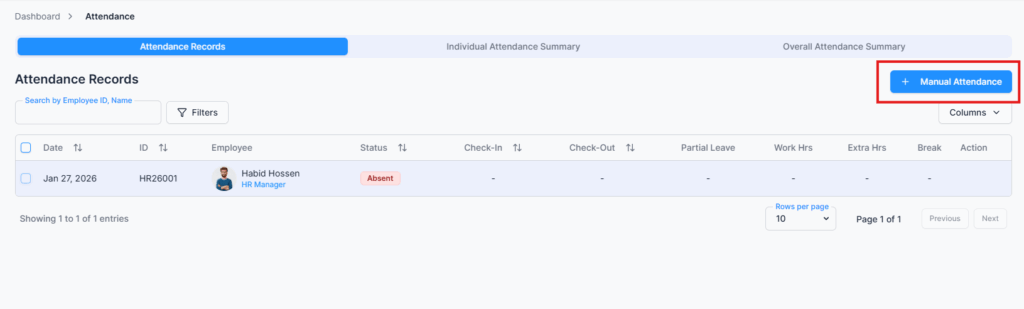
Manual Attendance #
Used when an employee forgets to check in or out, or when corrections are needed.
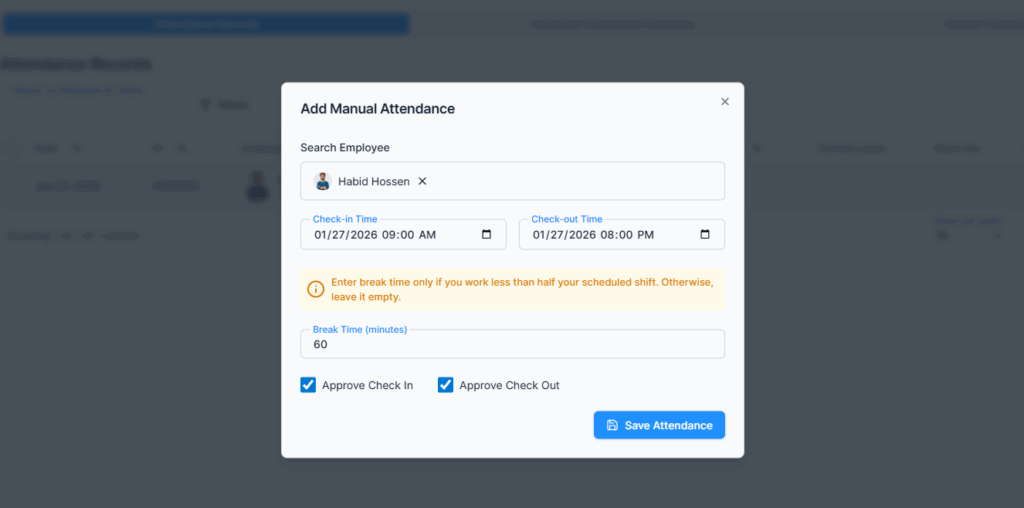
Form Fields #
- Search Employee: Enter name or email
- Check-in Time / Check-out Time
- Break Time: Enter only if the employee worked less than half of the scheduled shift
- Approve Check In / Approve Check Out
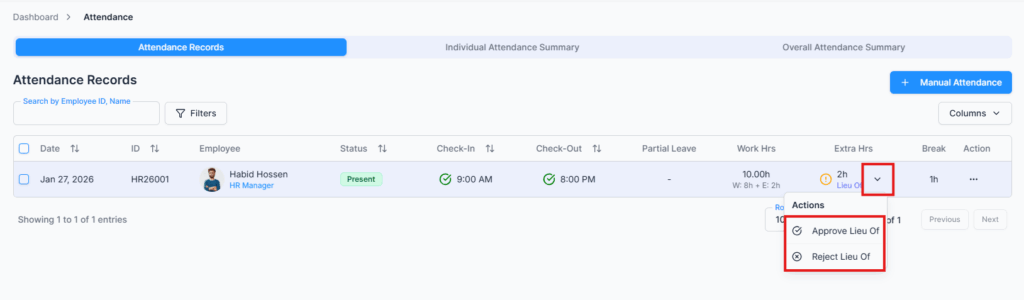
Approve Extra Hours / Overtime / Lieu Leave #
- Employees eligible for overtime or lieu leave will have hours recorded in the Extra Hours column.
- Approvers with the Overtime/Lieu Approve/Reject permission can approve or reject these hours.
Example:
- Employee worked 9 hours instead of 8-hour shift → 1h extra
- Logged in approver can approve → Employee profile reflects updated Extra Work Balance
Weekend & Holiday Work Handling #
If an employee works on a weekend or official holiday, their work can be approved as either a full-day Lieu Leave or full-day Overtime, depending on their eligibility settings.
How it works:
• If the employee is eligible for Lieu Leave, the worked day can be converted into a full-day Lieu Leave credit.
• If the employee is eligible for Overtime, the system records it as a full-day Overtime.
• The available option depends on the employee’s Pay Type and Eligibility Rules.
Payroll Date Dependency
When approving weekend or holiday work, the system uses the employee’s Last Pay Date:
• If you use Office-X Payroll, the last processed payroll date is used automatically.
• If you use a third-party payroll system, you must set the employee’s Last Pay Date manually.
This ensures accurate overtime, leave balance, and payroll calculations.
Bulk Approve Check-In / Check-Out #
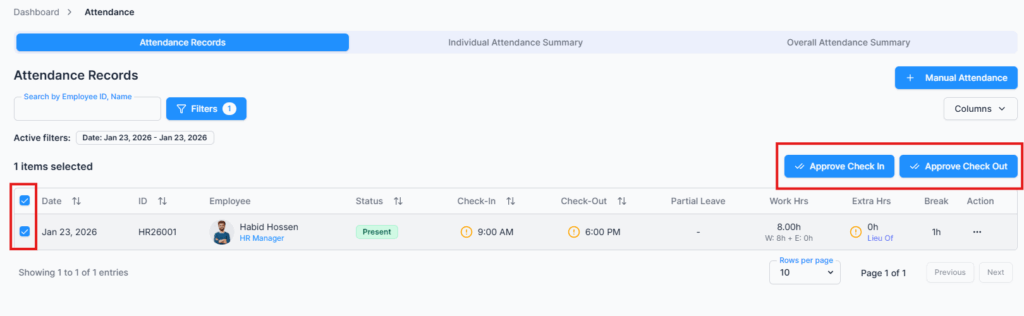
To save time when managing many employees, Office-X provides Bulk Approve options for attendance.
From the Attendance List, authorized users can:
• Select multiple employees at once
• Click Bulk Approve Check-In to approve all selected check-ins
• Click Bulk Approve Check-Out to approve all selected check-outs
This is especially useful when:
✔ Many employees check in or out around the same time
✔ Managers need to approve attendance for an entire team or shift
✔ Reducing repetitive manual approvals
Permissions Related to Attendance #
Attendance actions are controlled by role-based permissions:
• Create – Add manual attendance, approve multiple check-ins
• View – View attendance records
• Update – Edit times, extra hours, partial leave
• Delete – Remove incorrect manual entries
Only authorized users can approve overtime, lieu leave, and attendance changes.
Example Workflow #
- Employee checks in at 10:58 AM
- Status becomes Present
- Employee works 9 hours on an 8-hour shift
- Extra 1 hour appears under Extra Hours
- Admin approves the extra hour
- Employee profile updates
- Employee checks out and total working hours are finalized
Summary #
The Attendance Module provides:
✔ Accurate work hour tracking
✔ IP-based security
✔ Partial leave and overtime control
✔ Weekend & holiday work handling
✔ Approval workflows for managers and admins
All attendance data stays consistent with payroll, leave balances, and employee records.