
The Approve Leaves module allows authorized users, such as reporting managers or HR personnel, to review, approve, or reject leave requests submitted by employees.
Approval Flow: If your organization has a multi-step workflow configured for leave requests, all submissions will follow this workflow. If no workflow is configured, leave requests will default to the admin for approval.
All actions are permission-based, ensuring that only users with the appropriate rights can take action.
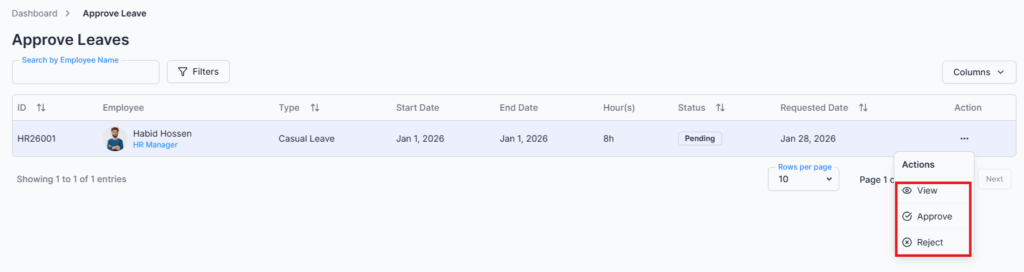
Action Options for Approvers #
Approvers can perform the following actions based on permissions:
- Approve – Approves the leave request and, if a multi-step approval workflow is configured, moves it to the next step.
- Reject – Rejects the leave request and allows the approver to add comments explaining the reason.
- View – Opens detailed leave request information, including:
- Leave type, period, and hours
- Employee leave balance and entitlement
- Any attachments submitted with the request
- Approval workflow and history
Comments & Communication #
- Approvers can add comments to leave requests to:
- Communicate instructions to the employee
- Ask for clarification regarding the request
- Provide feedback before final approval or rejection
- All comments are logged and visible in the leave request history for transparency.
Summary #
The Approve Leaves module ensures that leave requests are reviewed accurately, efficiently, and in accordance with company policy. Multi-step approval workflows, permission-based actions, and clear communication through comments make the leave management process transparent, traceable, and compliant.