
Skip to content
  • Home
  • Features
  • Pricing
  • FAQs
  • Help Center
Sign In

Getting Started

1
  • Getting Started with Office-X

Subscription & Billing

1
  • How Seats Work in Office-X

Features & Modules

64
  • Overview
  • Privacy & Security
    • Security
  • Business Management
    • Company
    • Billing & Payment
    • Support
  • Admin Module
    • Department
    • Designation
    • Pay Type
    • Employment Status
    • Leave Types
    • Benefits
    • Expense Categories
    • Teams
    • Forms
    • Events & Announcements
    • Incident Configuration
    • IP Configuration
    • Currency
    • Support Categories
  • SMTP & Email Templates
    • SMTP Config
    • Email Templates
  • Employees Module
    • Employee List
    • Adding a New Employee
    • View Employee Details
    • Edit an Employee
    • Reset Password
    • Work Hours/Shift Hours
    • Change Status
    • Assign/Unassign Seat
    • Adjust Leave Balance
    • Visual Guide
  • Permissions & Approval Flows
    • Permissions Management
    • Approval Flows (Workflow Management)
  • Work Shifts
    • Work Shifts
  • Holidays Calendar
    • Calendar
  • Attendance Management
    • Attendance Records
    • Individual Attendance Summary
    • Overall Attendance Summary
    • Visual Guide
  • Leave Management
    • Create Leave
    • Approve Leaves
    • View All Leaves
    • Visual Guide
  • Bill Management
    • Create Bill
    • Approve Bills
    • View All Bills
    • Visual Guide
  • Travel Requests
    • Create Travel Request
    • Approve Travel Requests
    • View All Travel Requests
    • Visual Guide
  • Purchase Requests
    • Create Purchase Request
    • Approve Purchase Requests
    • View All Purchase Requests
    • Visual Guide
  • Payroll (Bangladesh Only)
    • Tax Configuration & Calculation
    • Payroll Management
    • Visual Guide
  • Performance Management
    • Performance Management
  • Incident Report
    • Incident Report
  • Asset Tracking
    • Asset Tracking
  • Activity Logs
    • Activity Logs
  • Dashboard
    • Visual Guide
  • Support
    • Support
View Categories
  • Home
  • Docs
  • Features & Modules
  • Employees Module
  • Adjust Leave Balance

Adjust Leave Balance

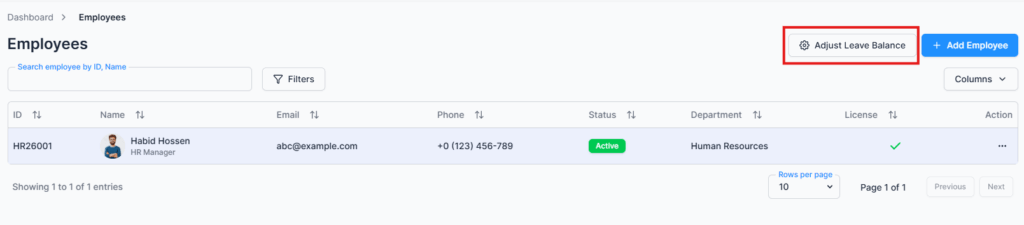
The Adjust Leave Balance page is accessed via the “Adjust Leave Balance” button in the Employee Table under the Employees route. This feature is available to subscriber admins or users with the required permission. It allows authorized users to update an employee’s leave history for past periods.

Overview #

The Adjust Leave Balance feature is designed primarily for companies with existing employees who have used leave prior to being added to the system. It allows you to edit the used leave values for each leave type according to the company’s leave policy, ensuring that the employee’s leave balances are accurate and up to date.
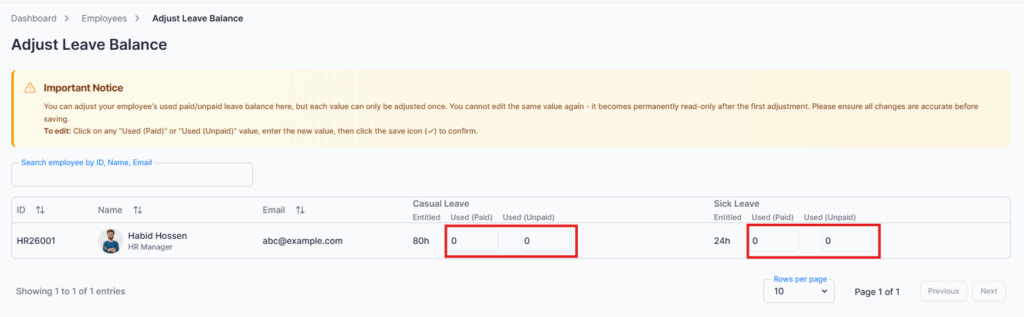
This adjustment acts as the opening leave balance for the employee. The feature is one-time editable, meaning once the adjustment is saved, it cannot be changed again, ensuring proper control and record integrity.
Example:
If an employee is entitled to 12 days of casual leave per year but has already used 4 days, you can enter 4 days as used leave in this adjustment. The system will then calculate the remaining balance accurately, which ensures proper leave tracking and helps maintain accurate payroll calculations.

Key Features #

  • Edit the used leave value for past periods based on leave type settings
  • Set the opening leave balance for new or migrated employees
  • Ensure accurate leave tracking and reporting for existing employees
  • Accessible only to authorized users with appropriate permissions

Summary #

The Adjust Leave Balance feature allows admins to accurately record past leave usage for existing employees, ensuring historical leave data is correctly reflected in the system. It provides a controlled way to set opening balances for employees migrating into the system or for retroactive adjustments.

Updated on January 28, 2026
Assign/Unassign SeatVisual Guide
Table of Contents
  • Overview
  • Key Features
  • Summary

Office-X is an all-in-one office management platform that streamlines employee management, attendance, payroll (Bangladesh only), asset tracking, and approvals. Automate workflows, gain insights, and run your business smarter with ease and security.

  • Links
  • Home
  • Features
  • Pricing
  • Support
  • FAQ
  • Help Center
  • Terms of Service
  • Privacy Policy
  • Follow Us
  • LinkedIn
  • Facebook
  • Youtube
Copyright ©2026 Office-X LLC. All rights reserved.
  • Home
  • Features
  • Pricing
  • FAQs
  • Help Center
Sign In