
Create dynamic multi-step approval processes for your organization
The Approval Flows module also known as Workflow Management helps your company handle requests through a structured approval hierarchy. From simple one-step reviews to complex multi-level authorizations, everything can be customized to fit your organization’s needs.
For example:
- A general employee’s leave request might follow this route: Employee → Reporting Manager → HR
- A team lead’s leave request could directly go to HR or the CEO.
With Office-X, you can design these approval chains dynamically — from one to multiple steps — for any feature like Leave Requests, Bill Approvals, Purchase Requests, or Travel Requests.
How It Works – Step by Step #
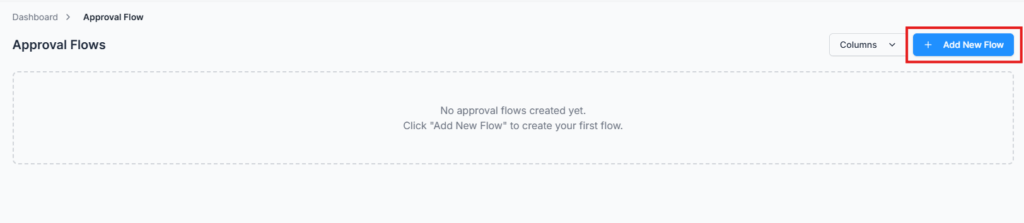
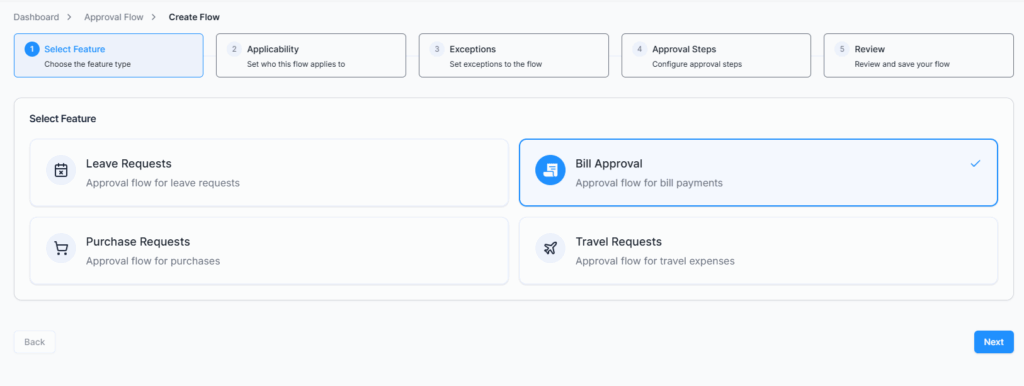
When you go to Admin → Approval Flow → Create Flow, you’ll follow a guided 5-step process:
Select Feature #
Choose which type of request you want to create a workflow for:
- Leave Requests – approval for employee leave applications
- Bill Approval – approval process for bill payments
- Purchase Requests – approval for purchase orders
- Travel Requests – approval for business travel expenses
Applicability #
Define who this flow applies to.
You can target specific employees or groups based on:
- Gender
- Department
- Designation
- Team
- Individual Employee
Example: Create a flow that applies only to Marketing Department employees or all male employees in Finance.
Exceptions #
Set exceptions for the rule — exclude specific people or groups from this approval flow.
For instance, if your flow applies to all male employees, you can exclude a specific department or particular employees from it.
Available exception types:
- Gender
- Department
- Designation
- Team
- Employee
Approval Steps #
This is where you define the step-by-step approval process.
For each step, you can:
- Give the step a name (e.g., Initial Review, Final Approval)
- Choose either:
- Include Reporting Manager, or
- Select Approvers (manually select one or multiple approvers)
- Enable Send Notification and/or Send Email to keep approvers informed instantly
You can add as many steps as your organization requires — and the request will automatically move through them in sequence.
Example:
| Step | Approvers | Notification | |
|---|---|---|---|
| Step 1 | Reporting Manager | ✅ | ❌ |
| Step 2 | HR Manager | ✅ | ✅ |
Review & Save #
Once you’ve set everything up, you’ll see a full summary of your approval flow.
Check all the details, then click “Create Approval Flow” — and you’re done!
Your flow will now appear in the Approval Flow Table, where you can:
- View – see flow details
- Edit – update steps or approvers anytime
- Delete – remove unnecessary flows
Example: Bill Approval Flow #
Applicability:
- Gender: Male
Exceptions:
- None
Steps:
- Step 1 – Initial Review
- Approver: Md Sajidul Alam
- Reporting Manager: No
- Notification: No
- Email: No
- Step 2 – Final Approver
- Approver: Habid Hridoy
- Reporting Manager: No
- Notification: Yes
- Email: No
Once a male employee submits a bill request, it first goes to Md Sajidul Alam.
After he approves, it automatically moves to Habid Hridoy for final approval.
When all steps are approved, the request status updates to Approved — simple and transparent.
Why It’s Useful #
- Streamlines complex approval hierarchies
- Reduces delays by automatically routing requests
- Ensures compliance and accountability at every level
- Flexible enough to handle any company structure
In short #
The Approval Flow module in Office-X gives you total control over how requests move within your organization — fast, transparent, and fully customizable.